 PluginStats
ColorPick Eyedropper users statistics
Chrome Web Store · Developer Tools
A zoomed eyedropper & color chooser tool that allows you to select color values from webpages and more.
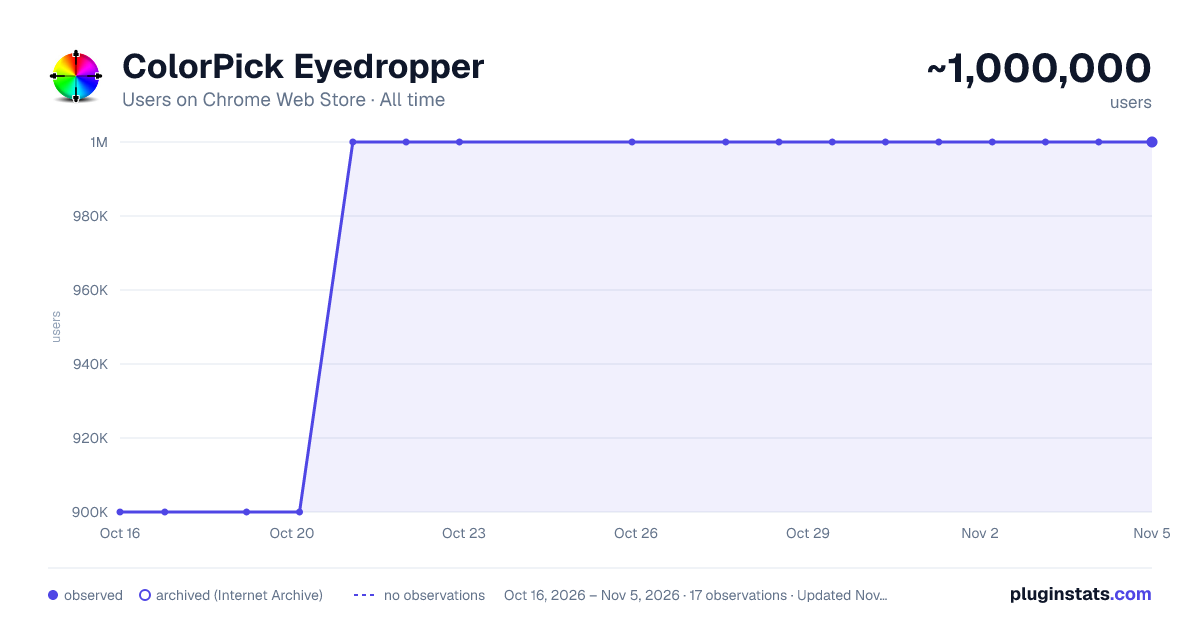
ColorPick Eyedropper has approximately 900,000 recorded users on Chrome Web Store, ranking #40 of 2,033 tracked listings.
Rating: 3.90 / 5 from 1,200 ratings
About ColorPick Eyedropper
A zoomed eyedropper & color chooser tool that allows you to select color values from webpages and more.
If you feel the need to alert the developer about a bug use the feedback forum instead of writing a review.
Note: by default "Attempt to auto copy value to clipboard" disabled. You will be warned during install about a request for clipboardWrite permissions, but this is disabled by default until you enable it in settings because automatically overwriting the clipboard may be annoying. If you do use this setting you can decide whether to auto copy the hex or the rgb css.
ColorPick needs permission on all websites so that it is at the ready when you need it. In order to use the tabs API this permission is required. Color pick does not abuse this permission and is highly configurable. You can always review the source code yourself, which is available online here https://github.com/qufighter/ColorPick PRs welcome!
Please note that colors are picked from a snapshot of the page that is updated only when you scroll. To take a new snapshot press r or use the re-snap button. Sometimes if you just changed tabs, you may see a snapshot error - this is an intentional security feature. Press R or scroll to correct this, or exit color pick and try again.
As with most extensions of this nature, it will not work out of the box on the web store, or on file:// pages. It will work on local file pages only after you "Allow access to file URLs" from the tools->extensions manager. However there is also an alternative feature "snap mode" that uses the active tab permission to take a screenshot anyway, which is then sent to a new tab where permission to run the extension may be granted, however you will have to click the extension icon again on this new tab at present.
If you experience an issue, try the following:
- Try a new website in a different tab and see if it works there
- Try the same website in a new tab and see if that works
- Reloading the extension or tab may sometimes be needed
If you need to operate on unsupported pages try the desktop app version (mac+pc) at color-pick.com or if you are selecting colors from screenshots, images or photos try the mobile phone/tablet app for IOS and Android - search the store for "ColorPick" (which also includes color based mini games).
If you're looking for a quick and easy to use color eye dropper with zoomed drag-able preview for fine tuning you've come to the right place. If you experience any bugs PLEASE report them using the feedback button, I want to fix them if they can be fixed.
It has been reported that it may take a few tries before it starts working initially. You may have to refresh the page or re-load the extension. I have personally experienced bugs where mousemove event does not fire, etc, but then when I switch out of chrome and back, it starts working. There is little that can be done to fix this except be patient and try again.
Keep in mind that your display's color space matters - if it or chrome is not set to sRGB (and restarted chrome) then some colors set to one value will pick as a different value (as if from a screenshot, which in some cases can have a similar effect).
Color Pick attempts to use lossless PNG quality to detect colors. If you experience bugs or distorted snapshot of the page disable this feature to use JPEG quality.
If your business is using this extension or the desktop app than you should urge them to purchase the appropriate license.
Thank You, Sam
This program is a Color Picker, or an Eye Dropper, also a ColorPicker or EyeDroper depending on how you wish to spell it. It also contains webpage region magnification/zoom loupe features. Zoom features may help you to see pixel perfect alignment accuracy during web development adjustments. This extension may someday be supported by URL rewriting affiliate links. This may be disabled from options and is disabled by default. When you uninstall this extension you may be asked to complete a survey - you can disable this survey from options.
Description from the Chrome Web Store listing.
README badge
Show your rank in a README or on your website. The badge updates automatically.
Charts
Images: 30d · 1y · all time · 1600×900 dark
Adoption over time
7/30/90-day growth
Ranking history
Ratings over time
Listing placement
Listing placement
Filled points are observed values; hollow points come from Internet Archive snapshots of the listing page. Dashed segments span periods with no observations — values between points are not interpolated.
Each band is one page of 20. Users on a linear scale. Placement is projected from users, so it can differ from the marketplace's own sort order. Hover a dot to see the listing.
Recent observations
Full history (3)Similar Chrome Web Store Developer Tools plugins
All 20 ColorPick Eyedropper alternatives



Data source
Covers every Chrome Web Store extension with at least 100 users, found through the store's public sitemap. User counts are read from public listing pages. The 10% most-used extensions are refreshed daily, the next 40% weekly and the next 40% monthly; the least-used 10% are not refreshed. Google displays rounded user counts (and caps the display at 10,000,000+), so small changes may not be visible. Rating counts above 1,000 are rounded (e.g. 1.6K).
Listing: https://chromewebstore.google.com/detail/colorpick-eyedropper/ohcpnigalekghcmgcdcenkpelffpdolg. First seen Oct 16, 2026; last successful collection Oct 19, 2026. See the methodology.