 PluginStats
Adobe Acrobat: PDF edit, convert, sign tools users statistics
Chrome Web Store · Workflow & Planning
Do more in Google Chrome with Adobe Acrobat PDF tools. View, fill, comment, sign, and try convert and compress tools.
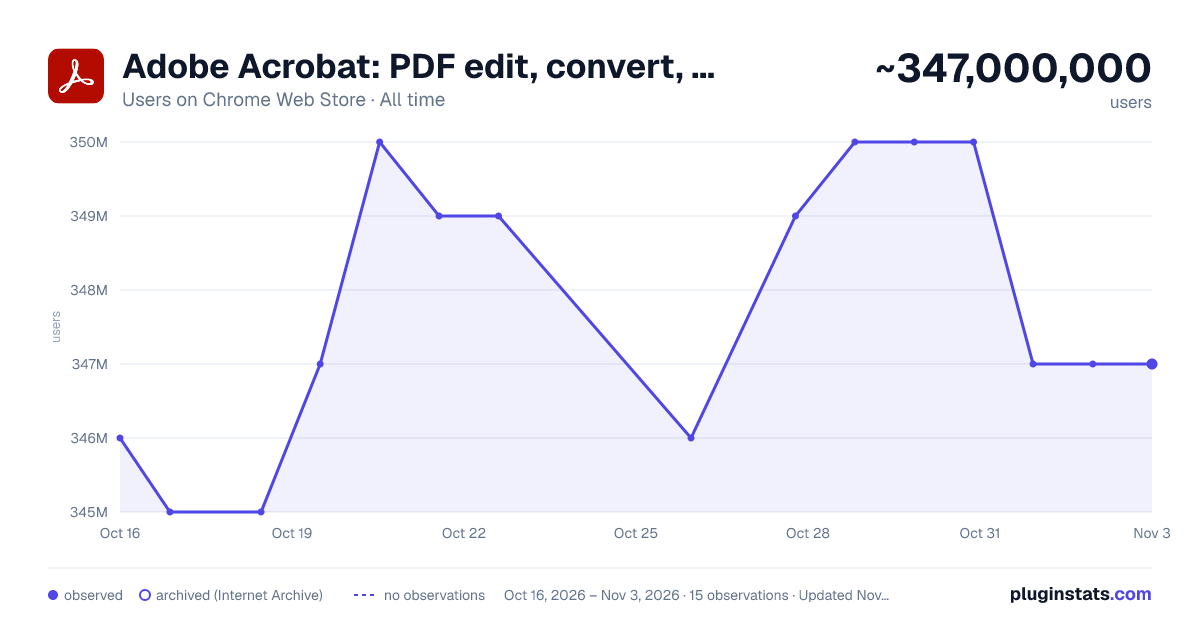
Adobe Acrobat: PDF edit, convert, sign tools has approximately 347,000,000 recorded users on Chrome Web Store, ranking #1 of 2,495 tracked listings.
Rating: 4.40 / 5 from 64,200 ratings
About Adobe Acrobat: PDF edit, convert, sign tools
Do more in Google Chrome with Adobe Acrobat PDF tools. View, fill, comment, sign, and try convert and compress tools.
Adobe Acrobat is the industry-leading PDF solution, used by millions of people. Use Acrobat PDF tools right in Google Chrome to get the best PDF viewing experience and get more done while browsing. You can add comments to PDFs, including sticky notes, text, and highlights—all for free.
If you need more advanced Acrobat features, you can try tools to export to and from PDF, create a PDF, merge PDF documents, organize a PDF, reduce PDF size, and more. Working with PDFs online has never been so easy.
HOW TO USE THE ACROBAT CHROME EXTENSION
- Install the Acrobat extension for Chrome.
- Pin the extension for quick access.
- Open any PDF in your browser.
- Select an Acrobat tool.
VIEW, DOWNLOAD, PRINT, and STORE PDFs • Get the best PDF viewing experience with the Acrobat PDF reader. • Download or print with a quick click. • Sign in to store your files online for fast access to PDF files from anywhere.
EDIT PDFs WITH COMMENTS FOR FREE • Add PDF notes, text, and comments, including sticky notes and highlights. • Write on PDF documents by adding text or drawings using PDF editor features.
FILL AND SIGN FORMS FOR FREE • Open a PDF in Adobe Acrobat Reader to fill and sign forms on your desktop. • Easily complete PDF forms with the Acrobat form filler feature. • E-sign documents with your signature or initials.
TRY TOOLS TO BE MORE PRODUCTIVE IN CHROME Try premium tools for even more PDF power. • Use our PDF converter tool to convert PDFs to and from Microsoft Word, Excel, and PowerPoint, as well as JPG and other file formats. • Create a PDF from a document or image, including converting JPG to PDF. • Combine files into a single PDF file or split a PDF. • Organize your PDF. Delete, rotate, or reorder PDF pages. • Compress a PDF to reduce its file size. • Send documents to others to e-sign online fast. • Protect a PDF document by adding a password. You can also sign up for a free trial at https://www.adobe.com/tryacrobat.
WHAT’s NEW: • Edit your PDFs in Acrobat Chrome Viewer • Fill and Sign forms for free • Support for opening local PDF files in extension
Terms & Conditions: Your use of this application is governed by the Adobe General Terms of Use (http://www.adobe.com/go/terms_en) and the Adobe Privacy Policy (http://www.adobe.com/go/privacy_policy_en) and any successor versions thereto.
Description from the Chrome Web Store listing.
README badge
Show your rank in a README or on your website. The badge updates automatically.
Charts
Images: 30d · 1y · all time · 1600×900 dark
Adoption over time
7/30/90-day growth
Ranking history
Ratings over time
Listing placement
Listing placement
Filled points are observed values; hollow points come from Internet Archive snapshots of the listing page. Dashed segments span periods with no observations — values between points are not interpolated.
Each band is one page of 20. Users on a linear scale. Placement is projected from users, so it can differ from the marketplace's own sort order. Hover a dot to see the listing.
Recent observations
Full history (4)Similar Chrome Web Store Workflow & Planning plugins
All 20 Adobe Acrobat: PDF edit, convert, sign tools alternatives



Data source
Covers every Chrome Web Store extension with at least 100 users, found through the store's public sitemap. User counts are read from public listing pages. The 10% most-used extensions are refreshed daily, the next 40% weekly and the next 40% monthly; the least-used 10% are not refreshed. Google displays rounded user counts (and caps the display at 10,000,000+), so small changes may not be visible. Rating counts above 1,000 are rounded (e.g. 1.6K).
Listing: https://chromewebstore.google.com/detail/adobe-acrobat-pdf-edit-co/efaidnbmnnnibpcajpcglclefindmkaj. First seen Oct 16, 2026; last successful collection Oct 20, 2026. See the methodology.