 PluginStats
FatRank - SEO Rank Checker users statistics
By FATJOE · Chrome Web Store · Tools
Check your website's ranking position in Google search results across different countries
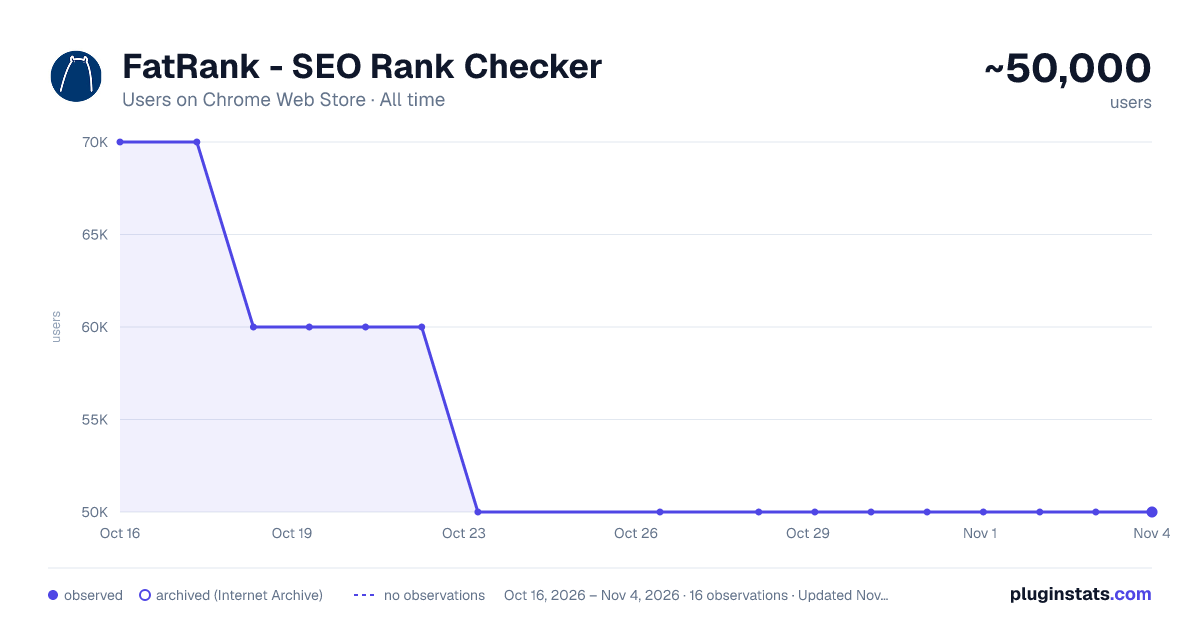
FatRank - SEO Rank Checker has approximately 50,000 recorded users on Chrome Web Store, a change of -28.6% over the past 7 days, ranking #177 of 3,853 tracked listings.
Rating: 4.00 / 5 from 228 ratings
About FatRank - SEO Rank Checker
Check your website's ranking position in Google search results across different countries
Version 0.195 MAJOR ISSUE OF SEARCH BLOCKING FIXED :)
- Please Note: This extension will use your Google local search settings and will include local listings as a rank position. To stop this make sure your location in Google search settings is set to your country i.e 'United States'. *
WHAT'S FAT RANK
Fat Rank is a FREE lightweight in browser keyword rank checker tool. Simply visit a website, click the Fat Rank icon, type in your keyword and it will tell you where that website ranks in Google and which page URL ranks. It is very practical and usable for both competitor research, prospecting and even simple quick ranking reports for your clients.
HOW TO USE FAT RANK
Visit a website, click on the extension icon and type a keyword or key phrase and the extension will return the current Google ranking position for that domain and also provide you with the url of the page the keyword ranks for. It will search down to a ranking depth of 100. If the domain doesn't rank for a keyword within the top 100 positions, it will simply display 'Not found'. You can make multiple keyword / key phrase checks and these will all store within your session history tab where you can export via a CSV as report for your client.
Beautifully simple, usable and practical tool designed for SEO's by SEO's.
SOME FAT RANK FAQ'S
-
Fat Rank is counting local results how do I stop this and check country wide? This extension will use your Google local search settings and will include local listings as a rank position. To stop this make sure your location in Google search settings is set to your country i.e 'United States'.
-
What does 'Not Found in Top 100 Results' mean? This means the website you are viewing does not rank within the top 100 results for the keyword you entered. We only check up to the 100th result for speed.
-
What does 'Try Again Later, Google is Blocking Searches' mean? Fat Rank uses your browser behind scenes to check a keyword ranking position. If you do too many keyword checks within a short period of time Google temporarily block search results. We recomend to leave the extension for a while and try again later.
Description from the Chrome Web Store listing.
README badge
Show your rank in a README or on your website. The badge updates automatically.
Charts
Images: 30d · 1y · all time · 1600×900 dark
Adoption over time
7/30/90-day growth
Ranking history
Ratings over time
Listing placement
Listing placement
Filled points are observed values; hollow points come from Internet Archive snapshots of the listing page. Dashed segments span periods with no observations — values between points are not interpolated.
Each band is one page of 20. Users on a linear scale. Placement is projected from users, so it can differ from the marketplace's own sort order. Hover a dot to see the listing.
Recent observations
Full history (7)Similar Chrome Web Store Tools plugins
All 20 FatRank - SEO Rank Checker alternatives



Data source
Covers every Chrome Web Store extension with at least 100 users, found through the store's public sitemap. User counts are read from public listing pages. The 10% most-used extensions are refreshed daily, the next 40% weekly and the next 40% monthly; the least-used 10% are not refreshed. Google displays rounded user counts (and caps the display at 10,000,000+), so small changes may not be visible. Rating counts above 1,000 are rounded (e.g. 1.6K).
Listing: https://chromewebstore.google.com/detail/fatrank-seo-rank-checker/jcnfkjjanbdfabigknbedgkfjkljhbdn. First seen Oct 16, 2026; last successful collection Oct 23, 2026. See the methodology.