 PluginStats
Search-Results Badges: $$/sqft, DOM, Price-Cut users statistics
Stamps every Zillow & Redfin search card with price-per-sqft, days-on-market, and a price-cut flag — triage the grid at a glance.
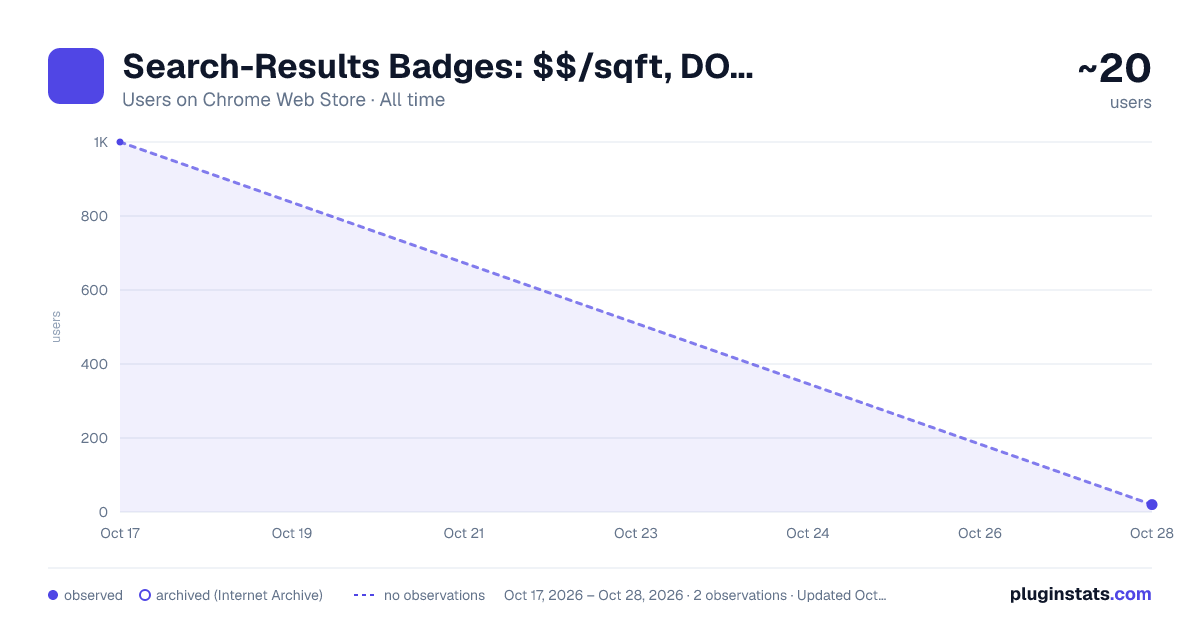
Search-Results Badges: $$/sqft, DOM, Price-Cut has approximately 1,000 recorded users on Chrome Web Store, ranking #863 of 2,952 tracked listings.
Rating: 5.00 / 5 from 7 ratings
About Search-Results Badges: $$/sqft, DOM, Price-Cut
Stamps every Zillow & Redfin search card with price-per-sqft, days-on-market, and a price-cut flag — triage the grid at a glance.
Search-Results Badges stamps every Zillow and Redfin search-results card with the three numbers you would otherwise open each listing to compare: price per square foot, days on market, and whether the price was cut. You triage the whole grid at a glance instead of clicking into card after card and doing the math yourself.
WHAT IT DOES
On a Zillow or Redfin results grid, the extension reads data the page has already loaded in your browser and adds a small badge cluster to each card:
- $/sqft — the list price divided by the living area. This is the only value the extension computes, and only when the card shows both a real price and a real area.
- Days on market — read straight from the card, never guessed or estimated.
- Price cut — shown only when the card explicitly indicates a price reduction.
Honest absence is the rule. A card that is missing an input simply gets no badge for that input — never a guessed or mis-parsed number. A land listing with no square footage shows days on market but no $/sqft. A card with no price-cut indicator shows no flag.
The badges keep up as you work: new cards get badged as you scroll, and the grid stays badged when you change a filter, sort, or page.
HOW TO USE IT
- Install the extension.
- Open a Zillow or Redfin search-results page.
- Every card is badged automatically — no setup, no account, no clicking into listings.
- Open the toolbar popup to turn individual badges or sites on and off, or to set the stale-listing day threshold.
The extension runs only on Zillow and Redfin results pages. On listing detail pages and every other site it stays inert.
FREE
- All three badges on every card, on every results page.
- Stale-listing emphasis and the price-cut flag.
- Per-site and per-badge toggles.
Reading the badges is always free and never count-capped.
PRO — $99 one-time
Pro turns the read-only numbers into a grid you can act on:
- Target $/sqft color highlight, plus a "vs results median" delta on each card.
- A pinned results summary bar: median, min and max $/sqft, number of price cuts, number of stale listings.
- Filter and sort the grid by the badges (only price cuts, sort by $/sqft or days on market).
- CSV export of the badged grid.
Pro applies to this extension. Upgrade at zovo.one.
PRIVACY
- No data collection and no telemetry. Listing data never leaves your device.
- The extension reads only the results grid already rendered in your browser.
- The only network call is a license check to verify Pro; it sends your license key and the extension name, nothing else. It is disclosed in the privacy policy.
- No third-party scripts, no cookies, no analytics.
PERMISSIONS
- storage — save your settings and license status on your device.
- alarms — periodic license re-check.
- Access to zillow.com and redfin.com — read the search results you are viewing to compute and show the badges.
No broad site access, no browsing-history access, no tab-content access.
A Zovo extension. Support and privacy policy at zovo.one.
Description from the Chrome Web Store listing.
README badge
Show your rank in a README or on your website. The badge updates automatically.
Charts
Images: 30d · 1y · all time · 1600×900 dark
Adoption over time
7/30/90-day growth
Ranking history
Ratings over time
Listing placement
Listing placement
Filled points are observed values; hollow points come from Internet Archive snapshots of the listing page. Dashed segments span periods with no observations — values between points are not interpolated.
Each band is one page of 20. Users on a linear scale. Placement is projected from users, so it can differ from the marketplace's own sort order. Hover a dot to see the listing.
Recent observations
Full history (1)Similar Chrome Web Store Shopping plugins
All 20 Search-Results Badges: $$/sqft, DOM, Price-Cut alternatives



Data source
Covers every Chrome Web Store extension with at least 100 users, found through the store's public sitemap. User counts are read from public listing pages. The 10% most-used extensions are refreshed daily, the next 40% weekly and the next 40% monthly; the least-used 10% are not refreshed. Google displays rounded user counts (and caps the display at 10,000,000+), so small changes may not be visible. Rating counts above 1,000 are rounded (e.g. 1.6K).
Listing: https://chromewebstore.google.com/detail/search-results-badges-sqf/kkakneioldgcbckkgphbdgbggpknfoka. First seen Oct 17, 2026; last successful collection Oct 17, 2026. See the methodology.