 PluginStats
PDF Downloader users statistics
Download all PDFs from the current page with one click
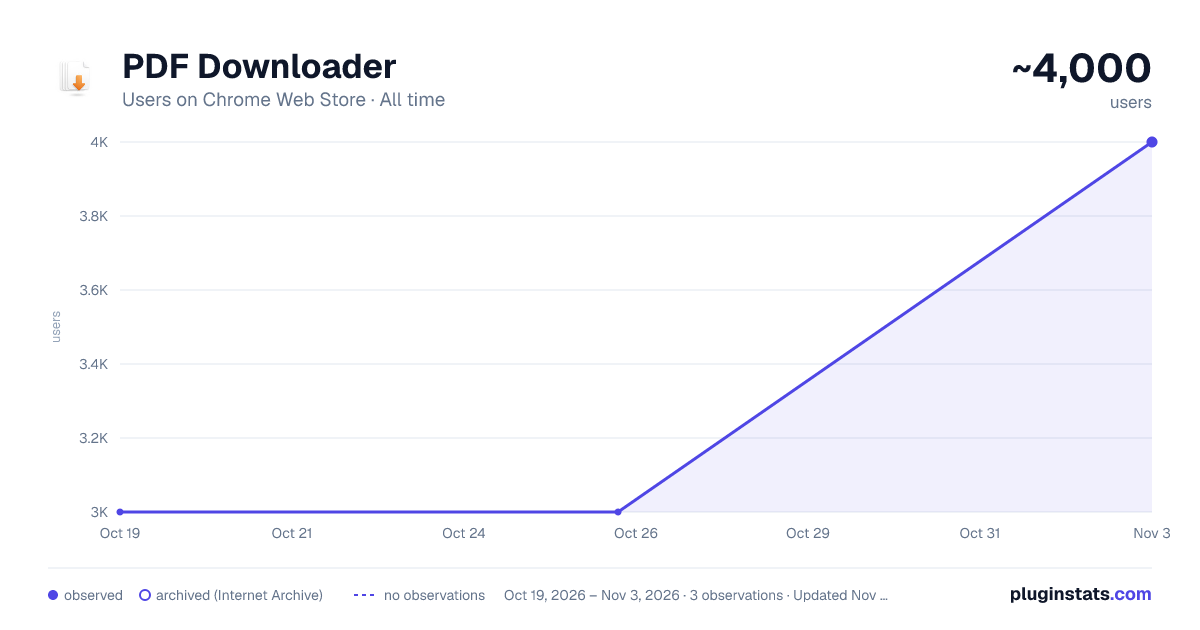
PDF Downloader has approximately 3,000 recorded users on Chrome Web Store, ranking #620 of 2,952 tracked listings.
Rating: 1.90 / 5 from 34 ratings
About PDF Downloader
Download all PDFs from the current page with one click
Download all PDFs from any webpage instantly. Perfect for students, researchers & professionals. One-click bulk PDF downloader.
Main Description (Copy this into Chrome Web Store)
🚀 Download All PDFs with One Click - Fast, Simple, Privacy-First
PDF Downloader is the ultimate tool for downloading multiple PDF files from any webpage instantly. Perfect for students downloading course materials, researchers collecting academic papers, and professionals gathering documents.
⭐ WHY CHOOSE PDF DOWNLOADER?
✓ ONE-CLICK BULK DOWNLOAD - Download all PDFs on a page with a single click ✓ AUTOMATIC ZIP CREATION - Bundle multiple PDFs into organized ZIP files ✓ MOODLE & LMS COMPATIBLE - Works perfectly with Moodle, Canvas, Blackboard, and other learning management systems ✓ SMART PDF DETECTION - Automatically finds PDFs in links, embeds, iframes, and dynamic content ✓ NO ADS, NO TRACKING - 100% privacy-focused. Your data stays on your device ✓ LIGHTNING FAST - Download dozens of files in seconds
🎓 PERFECT FOR STUDENTS & EDUCATORS
• Download entire course materials from Moodle with one click • Save lecture slides, readings, and study materials instantly • Organize semester documents into ZIP archives • No more clicking through 20+ individual PDF links • Save hours of time during exam prep
📚 IDEAL FOR RESEARCHERS & ACADEMICS
• Bulk download research papers from academic repositories • Extract PDFs from journal websites and databases • Save bibliography references quickly • Compatible with Google Scholar, arXiv, JSTOR, PubMed, and more
💼 GREAT FOR PROFESSIONALS
• Download client documents and reports • Save training materials and manuals • Extract documentation from company portals • Archive important PDFs for offline access
🔥 KEY FEATURES
📥 Bulk PDF Download - Download all PDFs simultaneously 📦 ZIP Archive Creation - Bundle files automatically 🎯 Smart Detection - Finds PDFs everywhere (links, embeds, LMS redirects) ⚡ Progress Tracking - Real-time download notifications ⚙️ Customizable Settings - Personalize your workflow 🔒 Privacy First - Zero tracking, works completely offline
🌐 WORKS ON POPULAR SITES
✓ Moodle, Canvas, Blackboard, Google Classroom ✓ Google Scholar, arXiv, ResearchGate, Academia.edu ✓ Corporate intranets and document systems ✓ Thousands more!
⚙️ HOW IT WORKS
- Navigate to any webpage with PDFs
- Click the extension icon
- Review detected PDFs
- Click "Download" - Done!
🆘 SUPPORT
Need help? We respond within 24 hours via the support tab.
⭐ LOVE IT? PLEASE RATE!
If this saves you time, leave a 5-star review to help others discover it!
Description from the Chrome Web Store listing.
README badge
Show your rank in a README or on your website. The badge updates automatically.
Charts
Images: 30d · 1y · all time · 1600×900 dark
Adoption over time
7/30/90-day growth
Ranking history
Ratings over time
Listing placement
Listing placement
Filled points are observed values; hollow points come from Internet Archive snapshots of the listing page. Dashed segments span periods with no observations — values between points are not interpolated.
Each band is one page of 20. Users on a linear scale. Placement is projected from users, so it can differ from the marketplace's own sort order. Hover a dot to see the listing.
Recent observations
Full history (1)Similar Chrome Web Store Tools plugins
All 20 PDF Downloader alternatives



Data source
Covers every Chrome Web Store extension with at least 100 users, found through the store's public sitemap. User counts are read from public listing pages. The 10% most-used extensions are refreshed daily, the next 40% weekly and the next 40% monthly; the least-used 10% are not refreshed. Google displays rounded user counts (and caps the display at 10,000,000+), so small changes may not be visible. Rating counts above 1,000 are rounded (e.g. 1.6K).
Listing: https://chromewebstore.google.com/detail/pdf-downloader/oagehclebbbknfohkjhfbeiljpkpnjkg. First seen Oct 19, 2026; last successful collection Oct 19, 2026. See the methodology.