 PluginStats
YouTube Video to Transcript users statistics
By mishasworlds · Chrome Web Store · Tools
Convert a YouTube video to transcript, then search, translate, copy, or download captions as TXT, SRT, and VTT files.
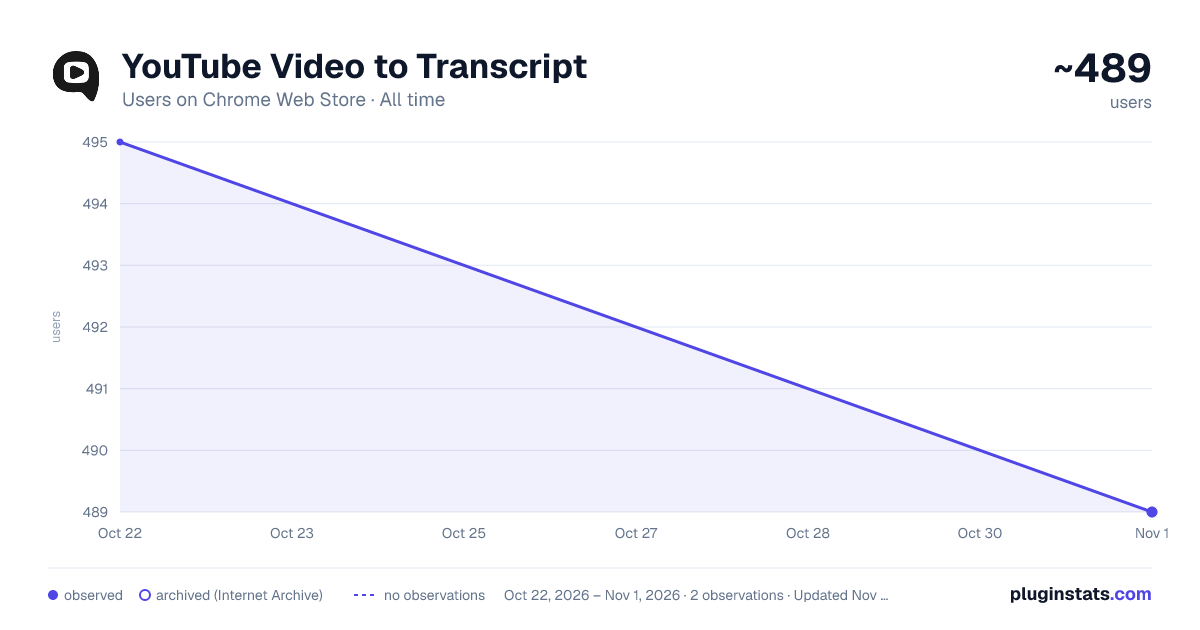
YouTube Video to Transcript has approximately 495 recorded users on Chrome Web Store, ranking #1938 of 3,853 tracked listings.
Rating: 4.40 / 5 from 8 ratings
About YouTube Video to Transcript
Convert a YouTube video to transcript, then search, translate, copy, or download captions as TXT, SRT, and VTT files.
Turn any YouTube video to transcript in seconds. Open a watch page and a side panel shows the full caption text, ready to read, search, copy, translate, and download — without leaving the player. No setup and no account required.
How the YouTube video to transcript workflow works:
- Open a watch page that already has captions.
- Launch the side panel added by the extension.
- Search the captions, click a line, and jump to that exact moment.
- Copy clean text or download the file as TXT, SRT, or VTT.
What you get:
- A youtube transcript downloader that turns a youtube video transcript into a clean file from caption or subtitle data
- Fast youtube transcript search inside the current page, with a live match count and highlight
- One-click timestamps that jump to the moment you need
- Built-in translation to 150+ languages via YouTube's own machine translation, with a switch to a native track when one exists
- Copy youtube transcript text, with optional timestamps and the video title
- Readable paragraph view or raw caption view, plus light, dark, and system themes
Turn speech into usable text. Use this youtube to transcript panel when you want to: 1️⃣ Get a transcript of youtube video lectures, talks, and tutorials 2️⃣ Download youtube subtitles or download youtube captions for editing and review 3️⃣ Convert youtube to text for notes, articles, and documentation 4️⃣ Extract youtube transcript quotes before deciding what to watch 5️⃣ Keep a transcript for youtube videos you study often
Good fit for: ➤ Students who get youtube transcript files from online courses and recorded classes ➤ Researchers checking interviews, talks, and a podcast transcript or two ➤ Writers collecting exact wording for articles and reports ➤ Language learners who read the video transcript while they listen ➤ Teams documenting webinars, product demos, and training
Download, search, and convert:
- youtube transcript download as TXT, SRT, or VTT, plus a quick srt download for editors
- youtube subtitle download and youtube caption download for the original caption text
- youtube cc download that keeps timing and line order intact
- youtube transcript search and search youtube captions to find any line fast
- copy youtube transcript text, then convert youtube to text in the format you prefer
- youtube transcript to text and youtube subtitles to text, ready for notes and quotes
Translate without losing the original:
- Translate the captions into any of 150+ languages, powered by YouTube's built-in machine translation, right from the panel
- When a native track exists in your target language, the extension switches to it instead of machine translation
- Recent languages are remembered, with an option to apply the same choice to new videos automatically
Export and copy options: • TXT for a clean youtube video to text file • SRT for subtitle timing and caption tools • VTT for web captions and online course platforms • Clipboard copy to drop the caption text into documents, chat, or email
Caption language handling:
- Choose any available caption language when a video has several tracks
- Your last language is remembered for the next video, and per-video choices return when you revisit
- Original timing is preserved so exported files stay aligned, and line order stays clean for quotes
- Long recordings load into a scrollable list with stable timing and clear status messages
The first release keeps the workflow focused. It is not a media downloader or converter, and it does not transcribe audio. It reads the caption, subtitle, and transcript data that YouTube already provides, then makes that text easy to search, translate, copy, and save.
Privacy notes:
- The extension runs in your browser on YouTube pages.
- It uses caption text, title, timestamps, and the selected language only to show, search, translate, copy, and export the result.
- No account is required, and your content never leaves the browser.
- No server is needed for the core workflow, and optional anonymous usage stats can be turned off any time.
FAQ
How to get a youtube transcript from a video? Open the video, launch the panel, and read the captions. Then copy the text or run a youtube transcript download as TXT, SRT, or VTT.
Can it get a transcript of youtube video content that has no captions? No. It works when caption, subtitle, or transcript data is available. If a video has no text track, the panel shows a clear message instead of inventing text.
Does it transcribe audio? No. This version focuses on captions YouTube already provides: download, search, translation, timestamp navigation, copy, and TXT, SRT, and VTT export. Audio transcription is out of scope for the first release.
What is the main use case? Get a youtube video to transcript fast, then search, translate, and save the text quicker than the native view.
Description from the Chrome Web Store listing.
README badge
Show your rank in a README or on your website. The badge updates automatically.
Charts
Images: 30d · 1y · all time · 1600×900 dark
Adoption over time
7/30/90-day growth
Ranking history
Ratings over time
Listing placement
Listing placement
Filled points are observed values; hollow points come from Internet Archive snapshots of the listing page. Dashed segments span periods with no observations — values between points are not interpolated.
Each band is one page of 20. Users on a linear scale. Placement is projected from users, so it can differ from the marketplace's own sort order. Hover a dot to see the listing.
Recent observations
Full history (1)Similar Chrome Web Store Tools plugins
All 20 YouTube Video to Transcript alternatives



Data source
Covers every Chrome Web Store extension with at least 100 users, found through the store's public sitemap. User counts are read from public listing pages. The 10% most-used extensions are refreshed daily, the next 40% weekly and the next 40% monthly; the least-used 10% are not refreshed. Google displays rounded user counts (and caps the display at 10,000,000+), so small changes may not be visible. Rating counts above 1,000 are rounded (e.g. 1.6K).
Listing: https://chromewebstore.google.com/detail/youtube-video-to-transcri/gbngopkocljdcknadjafejmnghgkcgef. First seen Oct 22, 2026; last successful collection Oct 22, 2026. See the methodology.