 PluginStats
@commentkit/build weekly downloads statistics
By commentkit · npm · Webpack plugins
CommentKit build plugins for Vite, Next.js, webpack and Astro: source locations on elements in dev, branch and commit for every build.
@commentkit/build has 49 recorded weekly downloads on npm, ranking #1993 of 2,855 tracked listings.
About @commentkit/build
@commentkit/build
Build plugins for CommentKit. One package for Vite, Next.js, webpack and Astro.
They do three things:
- Source locations (dev only). Every plain HTML element gets
data-ck-src="src/components/Card.tsx:12:5": the file, line and column where it is written. When someone comments on that element, the comment carries the location, so you and your AI agent open the right file straight away. - Branch and commit. The branch and commit of every build are recorded, so feedback is filed per branch. The CommentKit SDK picks them up by itself; you do not pass
branchorcommittoinit(). - Widget in dev (optional). Adds the CommentKit loader to your pages while you run the dev server.
npm install -D @commentkit/build
Requires Node 20.19 or newer.
Vite (React, Preact, Solid, Vue, Svelte)
// vite.config.ts
import { defineConfig } from "vite";
import react from "@vitejs/plugin-react";
import commentkit from "@commentkit/build/vite";

export default defineConfig({
  plugins: [commentkit(), react()],
});
Works the same with @vitejs/plugin-vue and @sveltejs/vite-plugin-svelte (both tested), and with any other plugin that compiles JSX, such as @preact/preset-vite or vite-plugin-solid. List commentkit() first; it also runs before the framework compiler when listed later.
SvelteKit
// vite.config.ts
import { sveltekit } from "@sveltejs/kit/vite";
import commentkit from "@commentkit/build/vite";

export default { plugins: [commentkit(), sveltekit()] };
Nuxt
// nuxt.config.ts
import commentkit from "@commentkit/build/vite";

export default defineNuxtConfig({
  vite: { plugins: [commentkit()] },
});
Next.js
// next.config.mjs
import { withCommentKit } from "@commentkit/build/next";

export default withCommentKit({
  reactStrictMode: true,
});
withCommentKit(config, options) accepts an object or a config function. It works with Turbopack (next dev, the default since Next.js 16) and webpack (next dev --webpack). Tested with Next.js 16.4 in both modes, dev server and build.
- In
next dev, source tagging runs on your.js,.jsxand.tsxfiles (nevernode_modules), on the server and in the browser, so the server-rendered HTML matches the hydrated page. NEXT_PUBLIC_COMMENTKIT_BRANCHandNEXT_PUBLIC_COMMENTKIT_COMMITare set for every build.- Turbopack uses
turbopack.rules. If your config already has a rule for*.js,*.jsxor*.tsx, CommentKit leaves it alone, skips tagging for those files and prints a warning; add our loader (@commentkit/build/webpack/loader) to your rule to keep both.
Next.js has no HTML hook, so inject is not available here. Add the widget with the React helper in your root layout:
import { CommentKit } from "@commentkit/comment-kit/react";

<CommentKit project="pk_test_your_key" />
Astro
// astro.config.mjs
import { defineConfig } from "astro/config";
import commentkit from "@commentkit/build/astro";

export default defineConfig({
  integrations: [commentkit()],
});
Tags the markup in .astro components and pages, and the islands written in React, Preact, Solid, Vue or Svelte. Works with Astro's current compiler and with the older Go compiler (Astro 5 and earlier).
webpack 5
// webpack.config.js
const { CommentKitWebpackPlugin } = require("@commentkit/build/webpack");

module.exports = {
  // …
  plugins: [new CommentKitWebpackPlugin()],
};
Source tagging runs when mode is "development". The plugin adds a pre-loader that runs before Babel, SWC, esbuild or ts-loader. It understands .jsx, .tsx, and .js or .mjs with JSX. .vue and .svelte files are also tagged before vue-loader or svelte-loader, but that combination has not been tested as thoroughly as Vite yet.
The branch and commit are defined as __COMMENTKIT_BUILD__, process.env.COMMENTKIT_BRANCH and process.env.COMMENTKIT_COMMIT.
When elements are tagged
| Bundler | Tagged | Not tagged |
|---|---|---|
| Vite, SvelteKit, Nuxt, Astro | vite / astro dev, and builds with a mode other than production (vite build --mode staging) | vite build, astro build |
| Next.js | next dev | next build |
| webpack | mode: "development" | mode: "production" |
To tag a preview build too, set COMMENTKIT_SOURCE=1 when you build it. COMMENTKIT_SOURCE=0 turns tagging off everywhere. Production builds are never tagged unless you ask.
What gets tagged
- Plain HTML elements, including custom elements (
<div>,<button>,<my-widget>). - Not components (
<Button>,<motion.div>), fragments,<template>,<slot>,<script>,<style>,<html>,<head>and everything in it, or<body>. - Inside
<svg>and<math>only the outer element is tagged, so an icon gets one attribute, not one per path. - An element that already has
data-ck-srckeeps yours. Running the transform twice changes nothing. - Files without
<are skipped without parsing. Files that do not parse are left exactly as they are.
Privacy
- Paths are relative to the project root, with forward slashes (
src/App.tsx:12:5). Absolute paths, user names and folder layouts outside the project never reach the page: files outside the project root (a sibling package in a monorepo) are not tagged. - Characters other than letters, digits and
_ . / @ + ~ ( ) [ ] $ , = ! # -are percent-encoded (src/Pricing%20Card.tsx:4:3), so any file name works. - Tags are added only in dev and preview builds, so production HTML stays exactly as you wrote it.
- The plugins send nothing anywhere. The branch and commit come from your CI variables or
git rev-parse.
Branch and commit
Read from the first of these that is set:…
Description from the npm listing.
- commentkit
- comments
- feedback
- vite-plugin
- webpack-plugin
- nextjs
- astro-integration
- source location
README badge
Show your rank in a README or on your website. The badge updates automatically.
Charts
Images: 30d · 1y · all time · 1600×900 dark


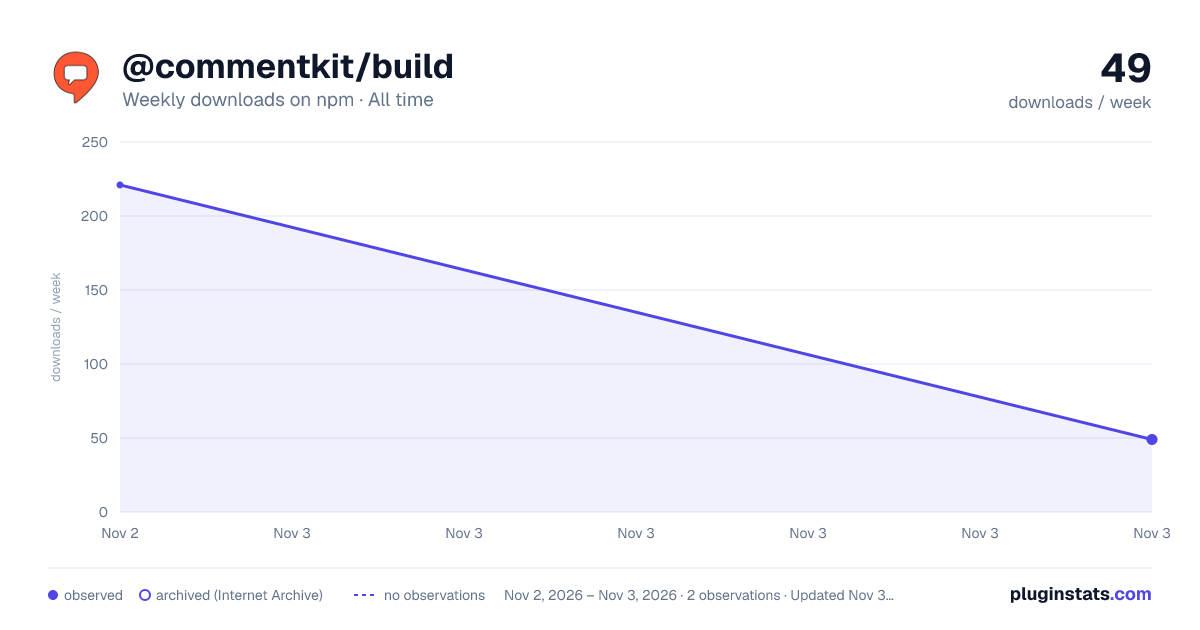

Adoption over time
7/30/90-day growth
Ranking history
Listing placement
Listing placement
Filled points are observed values; hollow points come from Internet Archive snapshots of the listing page. Dashed segments span periods with no observations — values between points are not interpolated.
Each band is one page of 20. Weekly downloads on a linear scale. Placement is projected from weekly downloads, so it can differ from the marketplace's own sort order. Hover a dot to see the listing.
Recent observations
Full history (2)Similar npm Webpack plugins plugins
All 20 @commentkit/build alternativesData source
Weekly downloads (trailing 7 complete days) come from the official npm downloads API. Downloads include CI and mirrors and are not equivalent to installs or users. npm publishes no ratings.
Listing: https://www.npmjs.com/package/@commentkit/build. First seen Nov 4, 2026; last successful collection Nov 5, 2026. See the methodology.