 PluginStats
ForcePaste - Smart Clipboard Typer users statistics
Chrome Web Store · Accessibility
Smart clipboard tool: simulates typing, manages snippets, reliable on all websites.
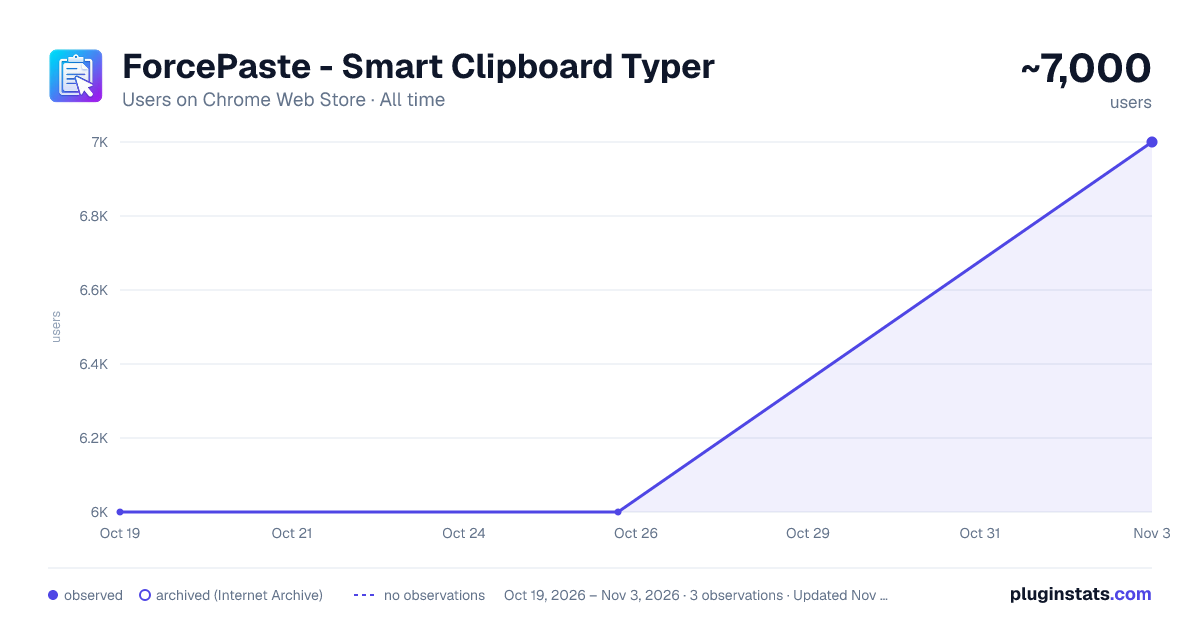
ForcePaste - Smart Clipboard Typer has approximately 6,000 recorded users on Chrome Web Store.
It ranks #347 of 2,033 tracked Chrome Web Store listings by users.
It is rated 4.6 out of 5 from 5 ratings.
PluginStats has 1 daily observations since Oct 19, 2026; the latest is from Oct 19, 2026.
Rating: 4.60 / 5 from 5 ratings
About ForcePaste - Smart Clipboard Typer
Smart clipboard tool: simulates typing, manages snippets, reliable on all websites.
ForcePaste ForcePaste - Smart Clipboard Typer 💪 Type ANYWHERE paste is blocked! Simulates real keyboard typing into ANY website. 💪 🌟 If you like ForcePaste, please rate 5 stars! 🌟
KEY FEATURES:
Bypass paste blockers by simulating real human typing Works on ALL websites and local HTML files Save frequently used text as snippets for quick reuse Adjustable typing speed (from realistic to ultra-fast) Custom keyboard shortcuts for lightning-fast access Works 100% offline - your data stays in your browser NO accounts needed, NO data collection SHORTCUTS:
Alt+Shift+S: Start typing from clipboard Alt+Shift+T: Open settings popup Alt+P: Quick access menu (same as right-click options) Customize at chrome://extensions/shortcuts HOW TO USE:
Copy text you want to paste. Click in any text field where pasting is blocked. Press Alt+Shift+S (or use the right-click menu). Watch as your text is typed automatically! WHY WE NEED PERMISSIONS:
Clipboard Access: To read your clipboard content for typing (only when you activate it). Storage: To save your snippets and settings locally in your browser. Scripting & Host Access: To enable the typing simulation on any website you need it on. We NEVER collect your data, send it anywhere, or track what you type. Everything stays on YOUR device!
Release Notes v2.0.0 (December 2025) 🎨 UI Overhaul
Complete redesign with modern, compact tabbed interface New time-tracker inspired design with cleaner layout Dark/Light theme toggle with improved visuals Stacked WPM display for better readability ⚡ New Features
Auto-save settings (no more save button needed) Real-time WPM display synced with typing speed slider Added donation link (Buy Me a Coffee) 🔧 Improvements
More realistic default typing settings (70 WPM, 30-300ms delays) Improved tutorial overlay with updated selectors Better header layout with ForcePaste branding 🐛 Bug Fixes
Fixed tutorial overflow issues on reset Removed unused code and cleaned up codebase Optimize overall performance
v1.0.0 (Initial Release) 🚀 Initial Release Bypass paste blockers by simulating real keyboard typing Works on all websites and local HTML files Snippet management for frequently used text Adjustable typing speed settings Custom keyboard shortcuts (Alt+Shift+S, Alt+Shift+T, Alt+P) Context menu integration 100% offline, no data collection
100% FREE, no ads, works offline, respects your privacy.
Description from the Chrome Web Store listing.
Where ForcePaste - Smart Clipboard Typer sits in the listing
Each band is one page of 20. Users on a log scale. Placement is projected from users, so it can differ from the marketplace's own sort order. Hover a dot to see the listing.
Charts
Images: 30d · 1y · all time · 1600×900 dark
Adoption over time
7/30/90-day growth
Ranking history
Filled points are observed values; hollow points come from Internet Archive snapshots of the listing page. Dashed segments span periods with no observations — values between points are not interpolated.
Recent observations
Full history (1)Similar Chrome Web Store Accessibility plugins




Data source
User counts are read from public Chrome Web Store listing pages. Google displays rounded user counts (and caps the display at 10,000,000+), so small changes may not be visible. Rating counts above 1,000 are rounded (e.g. 1.6K).
Listing: https://chromewebstore.google.com/detail/forcepaste-smart-clipboar/oadegkkobjpolcdokpcnlbfhlffiekii. First seen Oct 19, 2026; last successful collection Oct 19, 2026. See the methodology.