 PluginStats
2FAS Auth - Two Factor Authentication users statistics
Chrome Web Store · Privacy & Security
2FAS Browser Extension is simple, private, and secure: 1 click, 1 tap, and your token is automatically entered!
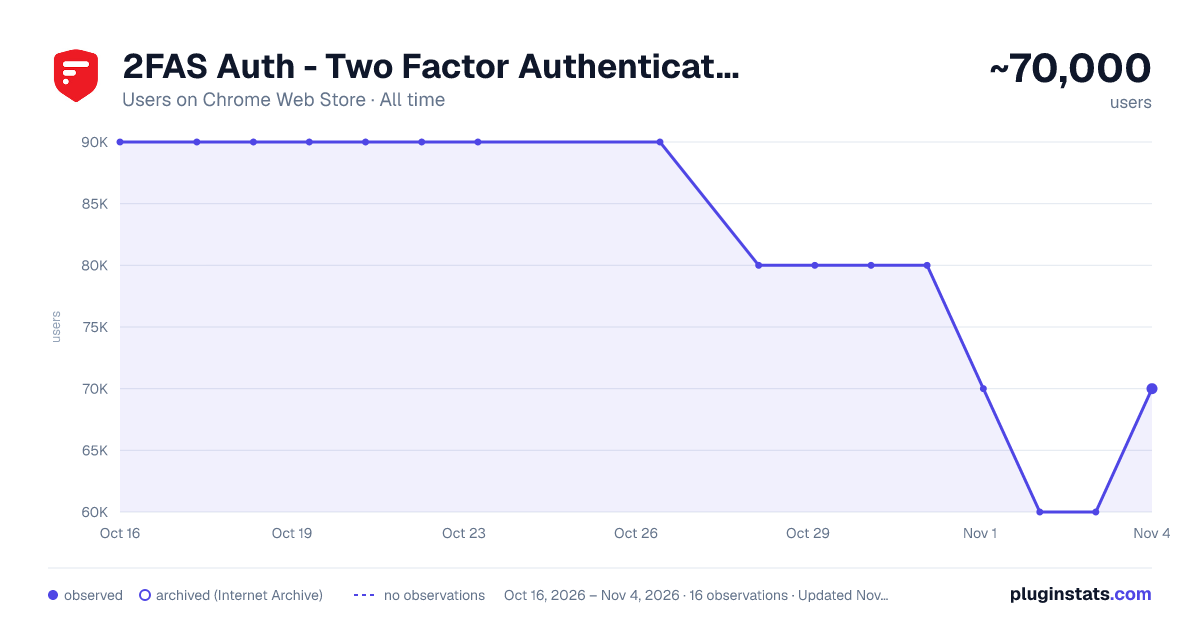
2FAS Auth - Two Factor Authentication has approximately 90,000 recorded users on Chrome Web Store, ranking #88 of 2,033 tracked listings.
Rating: 3.50 / 5 from 130 ratings
About 2FAS Auth - Two Factor Authentication
2FAS Browser Extension is simple, private, and secure: 1 click, 1 tap, and your token is automatically entered!
Add 2FAS Auth to your web browser with our extension! Enter 2FA tokens automatically without re-typing for better security!
The 2FAS Auth Browser Extension allows you to log in to any online service with 2-factor authentication enabled, faster!
Easy set up in three steps:
- Install the extension on your desktop browser
- Open the 2FAS Auth app on your phone and pair your phone with your desktop browser
- Start using the 2FAS Auth Browser Extension
When you want to log in using a 2FA token, simply select two-factor authentication token input field, click the 2FAS Auth Browser Extension icon, and confirm login on your phone!
Secure and fast log in.
Simply pair the service you want to login to with your 2FAS Auth app, then 2FAS Auth will automatically select your token for future logins, no searching or typing required!
Free access — no account required.
2FAS Auth is an easy-to-use authentication app that protects access to your online services and accounts.
Relying on a single password for your personal accounts, like Facebook or Instagram, often puts your data and sensitive information at risk.
The 2FAS Authenticator App generates one-time codes called Time-based One-time Passwords (TOTP) or HMAC-based (event-based) One-time Passwords (HOTP) for your account. By creating these codes offline and changing them every 30 seconds or every login, 2FAS drastically increases the security of your information.
Description from the Chrome Web Store listing.
README badge
Show your rank in a README or on your website. The badge updates automatically.
Charts
Images: 30d · 1y · all time · 1600×900 dark
Adoption over time
7/30/90-day growth
Ranking history
Ratings over time
Listing placement
Listing placement
Filled points are observed values; hollow points come from Internet Archive snapshots of the listing page. Dashed segments span periods with no observations — values between points are not interpolated.
Each band is one page of 20. Users on a linear scale. Placement is projected from users, so it can differ from the marketplace's own sort order. Hover a dot to see the listing.
Recent observations
Full history (3)Similar Chrome Web Store Privacy & Security plugins
All 20 2FAS Auth - Two Factor Authentication alternatives



Data source
Covers every Chrome Web Store extension with at least 100 users, found through the store's public sitemap. User counts are read from public listing pages. The 10% most-used extensions are refreshed daily, the next 40% weekly and the next 40% monthly; the least-used 10% are not refreshed. Google displays rounded user counts (and caps the display at 10,000,000+), so small changes may not be visible. Rating counts above 1,000 are rounded (e.g. 1.6K).
Listing: https://chromewebstore.google.com/detail/2fas-auth-two-factor-auth/dbfoemgnkgieejfkaddieamagdfepnff. First seen Oct 16, 2026; last successful collection Oct 19, 2026. See the methodology.