 PluginStats
Screen Text Extractor users statistics
By anuradhaherath2001 · Chrome Web Store · Developer Tools
Select any screen area and extract text instantly using OCR
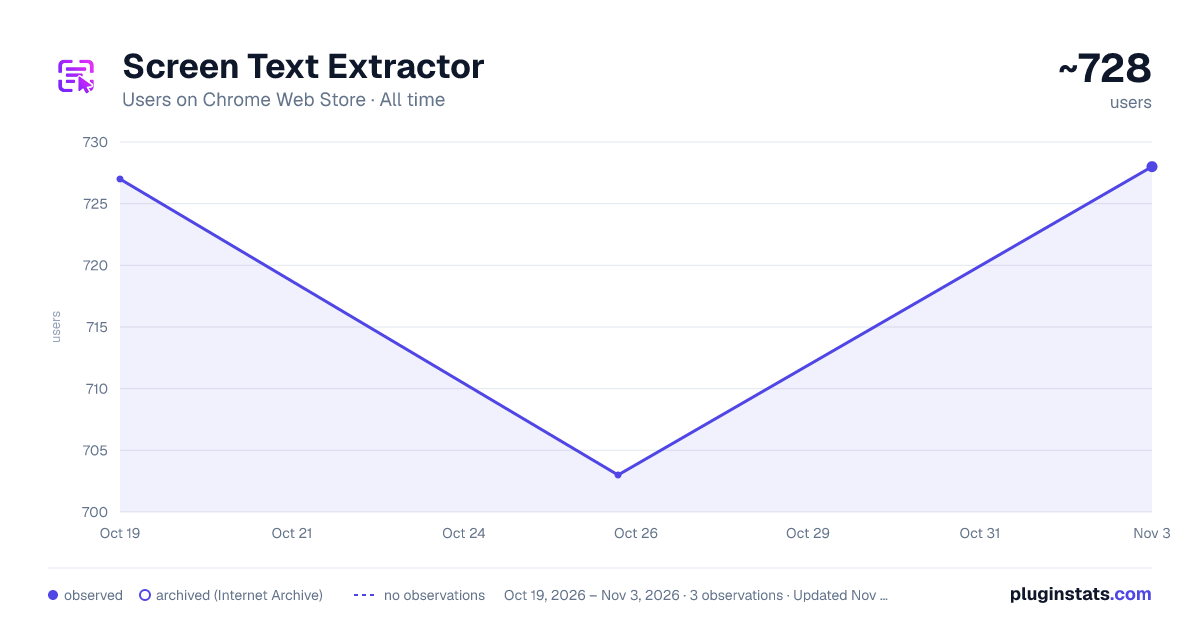
Screen Text Extractor has approximately 727 recorded users on Chrome Web Store, ranking #1045 of 2,495 tracked listings.
Rating: 5.00 / 5 from 3 ratings
About Screen Text Extractor
Select any screen area and extract text instantly using OCR
Screen Text Extractor lets you capture and digitize text from any visible area on a webpage — instantly, privately, and without leaving the browser.
✨ KEY FEATURES
• Area Selection — Click "Select Area" or press Alt+Shift+E, then drag to highlight any region • Powerful OCR — Tesseract.js processes your text locally; no cloud API needed • Auto Upscaling — Small text is automatically enlarged before processing for higher accuracy • Image Enhancement — Automatic contrast and brightness adjustment for difficult text • Copy & Download — Copy result to clipboard or save as a .txt file
📋 EXTRACTION HISTORY
• Every extraction is saved automatically to local browser storage • Search past extractions by content or date (today, yesterday, week, month) • Pin important extractions to keep them at the top • Delete individual items or clear all at once • Export your full history as a JSON backup file • Configure auto-delete rules and maximum history size
🎯 PERFECT FOR
- Text in images, screenshots, and infographics
- Paused video frames
- PDFs and e-books displayed in the browser
- Quotes, citations, and product descriptions
- Digitizing handwritten notes from photos
🔒 100% PRIVATE
All processing happens inside your browser. Nothing is sent to any server. No accounts, no tracking, no analytics — your data stays on your device.
Works completely offline. No installation of extra software required.
Description from the Chrome Web Store listing.
README badge
Show your rank in a README or on your website. The badge updates automatically.
Charts
Images: 30d · 1y · all time · 1600×900 dark
Adoption over time
7/30/90-day growth
Ranking history
Ratings over time
Listing placement
Listing placement
Filled points are observed values; hollow points come from Internet Archive snapshots of the listing page. Dashed segments span periods with no observations — values between points are not interpolated.
Each band is one page of 20. Users on a linear scale. Placement is projected from users, so it can differ from the marketplace's own sort order. Hover a dot to see the listing.
Recent observations
Full history (1)Similar Chrome Web Store Developer Tools plugins
All 20 Screen Text Extractor alternatives



Data source
Covers every Chrome Web Store extension with at least 100 users, found through the store's public sitemap. User counts are read from public listing pages. The 10% most-used extensions are refreshed daily, the next 40% weekly and the next 40% monthly; the least-used 10% are not refreshed. Google displays rounded user counts (and caps the display at 10,000,000+), so small changes may not be visible. Rating counts above 1,000 are rounded (e.g. 1.6K).
Listing: https://chromewebstore.google.com/detail/screen-text-extractor/hjgciikhlmhhflcigclmmlghmdbcmhdm. First seen Oct 19, 2026; last successful collection Oct 19, 2026. See the methodology.