 PluginStats
Controls for Instagram Videos users statistics
Chrome Web Store · Accessibility
Adds video playback controls to Instagram videos embedded in web pages (seek bar, volume, play/pause, download video button).
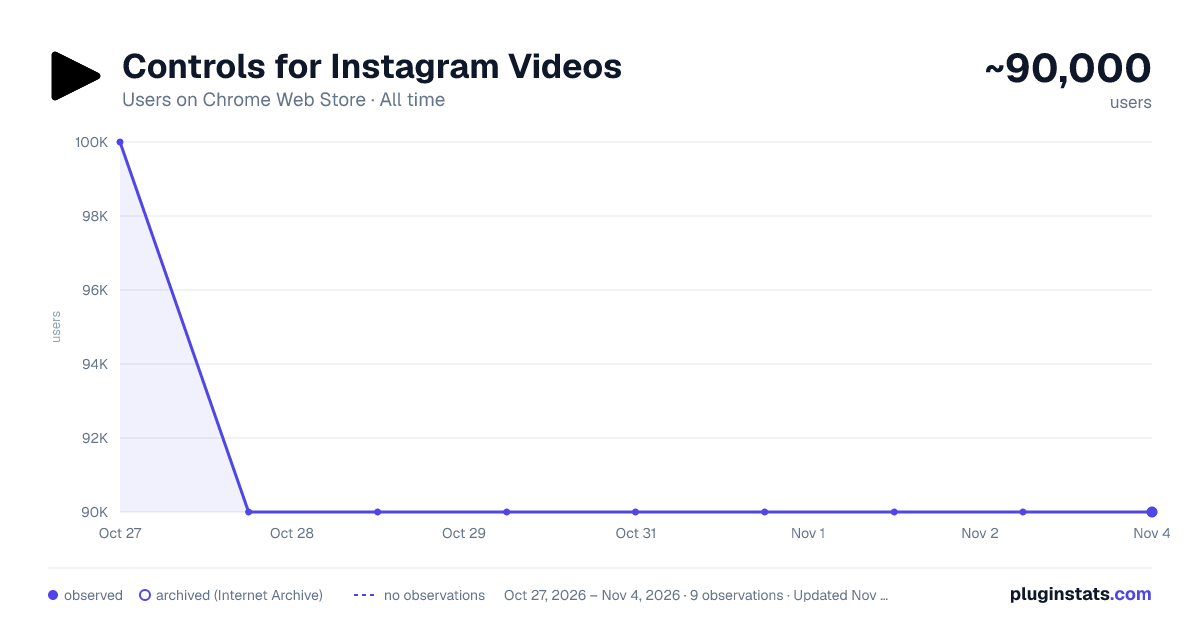
Controls for Instagram Videos has approximately 100,000 recorded users on Chrome Web Store, ranking #147 of 4,553 tracked listings.
Rating: 1.90 / 5 from 537 ratings
About Controls for Instagram Videos
Adds video playback controls to Instagram videos embedded in web pages (seek bar, volume, play/pause, download video button).
This tiny and efficient extension adds standard video playback controls to Instagram™ videos. Normally, all you can do with an Instagram™ video is play or pause it, but this extension will expose the native HTML 5 video player which has a seek bar (aka video scrubber), a volume control, a play/pause button, Picture-In-Picture (floating video) button, fullscreen video button, and on some videos it will also display a download button!
The extension automatically runs and works on all web pages that embed Instagram™ videos!
How to use it:
- Load any web page that contains an Instagram video
- Click the video to make it play
- That's it - the extension will automatically detect the video and will reveal the control buttons.
Options: -Control volume and playback speed via hotkey. -Remember your volume and playback speed for future videos. See the extension config page via right-clicking the extension icon in your browser bar, then select "Options". Or, just navigate to chrome://extensions/
Default Hotkeys - customizable via chrome://extensions/shortcuts Windows / Linux: Alt + UpArrow: Increase Volume Alt + DownArrow: Decrease Volume Ctrl + UpArrow: Increase Playback Speed Ctrl + DownArrow: Decrease Playback Speed
Mac: Alt + UpArrow: Increase Volume Alt + DownArrow: Decrease Volume Command + UpArrow: Increase Playback Speed Command + DownArrow: Decrease Playback Speed
Notes:
- After you install the extension, make sure to reload the page for any browser tabs that were opened before installing the extension. The extension will not run in those tabs until you do so.
- The download video button doesn't work on many videos anymore due to recent instagram changes, but it does still work on some.
- On pages where instagram auto plays videos as you scroll, such as on your home page feed, make sure to play/pause the video by clicking in the center of the video, instead of using the button at the lower left. Otherwise, when scrolling, the video may not stay paused.
Wondering why the extension is broken so much lately? Read https://rehfeld.us/browser-extensions/controls-for-instagram/instagram-changes
Issues currently being worked on: -Remember volume and playback speed not working in some cases. -The volume mute/buttons on the video vs the Instagram GUI aren't always in sync. -On stories, you must use the instagram play/pause button because the button on the video doesn't work.
Legal: Instagram™ is a registered trademark. This extension was developed independently of Instagram, by someone who is not related or affiliated with Instagram, without any help or endorsement from them.
Changelog
Feb 5th, 2023 V1.33 - Fix for not being able to click controls on some videos on home feed. Also make background shade which covers most of the video on reels pages less visually disruptive.
Feb 2nd, 2023 V1.32 - Another potential fix for some users not seeing controls on some videos. Also, add support for reels.
Nov 24th, 2022 V1.30 - More reliably adjust video height on story videos. Also, potential fix for some users not seeing controls on some videos.
Nov 18th, 2022 V1.29 - Fix video controls not being easily clickable for certain videos. Also, new features: configurable hotkeys for volume and video speed (right the extension icon > options).
Jun 22nd, 2022 V1.28 - Upgrade to manifest v3. This is a technical change, and should not affect any functionality.
Jun 17th, 2022 V1.27 - Make videos stay paused when scrolling on home page if you pause the video by clicking in the center of the video (pausing via the tiny pause button in the lower left will not work). Also, fix bug preventing users with a non-english browser language from using core features.
Jun 2nd, 2022 V1.25 - Adapt to recent instagram updates, fixing sudden lack of video controls. Also, resize the video upwards a bit on stories so the video controls arent covered by instagram comment/like buttons.
May 29th, 2021 V1.24 - More reliably avoid "Send Message" box from overlaying controls on Story videos. Also, hopefully avoid rare case of stuttering videos.
Aug 17th, 2020 V1.23 - Potential Bugfix for disappearing videos/images on some pages.
Aug 5th, 2020 V1.21 - Bugfix for disappearing videos on some pages.
Jul 18th, 2020 V1.19 - On some Story videos, resize the video a bit so the "Send Message" text box doesn't overlay the video controls. 2nd attempt.
May 11th, 2020 V1.18 - Undo previous change to Story videos, which affected some non-story videos and broke them.
May 9th, 2020 V1.17 - On some stories, move the video a bit so the "Send Message" text box doesn't overlay the video controls.
Apr 2nd, 2020 V1.16 - Fix bug sometimes causing wrong video to play when clicking.
Nov 2, 2019 V1.15 - Expand allowed playback rate range.
Oct 30, 2019 V1.14 - Add ability to set video playback speed. Also, enable the "remember volume" feature by default.
Sept 29, 2019 V1.13 - Add ability to automatically remember the volume of videos.
Jun 8, 2019 V1.11 - Update to react to Instagram changes, fixing support for stories page.
May 18, 2019 V1.10 - Show controls on videos in stories. Also, fix play/pause bug when clicking on center of videos.
V1.9 - Update readme.
V1.8 - Efficiency improvement.
V1.6 - More reliably detect videos on instgram.com pages that use modal dialogs.
V1.5 - Update to react to Instagram changes.
V1.4 - Update to react to Instagram changes.
V1.3 - Renamed Extension.
V1.2 - Added trademark notice.
V1.1 - Improve compatibility to work on more sites, including instagram.com website and other, non instagram.com sites.
V1.0 - Initial release.
Description from the Chrome Web Store listing.
README badge
Show your rank in a README or on your website. The badge updates automatically.
Charts
Images: 30d · 1y · all time · 1600×900 dark
Adoption over time
7/30/90-day growth
Ranking history
Ratings over time
Listing placement
Listing placement
Filled points are observed values; hollow points come from Internet Archive snapshots of the listing page. Dashed segments span periods with no observations — values between points are not interpolated.
Each band is one page of 20. Users on a linear scale. Placement is projected from users, so it can differ from the marketplace's own sort order. Hover a dot to see the listing.
Recent observations
Full history (1)Similar Chrome Web Store Accessibility plugins
All 20 Controls for Instagram Videos alternatives



Data source
Covers every Chrome Web Store extension with at least 100 users, found through the store's public sitemap. User counts are read from public listing pages. The 10% most-used extensions are refreshed daily, the next 40% weekly and the next 40% monthly; the least-used 10% are not refreshed. Google displays rounded user counts (and caps the display at 10,000,000+), so small changes may not be visible. Rating counts above 1,000 are rounded (e.g. 1.6K).
Listing: https://chromewebstore.google.com/detail/controls-for-instagram-vi/eigfbedabacomcacemdnkelnlhgbiacn. First seen Oct 27, 2026; last successful collection Oct 27, 2026. See the methodology.