 PluginStats
Agent Code Notes downloads statistics
By BeanSoft (7 listings) · JetBrains Marketplace · Code Tools
Agent Code Notes — the ultimate knowledge management plugin for JetBrains IDEs, now integrated with Code Agents. Capture code notes, pin notes to symbols, and browse...
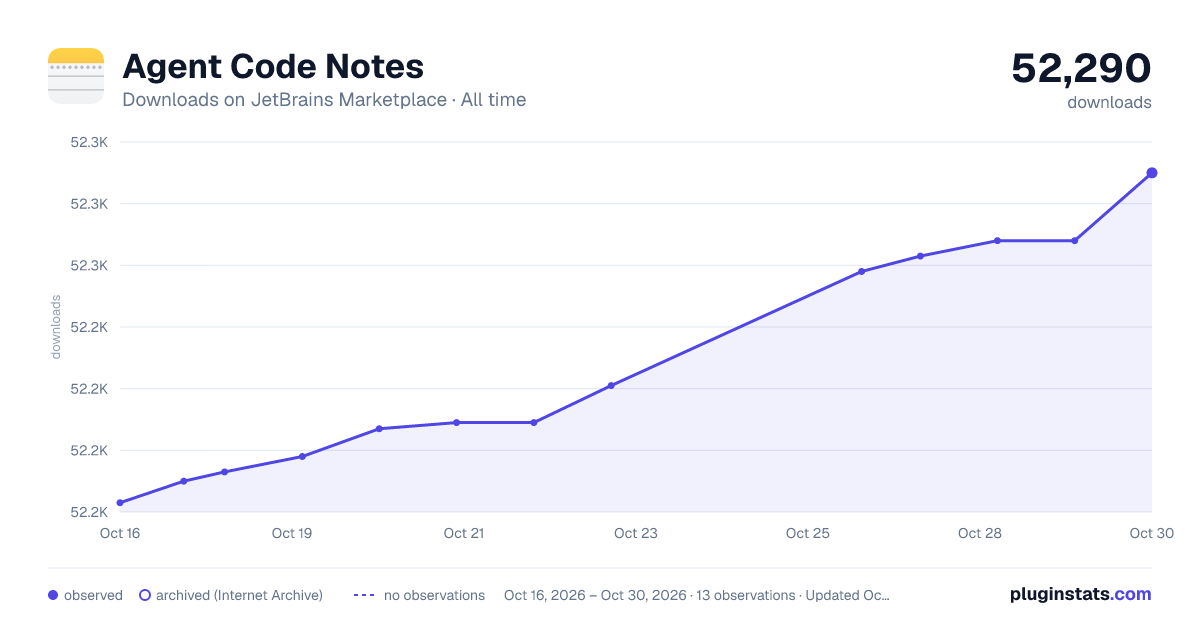
Agent Code Notes has 52,193 recorded downloads on JetBrains Marketplace.
It ranks #1267 of 2,500 tracked JetBrains Marketplace listings by downloads.
It is rated 4.8 out of 5 from 26 ratings.
PluginStats has 3 daily observations since Oct 16, 2026; the latest is from Oct 18, 2026.
Rating: 4.81 / 5 from 26 ratings
About Agent Code Notes
Agent Code Notes — the ultimate knowledge management plugin for JetBrains IDEs, now integrated with Code Agents. Capture code notes, pin notes to symbols, and browse AI-generated Markdown with symbol navigation. Instead of letting AI coding agents flood your project with hundreds of scattered Markdown files, store everything in a centralized, searchable knowledge base that stays inside your IDE.
All in One: Symbol Code Notes, Visual Markdown Editor, Markdown Symbol Preview. SQLite local storage or Git-friendly Markdown folder sync. Works across all JetBrains IDEs (IDEA 252+).
📝 Agent Code Notes
Add notes and bookmarks without altering source code, now you can save your AI agent chat content directly into code nodes, just say:Save the answer to Code Notes. Or create from the JetBrains IDEs' editor with Alt+M, from the gutter right-click menu, or from the Alt+Enter intention after selecting code — the note renders in place.
• Skills for the agent to interact with Code Notes, usage guide here: https://github.com/beansoft/code-notes-skill/blob/main/README.md • Save on the fly while typing or editing titles • Attachments management with image thumbnail view • Notes on read-only class files and library sources • Speed search across all notes • Virtual folder tree navigation + full-size editor mode • Same fragments shared across multiple running IDEs on one machine (IDEA / WebStorm / Android Studio / …) • Syntax highlighting for 300+ file types via TextMate bundles • Favorite code notes straight from the editor • Project-level notes with relative-path linking — portable across machines, backup/restore project bookmarks to XML for VCS sync (Git / SVN)
🤖 AI Skill — MCP Toolset for Claude Code / Agents 🆕 2026.2
Plugin ships an MCP toolset (NotesMcp) that exposes your notes to AI coding agents (Claude Code, Cursor, Cline, and any MCP-capable client) through the JetBrains MCP bridge. Ask the agent in natural language — English or Chinese — and it routes to the right tool automatically.
Exposed tools:
• search_code_notes_title — fast title search across all notes, snippet results with line/column coordinates • create_code_note — create a plain note or a TODO item (checked/unchecked), optionally into a folder by UUID, with language/type tag (markdown/java/kotlin/…) • update_code_note_content — replace an existing note's body by UUID • view_current_symbol — resolve the symbol under the caret in the focused editor (class / method / field / variable), return shortName, qualifiedName, language, file path, line, and PinNote protocol:pinText • add_note_to_current_symbol — create a note bound to the caret symbol via PinNote protocol, so it survives file moves and renames independently of the global "pin to symbol" setting
Bundled Claude Code skill — a plugin skill file routes natural-language triggers ("my notes", "save this snippet", "note this method", "我的笔记", "记下来", "给这个类加笔记") to the right MCP tool. Drop it into your Claude Code / Agent skills directory and the agent picks up notes commands with zero configuration.
📌 Symbol Notes — Pin to Symbol 🆕 2025.2
Link notes to a programming-language symbol — class, field, method — instead of the absolute line number. Notes stay attached when symbols move inside the file or when you pull updated source from VCS.
• Supported languages: Java, Kotlin, PHP, TypeScript, C# • Gutter icons render at the symbol's current location • More languages coming in future releases • Docs: Pin to Symbol
🎨 Markdown Symbol Preview (2026.2) 🆕
Native Swing-based Markdown editor. Symbol jump, Instant rendering, split-screen preview. Best companion for reading AI-generated Markdown docs.
• Switch on at Settings | Tools | Code Notes | MD Symbol Preview • No external Markdown plugin required • Handles code symbols, tables, code blocks, outlines • Supports main programming languages:Java, Kotlin, PHP, TypeScript and Python.
Storage
Local (SQLite) — offline-first. Nothing leaves your machine. Single notes.db file, easy to back up with any file-sync tool or USB stick.
Git Storage(beta) — offline-first. Lets you store your code notes as markdown files in a local Git repository instead of a closed SQLite database.
Evernote sync — store and sync notes with Evernote (internet required). View clipped web pages and image attachments without leaving the IDE. Ignore pictures option for faster load. Click Refresh in the Evernote tool window after editing in the Evernote app. Details: Sync with Evernote.
Editor
Built by a developer, for developers. All major languages plus 300+ via TextMate bundles. Full Markdown / AsciiDoc / IDEA Mind Map / Mermaid / PlantUML integration.
• Reader mode • Line numbers • Jump to referenced source file • Run code scratches (Java only, disable Reader Mode first) • Third-party language extensions: Scala, Rust, and more
Navigation
Smart display of linked source file paths. Keyboard navigation — Up/Down to move, Enter or double-click to open, Esc to return to main editor.
Tool Windows
iScratch (main notes panel) and Evernote (sync panel), both bottom-anchored. Add/remove virtual folders, create fragments in any language the IDE supports.
Notes is under active development. Issues and suggestions welcome.
Chinese Documents Below 中文说明文档
Agent 代码笔记 (Agent Code Notes) — JetBrains IDE 上的终极知识管理插件,现已集成 Code Agents。记录代码笔记、将笔记固定到符号、浏览带符号导航的 AI 生成 Markdown 文档。与其让 AI 编码助手在你的项目里散落上百个零散的 Markdown 文件,不如把所有内容集中存储到 IDE 内的可搜索知识库中。
All in One:符号代码笔记、可视化 Markdown 编辑器、Markdown 符号预览。支持 SQLite 本地存储或 Git 友好的 Markdown 文件夹同步。适配全线 JetBrains IDE (IDEA 252+)。
📝 代码笔记
无需修改源代码即可添加笔记和书签,现在还可以把 AI Agent 的对话内容直接保存到代码笔记中,只需说一句:把答案保存到 Code Notes。也可以在 JetBrains IDE 的编辑器中按 Alt+M、通过编辑器行号区域右键菜单,或选中代码后按 Alt+Enter 触发意图创建 — 笔记会直接在编辑器中实时显示。…
Description from the JetBrains Marketplace listing.
- Code Tools
- Productivity
Where Agent Code Notes sits in the listing
Each band is one page of 20. Downloads on a log scale. Placement is projected from downloads, so it can differ from the marketplace's own sort order. Hover a dot to see the listing.
Charts
Images: 30d · 1y · all time · 1600×900 dark
Adoption over time
7/30/90-day growth
Ranking history
Filled points are observed values; hollow points come from Internet Archive snapshots of the listing page. Dashed segments span periods with no observations — values between points are not interpolated.
Recent observations
Full history (3)Similar JetBrains Marketplace Code Tools plugins




Data source
Cumulative download counts come from the public JetBrains Marketplace API. JetBrains reports downloads, not active installs. Ratings are the mean of public votes.
Listing: https://plugins.jetbrains.com/plugin/17501-agent-code-notes. First seen Oct 16, 2026; last successful collection Oct 18, 2026. See the methodology.