 PluginStats
GlassCode (For Windows) downloads statistics
By GilEli121 · JetBrains Marketplace · Code Editing
GlassCode This plugin allows you to make your IDE to be fully transparent while keeping the code sharp and bright. Introduction Adjust the opacity level while keeping...
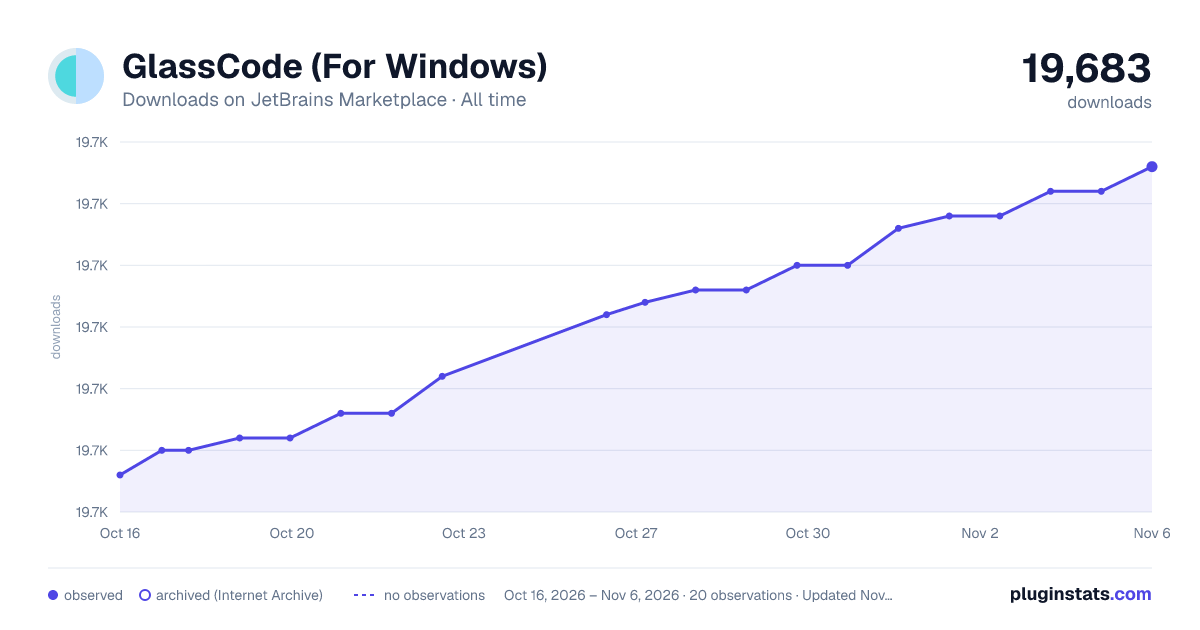
GlassCode (For Windows) has 19,661 recorded downloads on JetBrains Marketplace, ranking #2165 of 2,502 tracked listings.
Rating: 5.00 / 5 from 6 ratings
About GlassCode (For Windows)
GlassCode
This plugin allows you to make your IDE to be fully transparent while keeping the code sharp and bright.
Introduction
Adjust the opacity level while keeping the text sharp and bright
Using GlassCode plugin with combination of LiveEdit (WebStorm IDE)
Using GlassCode in Java (IntelliJ IDE)
Using GlassCode with blur effect set to high
Getting started
• Download GlassCode plugin • Install it in your IDE • It is recommended to use the high contrast theme for the best result or at lest any dark theme. My suggestion is to enable the high contrast theme
How to use
Currently, the only way to use this plugin is to click on the GlassCode tab here:
After that, the following menu will open:
Click on the Enable checkbox to enable the effect.
In this menu, the following options available:
• Enable on startup - If this option is selected, the transparency effect will start on startup when you open project
• Use "High Contrast" theme - This option is highly recommended to get the best transparency quality.
If you don't enable this option, at least make sure you use a dark theme. The transparency is not working good
on non-dark themes!
• Opacity - This is the opacity of the background only. The image processing algorithm is smart to not apply the opacity to the texts or anything that is not background
• Amount of brightness behind the window - This will reduce or decrease the light that you can see behind the window. This effect give similar result like when the opacity is high value and the theme is dark.
In general it is suggested to set this filter to 70% and the opacity to 30%-60% (it depends on what you like)
• Type of blur behind the window - This effect have 3 options: None, Medium and High. When it set to None, there is no blur effect at all. For Medium and High it looks as following:
Medium blur:
High blur:
• Text extra brightness - This option controls the amount of brightness of your code
Supported IDEs
• IntelliJ • WebStorm • Phpstorm • Other JetBrains IDEs (Not tested)
Supported Operating Systems
• Windows 10 64bit from version 2004 (20H1) and above
Notes
• Currently this plugin is supported only in Windows 10 v2004 and above • It is highly recommended to use the "High contrast" theme when using the glass effect. The transparency • Source code of the plugin is fully removed
Description from the JetBrains Marketplace listing.
- Code Editing
- Code Tools
- Editor Color Schemes
- Web
README badge
Show your rank in a README or on your website. The badge updates automatically.
Charts
Images: 30d · 1y · all time · 1600×900 dark
Adoption over time
7/30/90-day growth
Ranking history
Ratings over time
Listing placement
Listing placement
Listing placement
Listing placement
Filled points are observed values; hollow points come from Internet Archive snapshots of the listing page. Dashed segments span periods with no observations — values between points are not interpolated.
Each band is one page of 20. Downloads on a linear scale. Placement is projected from downloads, so it can differ from the marketplace's own sort order. Hover a dot to see the listing.
Recent observations
Full history (5)Similar JetBrains Marketplace Code Editing plugins
All 20 GlassCode (For Windows) alternatives



Data source
Cumulative download counts come from the public JetBrains Marketplace API. JetBrains reports downloads, not active installs. Ratings are the mean of public votes.
Listing: https://plugins.jetbrains.com/plugin/15868-glasscode-for-windows-. First seen Oct 16, 2026; last successful collection Oct 20, 2026. See the methodology.