 PluginStats
Advanced JSON Studio downloads statistics
By Godwin Joseph (2 listings) · JetBrains Marketplace · Code Tools
Advanced JSON Studio: The Intelligent JSON Workspace Stop wrestling with malformed data. Elevate your development workflow with the most powerful JSON toolkit for the...
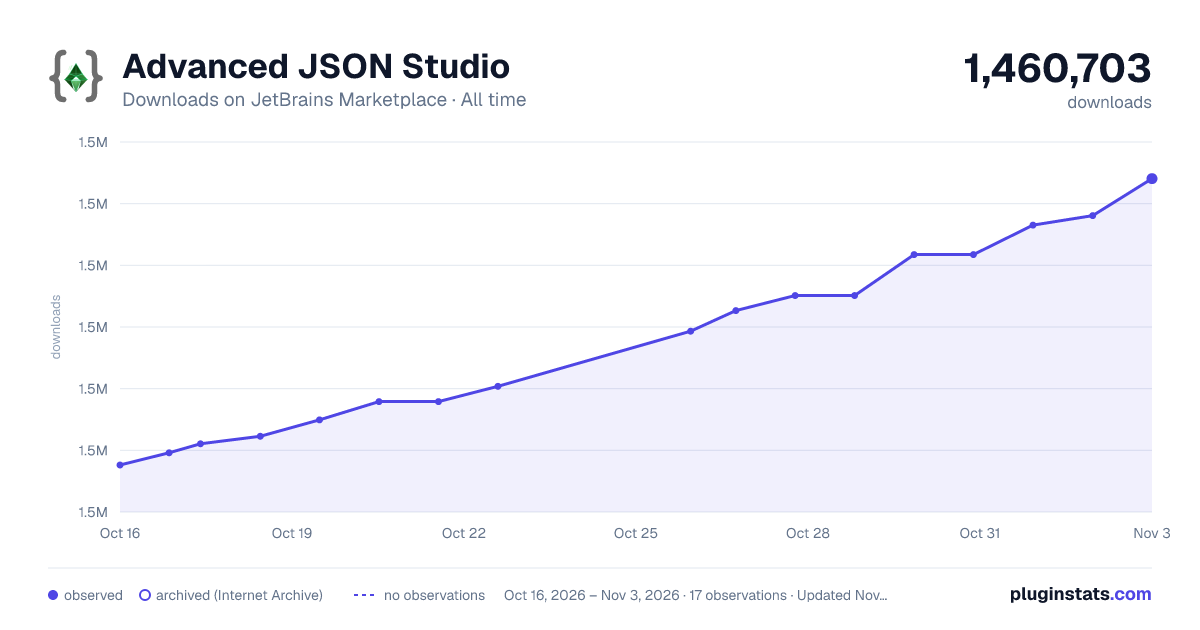
Advanced JSON Studio has 1,458,747 recorded downloads on JetBrains Marketplace, ranking #227 of 2,502 tracked listings.
Rating: 4.88 / 5 from 549 ratings
About Advanced JSON Studio
Advanced JSON Studio: The Intelligent JSON Workspace
Stop wrestling with malformed data. Elevate your development workflow with the most powerful JSON toolkit for the IntelliJ Platform. Advanced JSON Studio isn’t just a formatter—it’s a complete engineering environment designed to handle everything from massive API responses to broken configuration files. It’s the last JSON tool you’ll ever need.
• Auto-parse as you type — results update instantly without pressing a button. • Support converting JSON5, JSON, YAML, XML, TOML, Properties, JWT, CBOR and BSON in a single unified interface. • Present JSON in a clean, readable format with automated pretty printing. • Validate JSON for accuracy and integrity with ease. • Load local JSON files effortlessly with a dedicated sidebar button. • Retrieve JSON from web sources quickly — supports custom headers and POST body too. • Work across multiple tabs — each session is isolated, close and rename tabs individually. • Navigate JSON structures effortlessly using an intuitive Tree View with live search. • Visualize complex JSON structures as interactive graphs. Expand the view to explore large datasets with ease. • Query JSON using JSONPath and JMESPath expressions with live autocomplete. • Convert JSON to YAML instantly. • Convert JSON to XML instantly. • Convert JSON to TOML instantly — arrays of objects use correct [[table]] syntax. • Convert JSON to .properties instantly. • Convert JSON to CBOR instantly. • Convert JSON to BSON instantly. • Infer a JSON Schema from your JSON structure automatically. • Decode and verify JWT tokens — supports HMAC (HS256/384/512), RSA and ECDSA signatures. • Minify/Uglify JSON to a single line with one click. • Custom indentation size (1–8 spaces) and alphabetical key sorting. • View live statistics — key count, depth, object/array counts, and file size. • Compare two JSON documents side-by-side with structural diff highlighting. • Generate realistic dummy JSON for testing — choose structure, depth, and size. • Repair malformed JSON automatically using built-in and AI-powered strategies (can be disabled in settings). • Generate code from JSON powered by the acclaimed Quicktype engine — supports 12 languages: TypeScript, JavaScript, TypeScript + Zod, Python, Java, Kotlin, Swift, Go, C#, Rust, Ruby, and Dart. Output is written directly into your project directory.
• Open parser as a full editor tab — pop the tool window into the main editor area for more screen space. • Tip of the day — discover features with in-app tips; dismiss, navigate or disable anytime. • Your JSON input is automatically saved locally and restored on restart — no cloud sync, fully private. • Localization — the entire UI is available in Japanese, Korean, and Chinese (Simplified), following your IDE locale automatically.
• JSON Schema Validator — validate your JSON against any JSON Schema; save, edit and delete named schemas; view errors in a list or as live annotations in the Pretty tab.
• CSV Table View — convert any JSON array to a sortable table; download as .csv with one click. • Base64 auto-detection — paste a Base64-encoded JSON string and it is decoded and parsed automatically; a Base64 Encode tab encodes the current JSON to a Base64 string.
• Flatten / Unflatten — expand nested JSON into dot-notation flat pairs, or rebuild nested structure from flat keys. • Rich Pretty Print — live gutter decorations (color swatches, image thumbnails, clock/calendar/link/UUID icons) and inline inlay hints (timestamps, sizes, durations, large numbers) in the Pretty tab. All individually toggleable.
• Code → JSON — convert Python dicts/lists/tuples, JavaScript objects/arrays, and TypeScript exports directly to JSON. Handles interface/type declaration stripping, template literals, undefined → null, NaN/Infinity → null, trailing commas, and comments. Auto-converts as you type.
• GraphQL Formatter — format and validate GraphQL SDL, queries (with variables, aliases, fragments), mutations, subscriptions, and all SDL types via graphql-java. Auto-formats as you type.
• GraphQL Introspection — connect to any live GraphQL endpoint and fetch the full schema; browse types, fields, arguments, enums, interfaces, and directives. • GraphQL Query Runner — write and execute GraphQL queries with variables against a connected endpoint; results load directly into the JSON tooling pipeline.
Description from the JetBrains Marketplace listing.
- Code Tools
- Debugging
- Formatting
- Fun Stuff
- Miscellaneous
- Viewer
README badge
Show your rank in a README or on your website. The badge updates automatically.
Charts
Images: 30d · 1y · all time · 1600×900 dark
Adoption over time
7/30/90-day growth
Ranking history
Ratings over time
Listing placement
Listing placement
Listing placement
Listing placement
Filled points are observed values; hollow points come from Internet Archive snapshots of the listing page. Dashed segments span periods with no observations — values between points are not interpolated.
Each band is one page of 20. Downloads on a linear scale. Placement is projected from downloads, so it can differ from the marketplace's own sort order. Hover a dot to see the listing.
Recent observations
Full history (5)Similar JetBrains Marketplace Code Tools plugins
All 20 Advanced JSON Studio alternatives



Data source
Cumulative download counts come from the public JetBrains Marketplace API. JetBrains reports downloads, not active installs. Ratings are the mean of public votes.
Listing: https://plugins.jetbrains.com/plugin/10650-advanced-json-studio. First seen Oct 16, 2026; last successful collection Oct 20, 2026. See the methodology.