 PluginStats
GitLab CICD - Pipelines & Jobs, Builds Run Cancel Retry View Log downloads statistics
By ideguru · JetBrains Marketplace · Administration Tools
GitLab CICD for software developers GitLab CICD is an IDE plugin designed to make it easier for you to view and manage GitLab CI/CD directly from within the IDE. The...
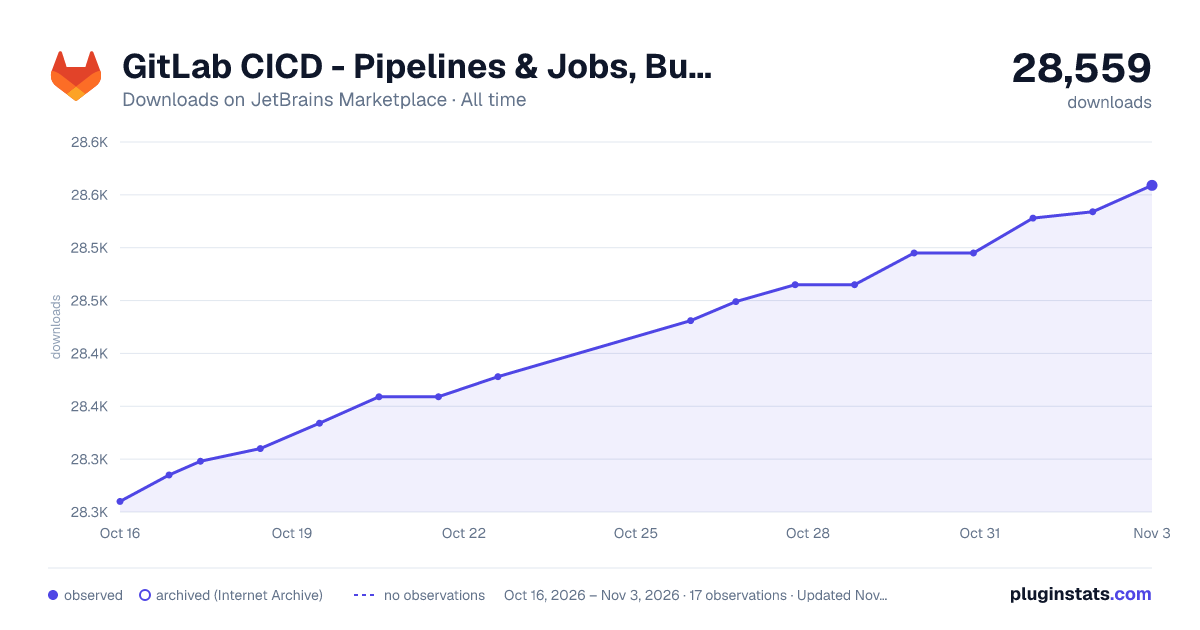
GitLab CICD - Pipelines & Jobs, Builds Run Cancel Retry View Log has 28,465 recorded downloads on JetBrains Marketplace, a change of +0.4% over the past 7 days, ranking #1810 of 2,503 tracked listings.
Rating: 4.86 / 5 from 21 ratings
About GitLab CICD - Pipelines & Jobs, Builds Run Cancel Retry View Log
GitLab CICD for software developers
GitLab CICD is an IDE plugin designed to make it easier for you to view and manage GitLab CI/CD directly from within the IDE. The plugin provides a user-friendly interface that allows you to easily view, run, cancel and retry GitLab Pipelines and Jobs without having to switch between the IDE and the GitLab web interface.
It works with both GitLab SaaS and GitLab Self-Managed (15.x or later).
With GitLab CICD, you can:
• 🔎 Quickly view the status of pipelines. • 🖥 View detailed information about each pipeline, stage and job. • 🛠 Run, cancel and retry pipeline or job. • 📋 Display job log in real time. • 💾 Download job artifacts. • 🔔 Receive notifications when your pipelines have been started or finished. • ✅ Validate/Lint your CICD configuration files (e.g. .gitlab-ci.yml). • 🌙 Enjoy GitLab CI/CD in Dark Mode.
❗Important note: The plugin acts as a direct client for GitLab, ensuring that no data is transmitted to any server other than GitLab itself. Access tokens are stored securely on your local machine in the IDE's password storage, which you can configure in the IDE Settings.
To open plugin, click on View -> Tool Windows -> GitLab CICD.
To validate CICD file, right-click on file, then select Validate CICD file.
By using GitLab CICD, you can save time and streamline your development workflows by eliminating the need to switch between multiple applications and interfaces. The plugin is easy to install and use, and provides a seamless integration between IDE and GitLab CI CD.
Plugin supports Chinese (Simplified) language pack.
GitLab CICD 是一个 IDE 插件,旨在使您更轻松地从 IDE 中直接查看和管理 GitLab CI/CD。该插件提供了一个用户友好的界面,允许您在 IDE 内轻松查看、运行、取消和重试 GitLab 流水线和任务,无需在 IDE 和 GitLab Web 界面之间切换。
它与 GitLab SaaS 和 GitLab 自托管(15.x 或更高版本) 都兼容。
使用 GitLab CICD,您可以:
• 🔎 快速查看流水线的状态。 • 🖥 查看每个流水线、阶段和任务的详细信息。 • 🛠 运行、取消和重试流水线或任务。 • 📋 实时显示任务日志。 • 💾 下载任务工件。 • 🔔 在流水线启动或完成时接收通知。 • ✅ 验证/检查您的 CI/CD 配置文件(例如 .gitlab-ci.yml)。 • 🌙 在暗模式下享受 GitLab CI/CD。
❗重要提示: 该插件充当 GitLab 的直接客户端,确保除 GitLab 本身外不传输任何数据到其他服务器。访问令牌安全地存储在您本地机器上的 IDE 密码存储中,您可以在 IDE 设置中配置。
要打开插件,请点击 View -> Tool Windows -> GitLab CICD。
要验证 CI/CD 文件,请右键单击文件,然后选择 Validate CICD file。
通过使用 GitLab CICD,您可以节省时间,简化开发工作流程,无需在多个应用程序和界面之间切换。该插件安装和使用都很简单,并在 IDE 和 GitLab CI CD 之间提供了无缝集成。
支持简体中文语言包。
Description from the JetBrains Marketplace listing.
- Administration Tools
- Build
- Notification and Visualizers
- Tools Integration
- VCS
README badge
Show your rank in a README or on your website. The badge updates automatically.
Charts
Images: 30d · 1y · all time · 1600×900 dark
Adoption over time
7/30/90-day growth
Ranking history
Ratings over time
Listing placement
Listing placement
Listing placement
Listing placement
Filled points are observed values; hollow points come from Internet Archive snapshots of the listing page. Dashed segments span periods with no observations — values between points are not interpolated.
Each band is one page of 20. Downloads on a linear scale. Placement is projected from downloads, so it can differ from the marketplace's own sort order. Hover a dot to see the listing.
Recent observations
Full history (11)Similar JetBrains Marketplace Administration Tools plugins
All 20 GitLab CICD - Pipelines & Jobs, Builds Run Cancel Retry View Log alternatives



Data source
Cumulative download counts come from the public JetBrains Marketplace API. JetBrains reports downloads, not active installs. Ratings are the mean of public votes.
Listing: https://plugins.jetbrains.com/plugin/22202-gitlab-cicd--pipelines--jobs-builds-run-cancel-retry-view-log. First seen Oct 16, 2026; last successful collection Oct 28, 2026. See the methodology.