 PluginStats
Structured Logging downloads statistics
By Oleg Shevchenko · JetBrains Marketplace · Code Editing
Analyzers for structured logging message templates in .NET. Supports Serilog, NLog, Microsoft.Extensions.Logging and ZLogger, including the interpolated ZLog* call...
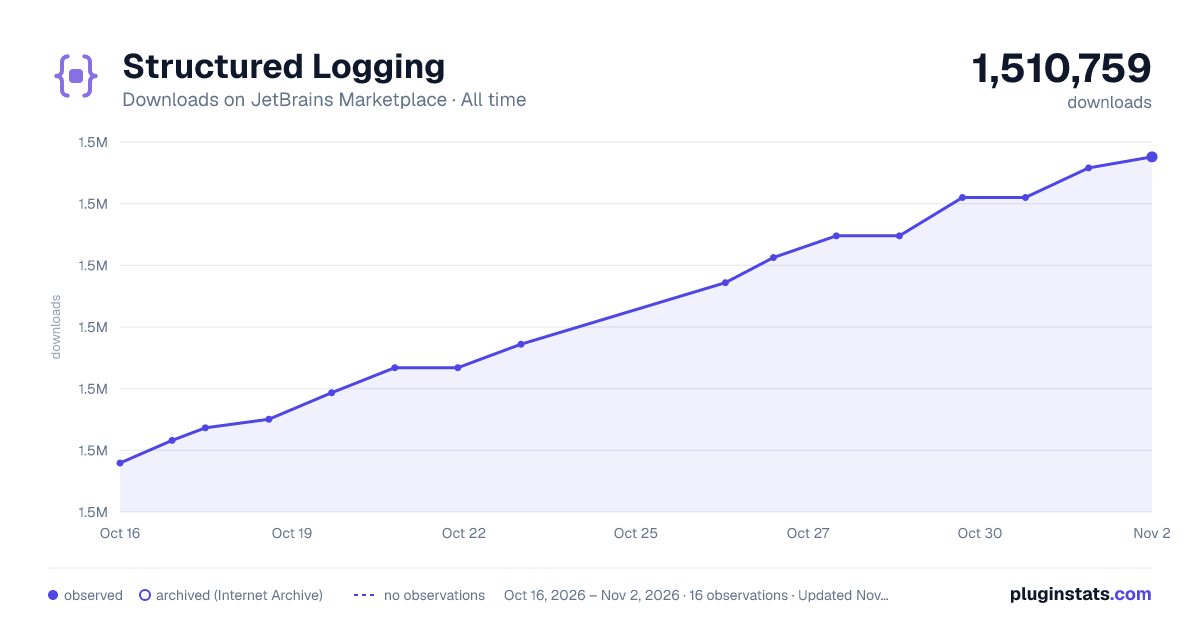
Structured Logging has 1,506,504 recorded downloads on JetBrains Marketplace.
It ranks #220 of 2,501 tracked JetBrains Marketplace listings by downloads.
It is rated 4.8 out of 5 from 16 ratings.
PluginStats has 4 daily observations since Oct 16, 2026; the latest is from Oct 19, 2026.
Rating: 4.75 / 5 from 16 ratings
About Structured Logging
Analyzers for structured logging message templates in .NET.
Supports Serilog, NLog, Microsoft.Extensions.Logging and ZLogger, including the interpolated ZLog* call sites of ZLogger 2.x and templates declared with LoggerMessageAttribute, ZLoggerMessageAttribute and LoggerMessage.Define/DefineScope. Custom logging wrappers are analyzed as well, once the method is annotated with MessageTemplateFormatMethodAttribute or its template parameter with StructuredMessageTemplateAttribute.
The plugin reports:
• Anonymous or complex objects that are not destructured, including inside a logging context • A destructuring or stringification operator that has no effect because the value is a scalar • A contextual logger that does not match the type it is used in • An exception passed as a template argument instead of the exception parameter • An exception logged as text through Message, StackTrace or ToString() • Duplicate properties in a template • Templates that are not compile-time constants • Positional properties used instead of named ones • Inconsistent log property naming, including inside a logging context • Log event messages written as sentences rather than fragments
Inside a message template, code completion offers property names built from the arguments that fill the holes, in the configured naming case and with the name of the argument this very hole binds to first, and closes the hole when the brace is missing.
Logging statements can optionally be dimmed, the way unreachable code is rendered, so that they stand out less than the surrounding code. Enable Dim logging statements in the plugin settings.
Individual analyzers can be turned off per line or per file with a // ReSharper disable once <AnalyzerName> comment, or per directory through .editorconfig.
Message template highlighting itself is a built-in feature of ReSharper and Rider since 2021.2; this plugin adds the analyzers on top of it.
For more information visit the project repository.
Description from the JetBrains Marketplace listing.
- Code Editing
- Code Quality
- Code Tools
- Formatting
- Refactoring
- Static Analysis
Where Structured Logging sits in the listing
Each band is one page of 20. Downloads on a log scale. Placement is projected from downloads, so it can differ from the marketplace's own sort order. Hover a dot to see the listing.
Charts
Images: 30d · 1y · all time · 1600×900 dark
Adoption over time
7/30/90-day growth
Ranking history
Filled points are observed values; hollow points come from Internet Archive snapshots of the listing page. Dashed segments span periods with no observations — values between points are not interpolated.
Recent observations
Full history (4)Similar JetBrains Marketplace Code Editing plugins




Data source
Cumulative download counts come from the public JetBrains Marketplace API. JetBrains reports downloads, not active installs. Ratings are the mean of public votes.
Listing: https://plugins.jetbrains.com/plugin/12832-structured-logging. First seen Oct 16, 2026; last successful collection Oct 19, 2026. See the methodology.