 PluginStats
Spring Explyt downloads statistics
By Explicit Insights LLC · JetBrains Marketplace · AI
Explyt Spring Plugin — Free Spring Boot plugin for IntelliJ IDEA Community (Java, Kotlin, Quarkus) Runtime-accurate Spring tooling for IntelliJ IDEA Community — free...
Spring Explyt has 20,593 recorded downloads on JetBrains Marketplace, ranking #2116 of 2,502 tracked listings.
Rating: 5.00 / 5 from 4 ratings
About Spring Explyt
Explyt Spring Plugin — Free Spring Boot plugin for IntelliJ IDEA Community (Java, Kotlin, Quarkus)
Runtime-accurate Spring tooling for IntelliJ IDEA Community — free for commercial and non-commercial use. Explyt loads your application's real Spring context via a lightweight javaagent, so beans, endpoints, and inspections reflect what your app actually wires up — not a static guess.
Bring powerful Spring and Spring Boot tooling to IntelliJ IDEA Community Edition. Build, navigate, test, and debug faster with:
• Accurate bean discovery and real context understanding (native context mode via javaagent) • Tool windows for Beans/Contexts and Endpoints • Built‑in HTTP client (OpenAPI/Swagger UI + .http/.rest runners) • Spring Debugger (including runtime Spring property lenses) • Spring Data, JPA, AOP, Docker/K8s, and lots of inspections & quick fixes • Quarkus CDI/JAX‑RS/AOP support • Optional AI helpers for Spring tasks • Spring-aware MCP tools for agentic AI clients (IntelliJ IDEA 2025.2+)
Why developers choose Explyt
• Faster feedback: precise inspections, completion and navigation eliminate wiring guesswork. • True Spring context awareness: lightweight native context run extracts real bean/config metadata, including conditional and factory beans. • Seamless API testing: run HTTP requests via Swagger UI in the IDE or execute .http/.rest files.
Highlights
Tool Windows
• Explyt Spring: load real bean metadata, browse contexts, navigate beans, view aspects, and open Bean Analyzer. • Video: How Native Context Mode works in Explyt Spring panel • Explyt Endpoints: view and navigate endpoints for MVC/WebFlux, router functions, and message brokers (Kafka/RabbitMQ listeners). • Video: How Explyt Endpoints Tool Window works
Accurate Bean Detection & Context Analysis
• Detects beans via annotations, factory methods and conditional logic (@Conditional, profiles, complex scans). • Native context mode eliminates many false positives by using real Spring logic. • Supports projects with multiple application contexts. • Autowiring/inspections also consider library beans (from dependencies), not only project sources.
Inlay Hints & Code Vision
• @Profile inlay hints show the computed result of profile expressions (e.g. "prod & !cloud" → true/false). • @Scheduled cron completion + hints (including zone attribute). • During Explyt debug sessions: runtime property value Code Vision in .properties / .yml (helps locate the PropertySource).
HTTP Client: OpenAPI/Swagger UI + .http/.rest
• Generate OpenAPI from Spring Web–annotated methods; open Swagger UI directly in the IDE. • Execute requests, inspect responses, copy cURL. • Execute .http/.rest files with JetBrains HttpClient CLI or httpyac.
Code Generation
Use Generate (Alt+Insert / Command+N):
• Generate Spring Web Method from URL/cURL (Java & Kotlin). • Generate HttpClient Method from URL/cURL (standalone java.net.http.HttpClient code, Java & Kotlin). • Generate JPA equals/hashCode for Java entities using a proxy-safe approach. • Properties ↔ YAML conversion.
Advanced Navigation & Analysis
• Beans in Search Everywhere: dedicated Beans tab in Search Everywhere (Shift Shift). • Bean Analyzer: visualize relationships between loaded beans and navigate to declarations. • Mark directory as Spring Application Property Folder: enable completion/validation for non-standard config locations. • SPI beans: navigation and gutter markers for beans produced via Java SPI (ServiceLoader).
Spring Boot & Web Enhancements
• Duplicate endpoint detection, OpenAPI validation, and better MockMvc/WebClient/WebTestClient support. • Docker Compose + Kubernetes: completion for Spring properties as environment variables (server.port → SERVER_PORT).
Spring Debugger
• Dedicated run configuration with a lightweight javaagent; shows Spring Context and Active Transaction in debugger tree. • Evaluate Spring context and call bean methods at breakpoints (Explyt.context helpers). • Inline run markers on Spring Data repositories to auto-populate Evaluate Expression during debug.
Spring Initializr
• Create Spring Boot projects (Java/Kotlin) with improved templates from start.spring.io. • Integrated UX: create Spring projects inside the IDE. • Always up to date.
Quarkus support
• CDI/DI navigation and inspections, JAX‑RS endpoints, interceptors/decorators, Endpoints tool window. • Works by static analysis, many features available without running the app.
AI integration
• AI actions: • DB schema ↔ JPA entity, • Entity ↔ DTO, • controller ↔ OpenAPI round‑trips, • Spring config generators, • HTTP conversions. • Works with OpenAI‑compatible providers or local models; requires IntelliJ Platform 2025.1+ for AI features. • Requires Explyt plugin to enable AI features.
MCP Server tools
• Supports the bundled JetBrains MCP Server in IntelliJ IDEA 2025.2+. • Adds Spring-aware MCP tools so agentic clients can inspect Spring Boot applications and project beans with less generic code exploration. • Current tools: explyt_get_spring_boot_applications, explyt_get_project_beans_by_spring_boot_application, explyt_find_spring_endpoint (find endpoints by URL pattern), explyt_get_spring_http_endpoints (list all HTTP endpoints with filters), explyt_get_spring_endpoint_contract (full API contract with DTO schema), explyt_trace_spring_call_chain (trace Controller → Service → Repository call chains with test references), and explyt_get_spring_data_entities (list JPA entities with table/column mappings, primary keys, relationships, and indexes).
Getting started
• Open the Explyt Spring tool window → Link Explyt Spring Boot Project From RunConfiguration → Load Beans. • Open the Explyt Endpoints tool window to explore web + message broker endpoints. • Use Search Everywhere (Shift Shift) → Beans tab to jump to any bean. • Use Bean Analyzer to explore the bean dependency graph. • Use Generate to create Spring Web methods or HttpClient code from URL/cURL.
Installation…
Description from the JetBrains Marketplace listing.
- AI
- Cloud
- Code Editing
- Code Quality
- Code Tools
- Database
- Debugging
- Framework
- Inspection
- Navigation
- Productivity
- Static Analysis
- Testing
- Web
README badge
Show your rank in a README or on your website. The badge updates automatically.
Charts
Images: 30d · 1y · all time · 1600×900 dark
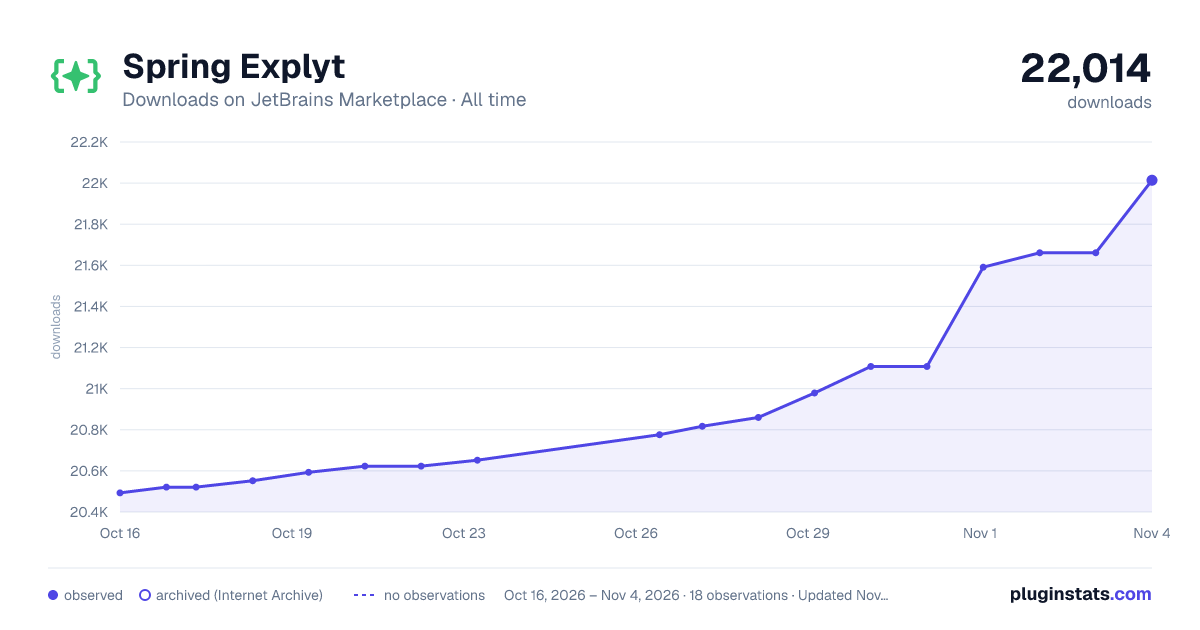
Adoption over time
7/30/90-day growth
Ranking history
Ratings over time
Listing placement
Listing placement
Listing placement
Listing placement
Filled points are observed values; hollow points come from Internet Archive snapshots of the listing page. Dashed segments span periods with no observations — values between points are not interpolated.
Each band is one page of 20. Downloads on a linear scale. Placement is projected from downloads, so it can differ from the marketplace's own sort order. Hover a dot to see the listing.
Recent observations
Full history (5)Similar JetBrains Marketplace AI plugins
All 20 Spring Explyt alternatives



Data source
Cumulative download counts come from the public JetBrains Marketplace API. JetBrains reports downloads, not active installs. Ratings are the mean of public votes.
Listing: https://plugins.jetbrains.com/plugin/28675-spring-explyt. First seen Oct 16, 2026; last successful collection Oct 20, 2026. See the methodology.