 PluginStats
Red Hat Dependency Analytics downloads statistics
By Red Hat (18 listings) · JetBrains Marketplace · Code Tools
Overview Red Hat Dependency Analytics (RHDA) plugin gives you awareness to security concerns within your software supply chain while you build your application. NOTE...
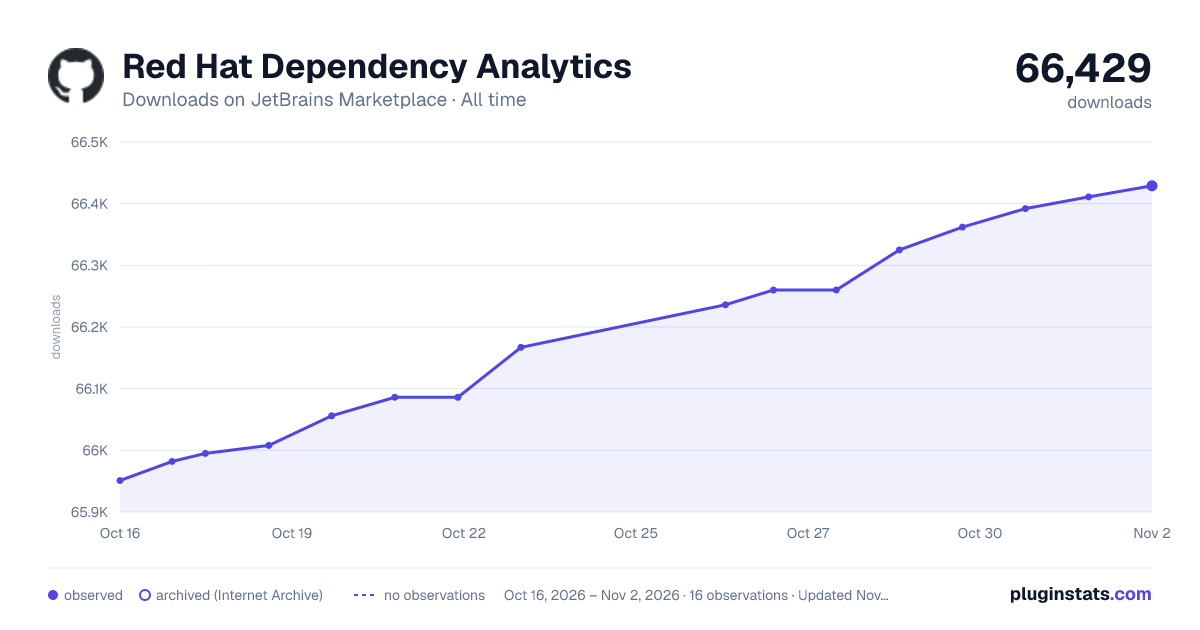
Red Hat Dependency Analytics has 66,086 recorded downloads on JetBrains Marketplace, ranking #1136 of 2,502 tracked listings.
Rating: 3.00 / 5 from 2 ratings
About Red Hat Dependency Analytics
Overview
Red Hat Dependency Analytics (RHDA) plugin gives you awareness to security concerns within your software supply chain while you build your application.
NOTE:
The Red Hat Dependency Analytics plugin is an online service hosted and maintained by Red Hat.
Dependency Analytics only accesses your manifest files to analyze your application dependencies before displaying the vulnerability report.
IMPORTANT:
Dependency Analytics supports multiple package managers:
• Maven (mvn) • NPM (npm) • PNPM (pnpm) • Yarn Berry and Classic (yarn) • Gradle Kotlin and Groovy (gradle) • Golang (go mod) • Python (pip) ecosystems • Rust (cargo) - TOML plugin required • Base images in Dockerfile
In future releases, Red Hat plans to support other package managers.
Quick Start
Prerequisites:
• You must have the package manager binary for your ecosystem available in your IDE's PATH environment. See the Configuration section below for the full list of supported package managers, their manifest files, and binary path settings.
Procedure
• Install IntelliJ IDEA on your workstation.
• After the installation finishes, open the IntelliJ IDEA application. • From the menu, click Settings, and click Plugins. • Search the Marketplace for Red Hat Dependency Analytics. • Click the INSTALL button to install the plugin. • To start scanning your application for security vulnerabilities, and view the vulnerability report, you can do one of the following:
• Open a manifest file, hover over a dependency marked by the inline Component Analysis, indicated by the wavy-red line under a dependency, and click Detailed Vulnerability Report.
• Right click on a manifest file in the Project window, and click Dependency Analytics Report.
• For JS/TS monorepos or Cargo workspaces, right click in the Project window and click Batch Workspace Analysis Report to analyze all packages at once.
Configuration
The Red Hat Dependency Analytics plugin has some configurable parameters that allows you to customize its behavior according to your preferences.
Procedure
• Open the IntelliJ IDEA application. • Click Settings from the menu, and click Tools. • Click the Red Hat Dependency Analytics.
Configurable parameters
• Maven (pom.xml):
Set the full path of the Maven executable, which allows Exhort to locate and execute the mvn command to resolve dependencies forMaven projects.
Path of the JAVA_HOME directory is required by the mvn executable.
If the paths are not provided, your IDE's PATH and JAVA_HONE environments will be used to locate the executables.
• Maven Wrapper:
preferWrapper : Configure whether to use Maven wrapper. There are three options available
true: Always use the wrapper regardless of Build,Execution,Deployment › Build Tools > Maven: Maven home path setting
false: Never use the wrapper regardless of Build,Execution,Deployment › Build Tools > Maven: Maven home path setting
fallback: Use IntelliJ's Build,Execution,Deployment › Build Tools > Maven: Maven home path setting (default behavior)
• Node (package.json):
Set the full path of the Node executable, which allows Exhort to locate and execute one of the corresponding npm, pnpm or yarn command to resolve dependencies for Node projects.
Path of the directory containing the node executable is required by one of the corresponding package manager npm, pnpm or yarn executable.
If the paths are not provided, your IDE's PATH environment will be used to locate the executables.
It also requires a corresponding lock file to be present in order to analyze package.json files.
• Golang (go.mod):
Set the full path of the Go executable, which allows Exhort to locate and execute the go command to resolve dependencies for Go projects.
If the path is not provided, your IDE's PATH environment will be used to locate the executable.
When option Strictly match package version is selected, the resolved dependency versions will be compared to the versions specified in the manifest file, and users will be alerted if any mismatch is detected.
• Rust (Cargo.toml):
Set the full path of the Cargo executable, which allows Exhort to locate and run the cargo command to resolve dependencies for Rust projects.
If the path is not provided, your IDE's PATH environment will be used to locate the executable.
• Python (requirements.txt):
Set the full paths of the Python and the package installer for Python executables, which allows Exhort to locate and execute the pip3 commands to resolve dependencies for Python projects.
Python 2 executables python and pip can be used instead, if the Use python 2.x option is selected.
If the paths are not provided, your IDE's PATH environment will be used to locate the executables.
When option Strictly match package version is selected, the resolved dependency versions will be compared to the versions specified in the manifest file, and users will be alerted if any mismatch is detected.
Python virtual environment can be applied, when selecting the Use python virtual environment option.
If selecting option Allow alternate package version while using virtual environment, the dependency versions specified in the manifest file will be ignored, and dependency versions will be resolved dynamically instead. This feature cannot be enabled when Strictly match package version is selected.
• Gradle (build.gradle, build.gradle.kts):
Set the full path of the Gradle executable, which allows Exhort to locate and run the gradle command to resolve dependencies for Gradle projects.
By not setting a path to the gradle binary, IntelliJ IDEA uses its default path environment to locate the file.
• Image (Dockerfile):
Set the full path of the Syft executable, which allows Exhort to locate and execute the syft command to generate Software Bill of Materials for the base images.…
Description from the JetBrains Marketplace listing.
- Code Tools
README badge
Show your rank in a README or on your website. The badge updates automatically.
Charts
Images: 30d · 1y · all time · 1600×900 dark
Adoption over time
7/30/90-day growth
Ranking history
Ratings over time
Listing placement
Listing placement
Filled points are observed values; hollow points come from Internet Archive snapshots of the listing page. Dashed segments span periods with no observations — values between points are not interpolated.
Each band is one page of 20. Downloads on a linear scale. Placement is projected from downloads, so it can differ from the marketplace's own sort order. Hover a dot to see the listing.
Recent observations
Full history (6)Similar JetBrains Marketplace Code Tools plugins
All 20 Red Hat Dependency Analytics alternatives



Red Hat Dependency Analytics on other marketplaces
Data source
Cumulative download counts come from the public JetBrains Marketplace API. JetBrains reports downloads, not active installs. Ratings are the mean of public votes.
Listing: https://plugins.jetbrains.com/plugin/12541-red-hat-dependency-analytics. First seen Oct 16, 2026; last successful collection Oct 21, 2026. See the methodology.