 PluginStats
Mermaid Visualizer downloads statistics
By AlexTDev · JetBrains Marketplace · Tools Integration
Mermaid diagrams in your IDE — live preview, code intelligence, and export, all offline. Rendering & Preview Live rendering of ```mermaid code blocks in the...
Mermaid Visualizer has 41,020 recorded downloads on JetBrains Marketplace, ranking #1448 of 2,502 tracked listings.
Rating: 4.90 / 5 from 10 ratings
About Mermaid Visualizer
Mermaid diagrams in your IDE — live preview, code intelligence, and export, all offline.
Rendering & Preview
• Live rendering of ```mermaid code blocks in the Markdown preview • Dedicated split editor with live preview for .mmd and .mermaid files • Zoom (Ctrl+wheel), pan, fit-to-window and 1:1 controls • Open in new tab — pop any diagram into its own full-size preview tab • Export diagrams as SVG or PNG — copy to clipboard or save to file • Automatic dark/light theme matching with your IDE • All 34+ Mermaid diagram types (including the new use case and agentflow diagrams) — fully offline with bundled Mermaid.js (v12.2.0) • ELK and dagre layouts — ELK is bundled and Mermaid 12's default; layout: dagre / layout: elk (with elk.* options) work per diagram in the YAML frontmatter, as does the flowchart-elk header keyword, or globally from the settings
Code Intelligence
• Syntax highlighting — keywords, diagram types, arrows, strings, comments, punctuation • Code completion — diagram types, context-sensitive keywords, node/participant names, arrows, directives • Go to Definition (Ctrl+B) — navigate to node/participant declarations • Find Usages (Alt+F7) — find all references to a node across the diagram • Rename (Shift+F6) — rename nodes/participants with all references updated • Structure View (Alt+7) — hierarchical view of diagrams, blocks, and nodes • Code Folding — fold subgraphs, loop/alt/opt/par blocks, and consecutive comments • Inspections & quick-fixes — unknown diagram types (with typo suggestions), invalid arrows, unused nodes • Render error annotations — Mermaid.js parsing errors surfaced directly in the editor
Settings
Configurable via Settings > Tools > Mermaid — theme (incl. the Mermaid 12 redux/neo themes), look (classic/hand-drawn/neo), layout engine (ELK/dagre), font family, max text size, live reload delay, max preview height.
Custom rendering colors — optionally override the visualizer background color and the line/edge color (disabled by default, so the rendering keeps following your IDE theme unless you opt in).
Customizable syntax colors via Settings > Editor > Color Scheme > Mermaid.
Usage
Write a ```mermaid fenced code block in any Markdown file and open the preview, or open any .mmd/.mermaid file.
Open source (Apache 2.0) — source code, issues & feedback on GitHub.
Description from the JetBrains Marketplace listing.
- Tools Integration
- Viewer
README badge
Show your rank in a README or on your website. The badge updates automatically.
Charts
Images: 30d · 1y · all time · 1600×900 dark
Adoption over time
7/30/90-day growth
Ranking history
Ratings over time
Listing placement
Listing placement
Listing placement
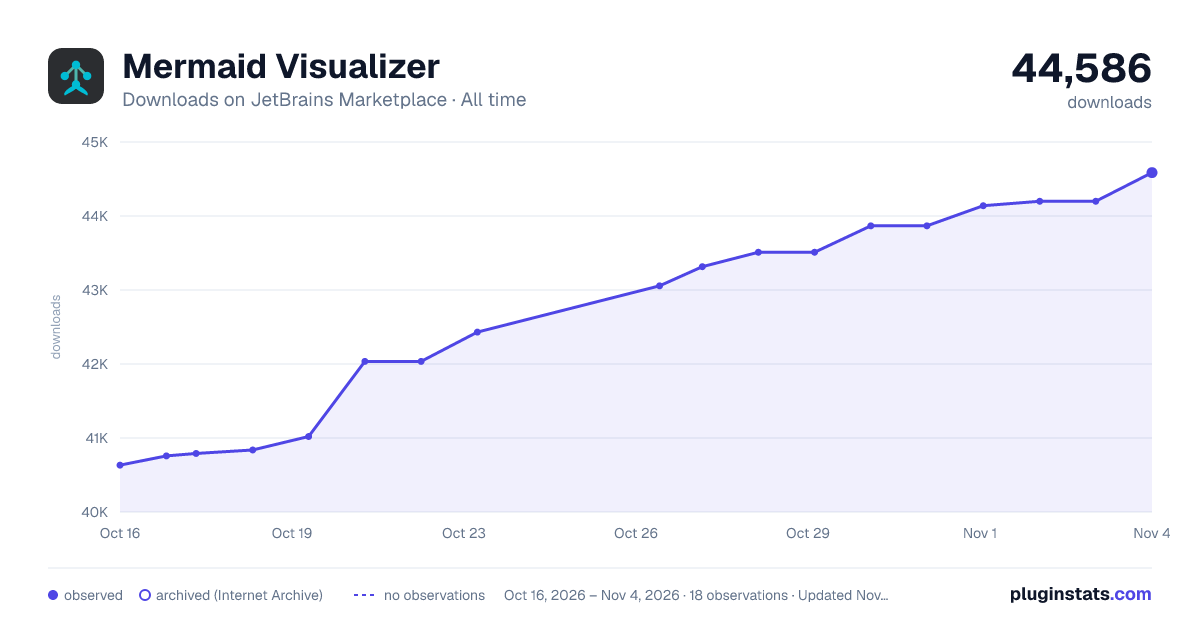
Filled points are observed values; hollow points come from Internet Archive snapshots of the listing page. Dashed segments span periods with no observations — values between points are not interpolated.
Each band is one page of 20. Downloads on a linear scale. Placement is projected from downloads, so it can differ from the marketplace's own sort order. Hover a dot to see the listing.
Recent observations
Full history (5)Similar JetBrains Marketplace Tools Integration plugins
All 20 Mermaid Visualizer alternatives



Data source
Cumulative download counts come from the public JetBrains Marketplace API. JetBrains reports downloads, not active installs. Ratings are the mean of public votes.
Listing: https://plugins.jetbrains.com/plugin/30432-mermaid-visualizer. First seen Oct 16, 2026; last successful collection Oct 20, 2026. See the methodology.