 PluginStats
Antigravity CLI Companion downloads statistics
By Yevhen Matasar · JetBrains Marketplace · AI
Runs the Antigravity CLI (agy) in a JetBrains IDE terminal (PhpStorm, IntelliJ IDEA, WebStorm, PyCharm, GoLand, etc.) and feeds it live editor context over MCP...
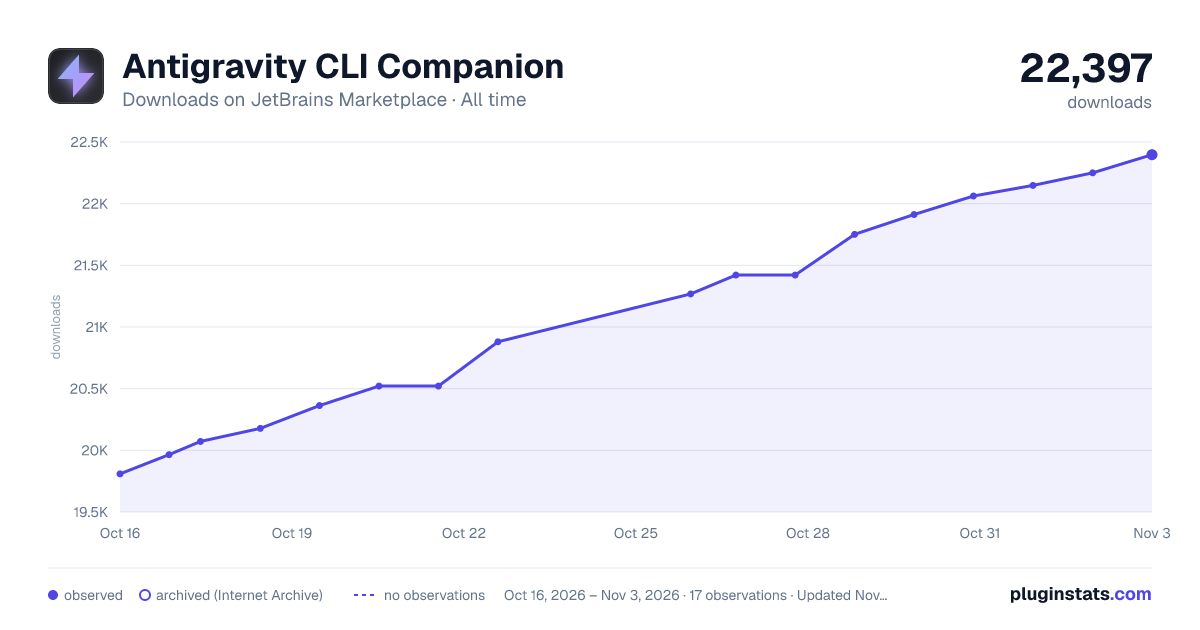
Antigravity CLI Companion has 20,521 recorded downloads on JetBrains Marketplace, ranking #2121 of 2,502 tracked listings.
Rating: 5.00 / 5 from 1 ratings
About Antigravity CLI Companion
Runs the Antigravity CLI (agy) in a JetBrains IDE terminal (PhpStorm, IntelliJ IDEA, WebStorm, PyCharm, GoLand, etc.) and feeds it live editor context over MCP — active file, selection, open tabs, and inspection diagnostics, on demand.
Independent third-party plugin — not Google's official Antigravity extension. Google's own agent installs from JetBrains AI → Settings → Agents and requires IDE 2026.2.1+ — see Google's official setup guide. If you want that first-party agent panel, use it. This plugin has a different purpose: it runs the Antigravity CLI (agy) in an IDE terminal and feeds it editor context over MCP, on IDE 2023.2 and up, with no JetBrains AI dependency.
The plugin runs a small local MCP (Model Context Protocol) server inside the IDE and registers itself in ~/.gemini/config/mcp_config.json. Whenever agy needs editor context it calls the plugin over MCP — no env vars, no lockfiles, no platform-specific bridges.
Click the Open Antigravity CLI toolbar button (top-right) to launch agy in an IDE-embedded terminal pre-wired to the running project. By default the button focuses the existing Antigravity terminal tab if one is open; enable Always open a new tab in settings to spawn a fresh session on every click.
Exposed MCP tools
• ide_get_active_editor — current file path, language, cursor, selection, content. • ide_get_open_files — every file currently open in an editor tab. • ide_get_diagnostics — inspections/errors/warnings for a file. • ide_open_file — open a file at an optional line/column.
Artifacts tool window
A right-anchored tool window lists recent brain entries agy generates — plans, summaries, walkthroughs from your conversations. Sorted by most-recently modified so the active session's output is always at the top; the conversation ID prefix on each row helps distinguish entries that share a filename. Auto-refreshes every few seconds while the tab is open; double-click any entry to open it in the editor.
Configure the path to your agy binary under Settings → Tools → Antigravity CLI Companion. No keyboard shortcut is bound by default — assign one via Settings → Keymap (search Open Antigravity CLI) or from the link in the plugin's settings panel.
Description from the JetBrains Marketplace listing.
- AI
- Code Tools
README badge
Show your rank in a README or on your website. The badge updates automatically.
Charts
Images: 30d · 1y · all time · 1600×900 dark
Adoption over time
7/30/90-day growth
Ranking history
Ratings over time
Listing placement
Listing placement
Listing placement
Filled points are observed values; hollow points come from Internet Archive snapshots of the listing page. Dashed segments span periods with no observations — values between points are not interpolated.
Each band is one page of 20. Downloads on a linear scale. Placement is projected from downloads, so it can differ from the marketplace's own sort order. Hover a dot to see the listing.
Recent observations
Full history (6)Similar JetBrains Marketplace AI plugins
All 20 Antigravity CLI Companion alternatives



Data source
Cumulative download counts come from the public JetBrains Marketplace API. JetBrains reports downloads, not active installs. Ratings are the mean of public votes.
Listing: https://plugins.jetbrains.com/plugin/31899-antigravity-cli-companion. First seen Oct 16, 2026; last successful collection Oct 21, 2026. See the methodology.