 PluginStats
AWS CodeArtifact + Maven downloads statistics
By LuisM Pena · JetBrains Marketplace · Build
Support to update AWS CodeArtifact Auth Token on maven projects. This plugin facilitates accessing and deploying artifacts in CodeArtifact on Maven Intellij Idea...
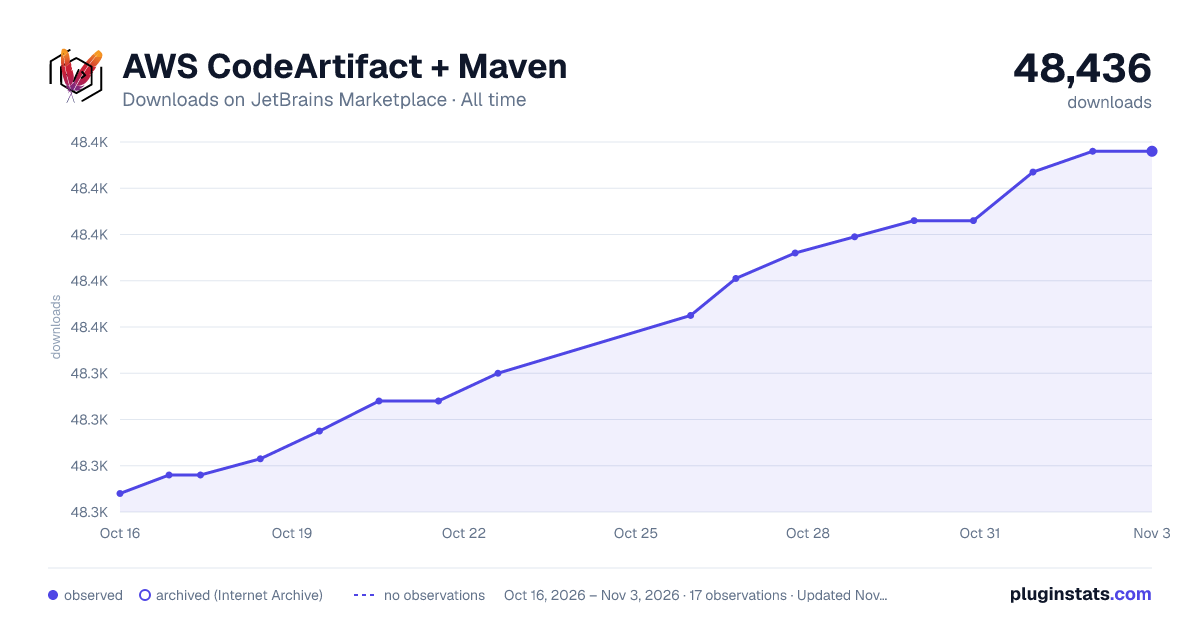
AWS CodeArtifact + Maven has 48,315 recorded downloads on JetBrains Marketplace, ranking #1329 of 2,502 tracked listings.
Rating: 5.00 / 5 from 5 ratings
About AWS CodeArtifact + Maven
Support to update AWS CodeArtifact Auth Token on maven projects.
This plugin facilitates accessing and deploying artifacts in CodeArtifact on Maven Intellij Idea projects.
AWS provides very specific instructions to set up Maven to support AWS CodeArtifact. Basically, your file ~/.m2/settings.xml must include a server specification such as:
<settings> <servers> <server> <id>coderazzi-project-yz</id> <username>aws</username> <password>${env.CODEARTIFACT_AUTH_TOKEN}</password> </server> </servers> </settings>The token CODEARTIFACT_AUTH_TOKEN needs to be refreshed every 12 hours (by default) by doing:
export CODEARTIFACT_AUTH_TOKEN=aws codeartifact get-authorization-token --domain DOMAIN --domain-owner DOMAIN_OWNER --query authorizationToken --output text
After issuing the previous command, the environment that executes the command has authorized access to CodeCommit
The main problem here is that when using an IDE like IDEA, you would need to update the CODEARTIFACT_AUTH_TOKEN environment variable and then launch the IDE. And as the token needs to be refreshed, it is needed to quit the IDE and repeat the process every 12 hours. Plus, it is needed to update the environment variable in the same environment where the IDE is launched, quite inconvenient if launching the IDE from anywhere except the command line.
Idea allows to set up environment variables for MVN execution (under Settings/Build/Execution/Deployment/Build Tools/Maven/Runner), but this would imply to manually obtaining the token and updating the setting periodically.
A better option for this specific scenario is to automatically update the password in ~/.m2/settings.xml, to reflect the real token. That is, the settings file will look like:
<settings> <servers> <server> <id>coderazzi-project-yz</id> <username>aws</username> <password>REAL_CREDENTIALS_OBTAINED_FROM_AWS</password> </server> </servers> </settings>CodeArtifact-Maven Idea plugin does exactly this simple task. Note that there is an AWS-supported AWS plugin, but it does not cover getting auth tokens for CodeArtifact
Installation
Plugin available in Intellij Idea public plugin repository, as CodeArtifact+Maven
Usage
After installation, a menu entry appear under Tools: Generate AWS CodeArtifact Auth Token for Maven
When selected, a window appears to enter the required details:
• Domain: the domain in AWS • Domain Owner: the account owner, something like 023174738914 • Maven server id: the server name provided in your maven settings file -as following the instructions from AWS-. This is a value obtained already from the maven settings file, using all servers whose username is aws
• AWS profile: the profile to use to obtain the auth tokens, read from any of the files <USER-HOME>/.aws/config, <USER-HOME>/.aws/credentials, <AWS_CONFIG_FILE>, <AWS_SHARED_CREDENTIALS_FILE>
• Region: the target region. If specified, it overrides the region given by the profile -if any- • Maven settings file: the location of the maven settings file, usually under USER-HOME/.m2 • AWS cli path: where to find the aws executable
The first five settings above can be defined multiple times, using different configurations. A configuration is defined using the fields:
• Configuration: any unique non, empty name provided by the user. • Enabled: Whether to use this configuration when generating multiple tokens at once.
The button Generate Auth Token will initiate the requests of a token to AWS and its inclusion in the maven settings file. If there are multiple configurations defined, the user can update the state of the checkbox Generate Tokens for all configurations; if selected, a token will be generated for each enabled configuration.
MFA support
From version 3.0.0, the plugin includes support for MFA, prompting the user to enter the MFA token if required.
Currently, only MFA based on roles is supported, where the chosen profile identifies a IAM role, not a IAM user.
For more information on the distinction between role-based-MFA and user-based-MFA, check https://coderazzi.net/cloud/aws/mfa
Description from the JetBrains Marketplace listing.
- Build
- Cloud
- Maven
README badge
Show your rank in a README or on your website. The badge updates automatically.
Charts
Images: 30d · 1y · all time · 1600×900 dark
Adoption over time
7/30/90-day growth
Ranking history
Ratings over time
Listing placement
Listing placement
Listing placement
Listing placement
Filled points are observed values; hollow points come from Internet Archive snapshots of the listing page. Dashed segments span periods with no observations — values between points are not interpolated.
Each band is one page of 20. Downloads on a linear scale. Placement is projected from downloads, so it can differ from the marketplace's own sort order. Hover a dot to see the listing.
Recent observations
Full history (5)Similar JetBrains Marketplace Build plugins
All 20 AWS CodeArtifact + Maven alternatives



Data source
Cumulative download counts come from the public JetBrains Marketplace API. JetBrains reports downloads, not active installs. Ratings are the mean of public votes.
Listing: https://plugins.jetbrains.com/plugin/16777-aws-codeartifact--maven. First seen Oct 16, 2026; last successful collection Oct 20, 2026. See the methodology.