 PluginStats
Better Highlights downloads statistics
By Igor Zarvanskyi · JetBrains Marketplace · Code Editing
Features: Colorize comments. Reference source code in comments. Show cognitive complexity for methods. Use gutter icons for highlights. Highlight regions (whole line...
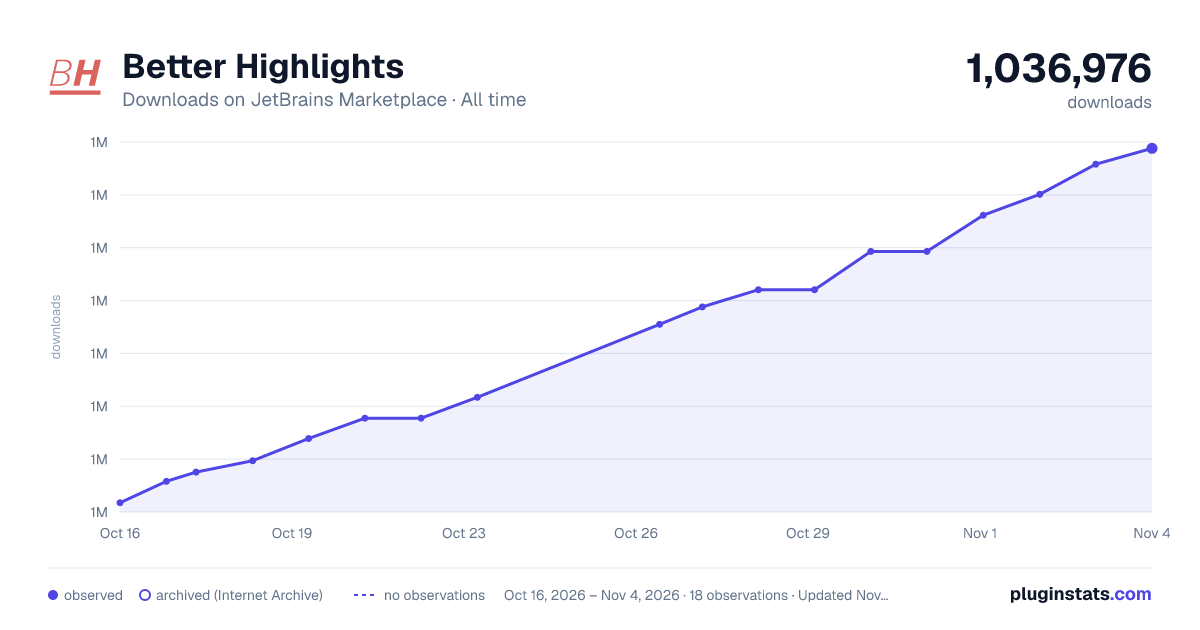
Better Highlights has 1,035,878 recorded downloads on JetBrains Marketplace, ranking #277 of 2,502 tracked listings.
Rating: 4.83 / 5 from 47 ratings
About Better Highlights
Features:
• Colorize comments. • Reference source code in comments. • Show cognitive complexity for methods. • Use gutter icons for highlights. • Highlight regions (whole line highlight). • Reference files in comments. • Reference other comments inside comments. • [PAID] Highlight keywords, methods and functions (syntax highlight). • [PAID] Highlight anything by RegExp. • [PAID] Define highlight severity for comment/tokens/regexp. • [PAID] Display settings for cognitive complexity. • [PAID] Define custom start/end tokens for wikilink format. • [PAID] Reference source code in comments outside wikilink. • [PAID] Genese Cpx cognitive complexity algorithm. • [PAID] Add custom gutter icons. • [PAID] Wikilink support in Markdown and plain text files.
Elevate your coding experience with "Better Highlights", one of the best plugins designed for JetBrains products. Unleash the power of keyword, methods and comment highlighting, seamless code referencing in comments, and real-time cognitive complexity metrics. Compatible with all JetBrains IDEs, including IntelliJ IDEA, Android Studio, PyCharm, PhpStorm, Webstorm and more, this top plugin guarantees coding excellence, no matter the JetBrains tool you use.
Comment/Region/Keyword/Method/Functions/RegExp plugin functionality description:
• "Highlighting" means ability of changing color of programming language keywords, comments etc. • Highlighting is based on first word in commented line. By default, are used tokens *, !, ?. • User can add own custom tokens for colorizing comment lines. • Comment highlighting supports default color settings change - color, background color, bold, italic, effects.
• Region highlighting is used to colorize whole commented line with some background color to visually separate blocks of code.
• Keyword highlighting is used to colorize programming language keywords in other words custom syntax highlight. Method keywords is used to colorize keywords, which are part of method signature (most often used to change color of access modifiers private/public/protected on methods, but not classes).
• Method/Functions highlighting is used to colorize methods and functions implementation and usage/reference. Methods/Functions are defined with RegExp (most often used to change color of getter and setters).
• RegExp highlighting is used to colorize anything by RegExp. Usually is used to colorize language constructions, which are not keywords or to colorize some phrases, not just single keyword.
• RegExp highlighting can be limited to certain files with file name regexps. • Simple word is also a valid RegExp, so could be used to colorize regular language constructions, which are not keywords.
• User can select different highlight severity to override Error and Warning highlights and display highlights in list of errors/warnings.
• User can select gutter icon for comment/region/keyword/method/function/regexp highlighting.
Wikilink plugin functionality description:
• Wikilink is a format of linking articles used in Wikipedia, where links are wrapped with double square brackets. For example, [[this is wikilink]].
• Highlights wikilinks in comments. • Wikilink highlighting supports default color settings change - color, background color, bold, italic, effects.
• Support wikilink references to files (absolute or relative path) (link to file in comment). • Support wikilink references to tagged comments (link comments). • Support wikilink references to classes and class methods/fields (link source code). This is one of the best feature of plugin.
• Support wikilink references for non-OOP languages via file name with [[filename.ext#funcitonName]] • Wikilink references supports "Go to definition", "Find usages" and "Rename refactoring" intellij out of the box functionality.
• Intellij Inspection to find and highlight unresolved references in wikilink(not existing links) for file and project levels.
• Support tagged comments autocompletion in wikilink. • Support class names and methods autocompletion in wikilink. • Define user start/end tokens instead of using wikilink format. • Support source code references in comments outside wikilink (any word would be resolved as source code reference).
• Support wikilinks in Markdown and plain text files with references to Markdown file without extension. This can be used for Personal Knowledge Management (Second Brain) to create links between notes.
Cognitive complexity plugin functionality description:
• Calculates SonarQube Cognitive Complexity metric for methods, which was proposed by G. Ann Campbell in Cognitive Complexity - A new way of measuring understandability.
• Calculates Genese Cpx Cognitive Complexity metric for methods, which was described by Gilles Fabre in a github repo. • Metric is shown as inlay hint with realtime live calculation. This is one of the most recommended feature of plugin.
• User can adjust position of inlay hint, define custom description text, custom description background and display complexity icon in gutter.
• "high cognitive complexity" inspection is available to find in project all methods with high complexity.
Plugin functionality support by language:
Language Comment, Region, RegExp highlighting* Method/Function highlighting Keyword highlighting Highlight complexity Source code reference (wikilink)
JavaScript/Typescript + + + + +
Python + + + + +
Java + + + + +
C# (Rider) + + +
C/C++ (Rider/Clion Nova) +
C/C++/Objective-C + + + + +
PHP + + + + +
Go + + + + +
Kotlin + + + + +
Dart + + + + +
Rust + + + + +
Ruby + + + + +
Lua (EmmyLua) + + + + +
SQL + + +
Shell scripting +
Markdown +
HTML / XML +
Plain text files +
- Highlighting should work with any language, not only mentioned in table (for example, lua, groovy, scala, haskell, erlang, elixir etc.)
If you need support for another language or some additional functionality - feel free to create a ticket in bugtracker.…
Description from the JetBrains Marketplace listing.
- Code Editing
- Code Quality
- Editor
- Editor Color Schemes
- Formatting
- Inspection
README badge
Show your rank in a README or on your website. The badge updates automatically.
Charts
Images: 30d · 1y · all time · 1600×900 dark
Adoption over time
7/30/90-day growth
Ranking history
Ratings over time
Listing placement
Listing placement
Listing placement
Listing placement
Filled points are observed values; hollow points come from Internet Archive snapshots of the listing page. Dashed segments span periods with no observations — values between points are not interpolated.
Each band is one page of 20. Downloads on a linear scale. Placement is projected from downloads, so it can differ from the marketplace's own sort order. Hover a dot to see the listing.
Recent observations
Full history (5)Similar JetBrains Marketplace Code Editing plugins
All 20 Better Highlights alternatives



Data source
Cumulative download counts come from the public JetBrains Marketplace API. JetBrains reports downloads, not active installs. Ratings are the mean of public votes.
Listing: https://plugins.jetbrains.com/plugin/12895-better-highlights. First seen Oct 16, 2026; last successful collection Oct 20, 2026. See the methodology.