 PluginStats
Spectral downloads statistics
By Schwarz IT · JetBrains Marketplace · Code Tools
This plugin is a wrapper for the tool Spectral, a linter for OpenApi schemas. Installation Using IDE built-in plugin system:Settings/Preferences > Plugins >...
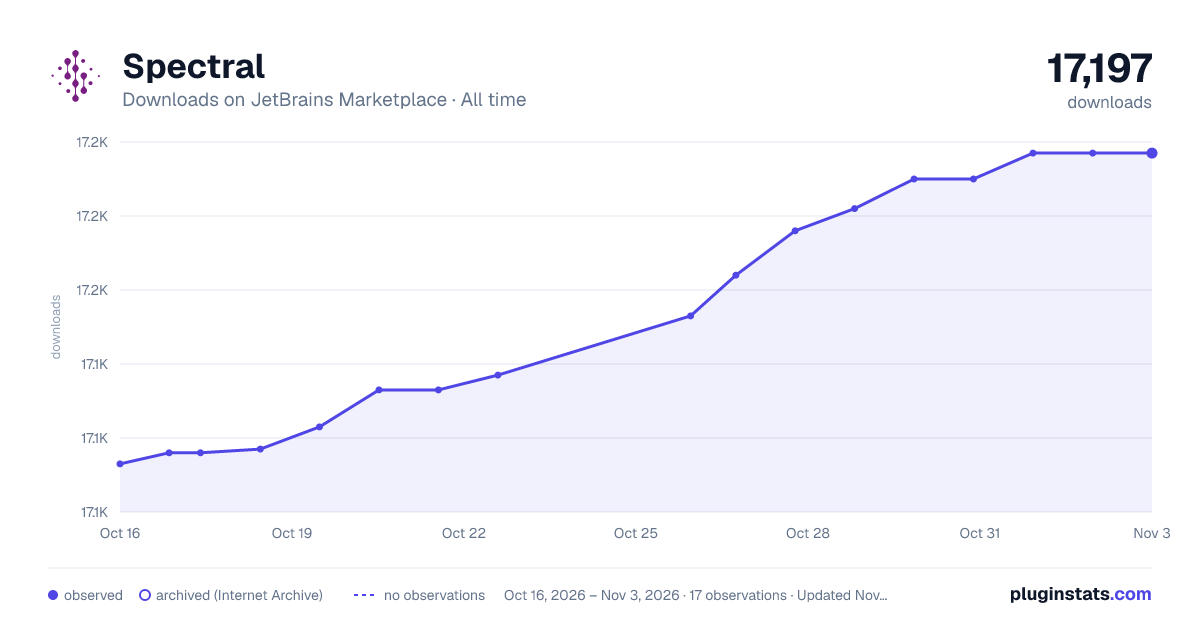
Spectral has 17,133 recorded downloads on JetBrains Marketplace, ranking #2299 of 2,502 tracked listings.
Rating: 2.83 / 5 from 6 ratings
About Spectral
This plugin is a wrapper for the tool Spectral, a linter for OpenApi schemas.
Installation
• Using IDE built-in plugin system:
Settings/Preferences > Plugins > Marketplace > Search for "Spectral" > Install Plugin
• Manually:
Download the latest release and install it manually using Settings/Preferences > Plugins > ⚙️ > Install plugin from disk...
Since version 2 of this plugin it is required to have the spectral CLI installed on your system. If you don't have it installed yet make sure to follow this guide: Installing Spectral
Note: The CLI needs to be in your path and executable from the command line.
Features
Automatic linting
Automatic linting of your OpenApi specifications and highlighting in your editor
Configurable Ruleset
Specify your own ruleset in the plugins settings, under Preferences -> Tools -> Spectral -> Ruleset.
There you can specify a file on your local machine or just paste the URL of a ruleset available on the internet e.g.: Schwarz IT API linting rules.
Examples:
• Link to a hosted ruleset: https://raw.githubusercontent.com/SchwarzIT/api-linter-rules/main/spectral-api.yml • Local ruleset relative to Project base-path: .spectral.json • Fully-qualified path: /Users/user/.spectral.yaml
Configurable Included path patterns
Select the files that will be linted. By default, every file called "openapi.json", "openapi.yml" or "openapi.yaml" within the Project root will be matched for linting by the plugin when it's opened.
You can adjust this in the settings under Preferences -> Tools -> Spectral -> Included path patterns. All paths are relative to the project's root directory unless absolute.
Examples:
• openapi.json: Matches the file called "openapi.json" inside the root directory of the project • components//*.yaml: Matches all files inside the project subdirectory "components" that end with ".yaml" • /Users/user/code//openapi*.yaml: Matches all YAML files within the absolute path "/Users/mick/code" that start with "openapi" and end with ".yaml"
Note: Each file must also be recognised by the IDE as a JSON or YAML file - that is with a suitable File Type association. If it is detected as a plain text (or any other type) it will be ignored.
Description from the JetBrains Marketplace listing.
- Code Tools
- Inspection
- Static Analysis
- Testing
- Tools Integration
README badge
Show your rank in a README or on your website. The badge updates automatically.
Charts
Images: 30d · 1y · all time · 1600×900 dark
Adoption over time
7/30/90-day growth
Ranking history
Ratings over time
Listing placement
Listing placement
Listing placement
Listing placement
Filled points are observed values; hollow points come from Internet Archive snapshots of the listing page. Dashed segments span periods with no observations — values between points are not interpolated.
Each band is one page of 20. Downloads on a linear scale. Placement is projected from downloads, so it can differ from the marketplace's own sort order. Hover a dot to see the listing.
Recent observations
Full history (6)Similar JetBrains Marketplace Code Tools plugins
All 20 Spectral alternatives



Data source
Cumulative download counts come from the public JetBrains Marketplace API. JetBrains reports downloads, not active installs. Ratings are the mean of public votes.
Listing: https://plugins.jetbrains.com/plugin/18520-spectral. First seen Oct 16, 2026; last successful collection Oct 21, 2026. See the methodology.