 PluginStats
Developer Tools downloads statistics
By Marcel Kliemannel (2 listings) · JetBrains Marketplace · Code Tools
Developer Tools brings a practical toolbox of everyday development utilities directly into IntelliJ-based IDEs. It keeps common tasks such as encoding data...
Developer Tools has 474,282 recorded downloads on JetBrains Marketplace, ranking #437 of 2,502 tracked listings.
Rating: 4.95 / 5 from 43 ratings
About Developer Tools
Developer Tools brings a practical toolbox of everyday development utilities directly into IntelliJ-based IDEs. It keeps common tasks such as encoding data, transforming text, validating JSON, generating identifiers, inspecting archives, formatting code and SQL, and checking certificates inside the IDE, so you do not need to switch to separate web tools or command-line snippets. Plugin icon by Gabriele Malaspina.
Key Features
• JWT Encoder/Decoder • Base32, Base64, URL Base64, MIME Base64, URL, and ASCII Encoder/Decoder • Text escaping and unescaping for HTML entities, Java strings, JSON, CSV, XML, and escape sequences • Regular Expression Matcher • UUID, ULID, Nano ID, password, QR code/barcode, Lorem Ipsum, and ASCII art generators • Text Sorting • Text Case Transformation • Text Diff Viewer • Config Format Conversion • Text Statistic • Text Filter • JSON Path Parser • JSON Schema Validator • Hashing and HMAC • HTTP Server (WireMock) • Archive viewer and extractor for ZIP, TAR, JAR, 7z, and other formats • Date and time tools for Unix timestamps, formatting, and parsing • Unit converters for time, data size, and transfer rate • Code Style Formatting • SQL Formatting • CLI Command Conversion • Color Picker • Fetching, analyzing, and exporting server certificates • Notes
Integration
The full toolbox is available in both a persistent tool window and a standalone dialog. Tools can have multiple named workbenches, so you can keep separate inputs and configurations for different tasks. Frequently used text operations are also available from the editor popup menu and as intentions; depending on the action, they work on selected text or on the Java/Kotlin string or identifier at the caret.
Plugin settings are available in IntelliJ IDEA's settings/preferences under Tools | Developer Tools.
Tool Window
The tool window is available under View | Tool Windows | Developer Tools. Inputs, selected tools, expanded menu groups, and tool configuration are stored per project.
Dialog
The dialog is available from IntelliJ IDEA's main menu under Tools | Developer Tools.
To add the "Open Dialog" action to the main toolbar, enable it in IntelliJ IDEA's settings/preferences under Tools | Developer Tools, or add it manually via Customize Toolbar... | Add Actions... | Developer Tools.
Dialog inputs, selected tools, expanded menu groups, and tool configuration are stored at the application level.
Translations
English
简体中文
Deutsch
Description from the JetBrains Marketplace listing.
- Code Tools
- Productivity
README badge
Show your rank in a README or on your website. The badge updates automatically.
Charts
Images: 30d · 1y · all time · 1600×900 dark
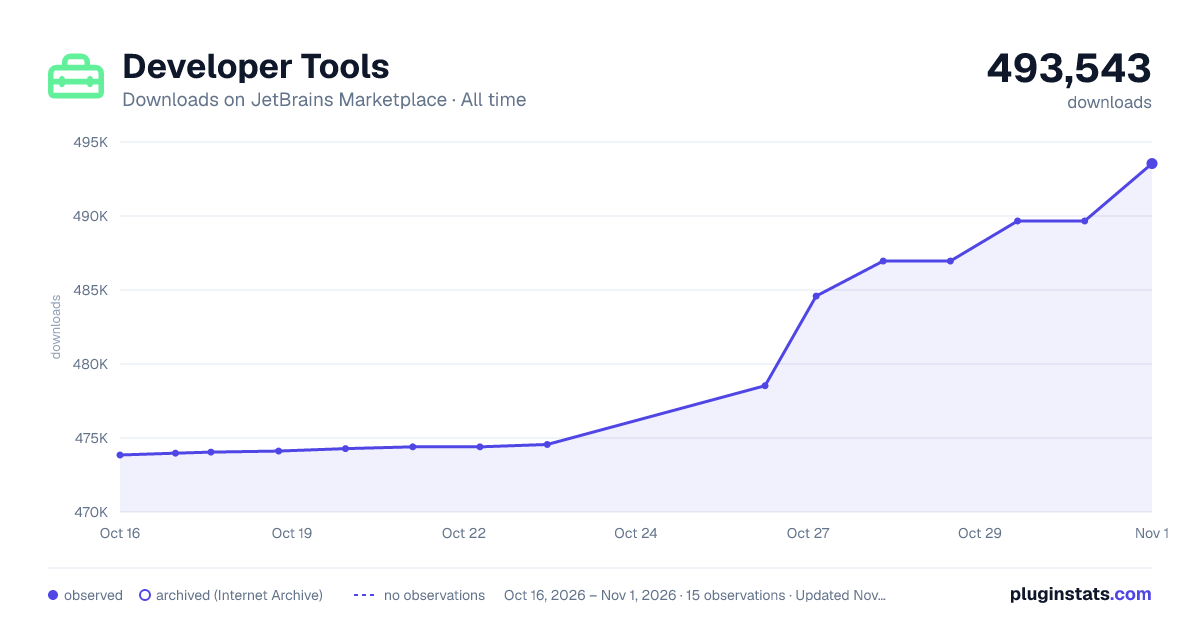
Adoption over time
7/30/90-day growth
Ranking history
Ratings over time
Listing placement
Listing placement
Listing placement
Filled points are observed values; hollow points come from Internet Archive snapshots of the listing page. Dashed segments span periods with no observations — values between points are not interpolated.
Each band is one page of 20. Downloads on a linear scale. Placement is projected from downloads, so it can differ from the marketplace's own sort order. Hover a dot to see the listing.
Recent observations
Full history (5)Similar JetBrains Marketplace Code Tools plugins
All 20 Developer Tools alternatives



Data source
Cumulative download counts come from the public JetBrains Marketplace API. JetBrains reports downloads, not active installs. Ratings are the mean of public votes.
Listing: https://plugins.jetbrains.com/plugin/21904-developer-tools. First seen Oct 16, 2026; last successful collection Oct 20, 2026. See the methodology.