 PluginStats
ERD Editor downloads statistics
By dineug (2 listings) · JetBrains Marketplace · Database
Design a database schema visually, without leaving your IDE. Diagrams are plain .erd.json files in your project, and the editor never connects to a database. Getting...
ERD Editor has 29,752 recorded downloads on JetBrains Marketplace, ranking #1741 of 2,502 tracked listings.
Rating: 4.00 / 5 from 3 ratings
About ERD Editor
Design a database schema visually, without leaving your IDE. Diagrams are plain .erd.json files in your project, and the editor never connects to a database.
Getting started
• Create an empty file with a .erd.json extension and open it. It opens in ERD Editor. • Right-click the canvas for every action: add a table, or choose Import to start from a .sql, GraphQL, DBML or AML file.
• Edits are written to the file a fraction of a second after you stop. Undo and redo, on the editor's toolbar, are its own history.
Features
• Design — tables, columns, memos and table groups, four relationship cardinalities, ON DELETE and ON UPDATE, alternate keys, Auto Layout
• Import — SQL DDL, GraphQL SDL, DBML and AML, replacing the diagram or adding to it • Export — DDL for eight databases, code in 22 languages and ORMs, PNG and SVG • Navigate — a command palette, an Explorer tree with find and replace, Graph and Flow views • History — undo and redo, time travel through the session, a diff viewer against another file • 25 languages and a System, Light or Dark theme, following the IDE by default • Coding agents — Claude Code or Codex edits the diagram live on the canvas (Coding agents, below)
• Multiple editors — the same diagram open in several editors, such as a split, stays in sync
Databases: Databricks, MariaDB, MSSQL, MySQL, Oracle, PostgreSQL, Snowflake, SQLite
Code: TypeScript, GraphQL, C#, Java, JPA, Kotlin, Scala, Go, SQLAlchemy, TypeORM, Sequelize, Drizzle, DBML, AML, Mermaid, PHP, Doctrine, Rust, SeaORM, Swift, Zod, JSON Schema
Every feature step by step: the Editing Guide.
Coding agents
A coding agent such as Claude Code or Codex edits the diagrams of the projects open in this IDE through the ERD Editor MCP server. Each change shows up on the canvas as it happens, and the agent's undo reverts only its own edits.
Add it with one command, in your project folder (Node.js 22.12 or later):
Claude Code
claude mcp add --transport stdio erd-editor -- npx -y @dineug/erd-editor-mcp
Codex
codex mcp add erd-editor -- npx -y @dineug/erd-editor-mcp
Then trust the project, start the agent in the same folder and ask, for example "Add a reviews table to schema.erd.json, related to users and products". Other clients and the tool list are in the MCP server's README.
Unticking Settings | Tools | ERD Editor → Coding agents turns the connection off for the whole IDE, as an untrusted project does for itself: the agent can then read the diagrams but never writes them. In an IDE installed as a Flatpak, which the MCP server cannot reach, the agent edits the files on disk, so close the diagram first: ERD Editor does not reload a file changed on disk.
Settings
Settings | Tools | ERD Editor holds, for the whole IDE, the appearance, gray color and accent color, the display language and Coding agents. Auto, the default, follows the IDE's theme and language, and the editor's theme builder and language button change these same settings.
Requirements
• An IntelliJ-based IDE, 2025.2 or later, running on the JetBrains Runtime, since the editor is a JCEF webview.
Documentation
• Editing Guide — every editor feature • MCP — the MCP server and its tools • Documentation
Also available
• Web app — installable PWA with real-time collaboration • Google Drive app — open and save diagrams in Google Drive
• VS Code extension • Obsidian plugin • @dineug/erd-editor — the editor as a custom element for your own app
• @dineug/erd-editor-mcp — the MCP server coding agents edit diagrams through
Description from the JetBrains Marketplace listing.
- Database
- Editor
- Graphics
- Tools Integration
README badge
Show your rank in a README or on your website. The badge updates automatically.
Charts
Images: 30d · 1y · all time · 1600×900 dark
Adoption over time
7/30/90-day growth
Ranking history
Ratings over time
Listing placement
Listing placement
Listing placement
Listing placement
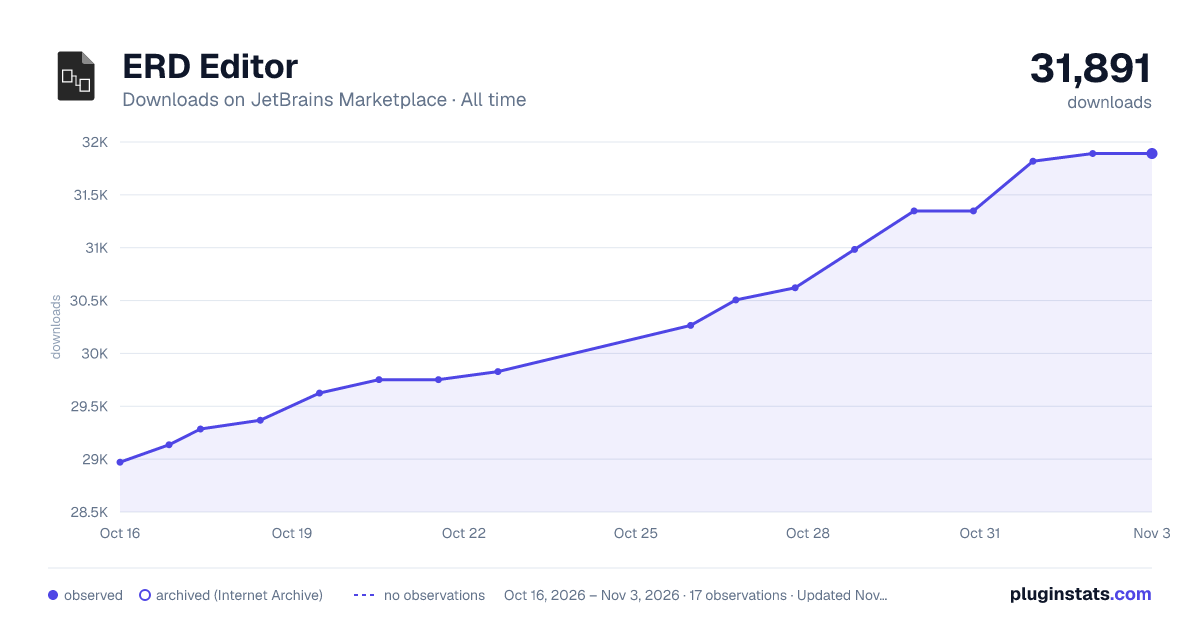
Filled points are observed values; hollow points come from Internet Archive snapshots of the listing page. Dashed segments span periods with no observations — values between points are not interpolated.
Each band is one page of 20. Downloads on a linear scale. Placement is projected from downloads, so it can differ from the marketplace's own sort order. Hover a dot to see the listing.
Recent observations
Full history (6)Similar JetBrains Marketplace Database plugins
All 20 ERD Editor alternatives



ERD Editor on other marketplaces
Data source
Cumulative download counts come from the public JetBrains Marketplace API. JetBrains reports downloads, not active installs. Ratings are the mean of public votes.
Listing: https://plugins.jetbrains.com/plugin/23594-erd-editor. First seen Oct 16, 2026; last successful collection Oct 21, 2026. See the methodology.