 PluginStats
Augment: Coding Agent Built for Large, Complex Codebases downloads statistics
By Augment Computing (2 listings) · JetBrains Marketplace · Externally-Paid
Augment Code is the AI coding platform for JetBrains IDEs, built for large, complex codebases. Powered by an industry-leading context engine, our Coding Agent...
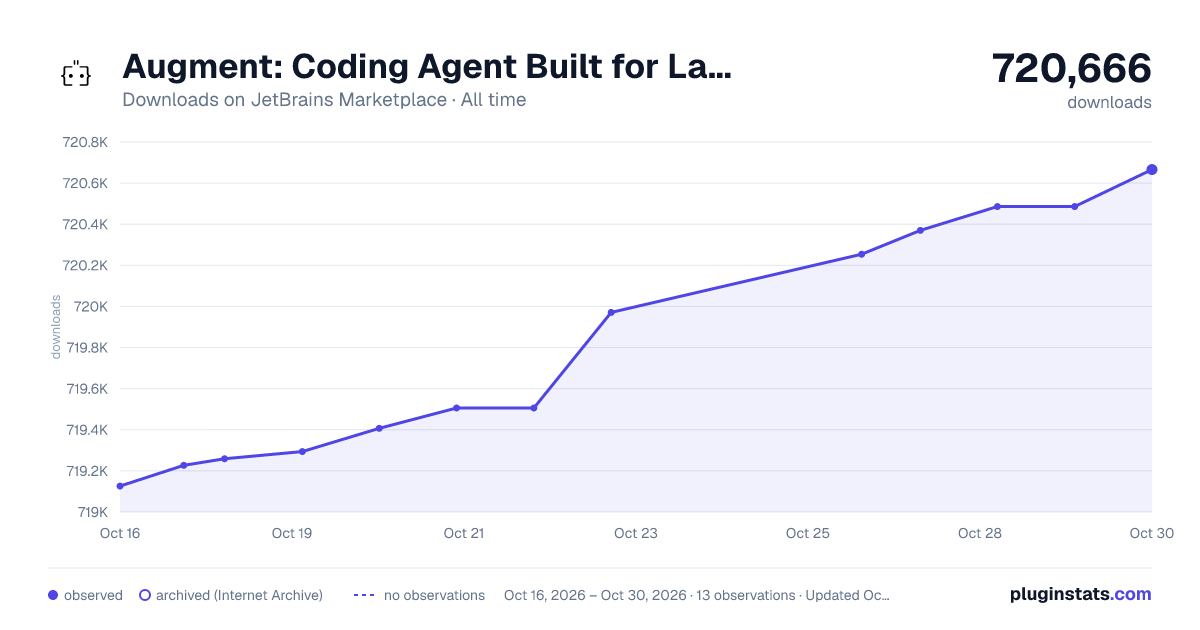
Augment: Coding Agent Built for Large, Complex Codebases has 719,407 recorded downloads on JetBrains Marketplace, ranking #344 of 2,502 tracked listings.
Rating: 3.37 / 5 from 209 ratings
About Augment: Coding Agent Built for Large, Complex Codebases
Augment Code is the AI coding platform for JetBrains IDEs, built for large, complex codebases. Powered by an industry-leading context engine, our Coding Agent understands your entire codebase — architecture, dependencies, and legacy code.
Why Augment?
Augment is not just another AI coding tool – it's an AI-powered coding platform built specifically for enterprise-scale development:
• Advanced AI Agent: Complete complex tasks, build features, and solve production issues with an AI agent that deeply understands your codebase • Intelligent AI Chat: Ask questions, plan features, and get instant answers with deep codebase understanding • World-class Context Engine: Our proprietary context engine understands your entire codebase, dependencies, and project structure • Native Integrations: Connect with Jira, Linear, Notion, GitHub, and more to bring all your development context together
Get up to speed instantly
Whether you're exploring a new codebase or diving into unfamiliar territory, Augment's AI helps you understand complex systems in minutes. Our AI coding assistant can:
• Explain how systems work • Help investigate bugs • Guide you through new APIs and frameworks • Accelerate onboarding to new projects
Make updates with confidence
In production-grade software, there are no simple changes. Augment's AI Agent manages the complexity for you by understanding:
• Your code structure and patterns • API contracts and schemas • Dependencies and their interactions • Best practices specific to your codebase
Key Features
AI Agent - Your Intelligent Coding Partner
Let our AI Agent handle complex engineering tasks while you focus on architecture and design. The Agent can:
• Complete Features: Build entire features with proper error handling and tests • Fix Bugs: Investigate and resolve production issues with full context • Refactor Code: Modernize legacy code while maintaining functionality • Write Tests: Generate comprehensive test suites that actually work
Intelligent Chat
Get instant answers with confidence:
• Codebase Q&A: Ask anything about your code and get accurate answers • Multi-file Edits: Make coordinated changes across multiple files • Context Awareness: Chat understands your current file, recent changes, and project structure
Supported IDEs
Augment works seamlessly with all JetBrains IDEs:
• IntelliJ IDEA (Community & Ultimate) • PyCharm (Community & Professional) • WebStorm • GoLand • PhpStorm • CLion • RubyMine • DataGrip • Rider • Android Studio • And more!
Installation
• Open your JetBrains IDE • Go to Settings/Preferences → Plugins • Search for "Augment" in the Marketplace • Click Install and restart your IDE • Sign in with your Augment account to start coding with AI
Getting Started
Quick Start
• Install the Plugin: Follow the installation steps above • Sign In: Click "Sign In" to get started • Open Chat: Press Ctrl+Alt+I (Windows/Linux) or Cmd+Ctrl+I (macOS) • Try Agent: Ask the AI to complete a task or build a feature
Essential Shortcuts
• Open Chat: Ctrl+Alt+I / Cmd+Ctrl+I • Show History: Ctrl+Alt+7 / Cmd+Ctrl+7
Configuration
Customize Your Experience
• File Types: Disable Augment for specific file types if needed • Integrations: Connect your development tools for enhanced context
Access settings via Settings/Preferences → Editor → Augment
Pro Tips
• Use Natural Language: Chat understands context, so ask questions naturally • Leverage Integrations: Connect Jira, Linear, or Notion for richer context • Review Agent Changes: Always review AI-generated code before committing • Provide Feedback: Use thumbs up/down to help improve suggestions
Resources
• Documentation • Community Discord • Support & Issues • Enterprise Solutions
Pricing
Choose the plan that fits your needs:
• Indie: Perfect to get started ($20/month) • Standard: For individuals or small teams ($60/month) • Max: Designed for high-demand teams ($200/month) • Enterprise: Custom solutions for large organizations
Visit augmentcode.com/pricing for details.
Description from the JetBrains Marketplace listing.
- Externally-Paid
- AI
- Code Editing
- Code Quality
- Code Tools
- Completion
- Machine Learning
- Productivity
README badge
Show your rank in a README or on your website. The badge updates automatically.
Charts
Images: 30d · 1y · all time · 1600×900 dark
Adoption over time
7/30/90-day growth
Ranking history
Ratings over time
Listing placement
Listing placement
Listing placement
Listing placement
Filled points are observed values; hollow points come from Internet Archive snapshots of the listing page. Dashed segments span periods with no observations — values between points are not interpolated.
Each band is one page of 20. Downloads on a linear scale. Placement is projected from downloads, so it can differ from the marketplace's own sort order. Hover a dot to see the listing.
Recent observations
Full history (5)Similar JetBrains Marketplace Externally-Paid plugins
All 20 Augment: Coding Agent Built for Large, Complex Codebases alternatives



Augment: Coding Agent Built for Large, Complex Codebases on other marketplaces
Data source
Cumulative download counts come from the public JetBrains Marketplace API. JetBrains reports downloads, not active installs. Ratings are the mean of public votes.
Listing: https://plugins.jetbrains.com/plugin/24072-augment-coding-agent-built-for-large-complex-codebases. First seen Oct 16, 2026; last successful collection Oct 20, 2026. See the methodology.