 PluginStats
Cucumber + downloads statistics
By Maxime HAMM (3 listings) · JetBrains Marketplace · BDD
The best Cucumber user experience to run, edit, print Gherkin features... and develop with Java, Kotlin, Scala... NEW : Reorder Gherkin table rows and columns by...
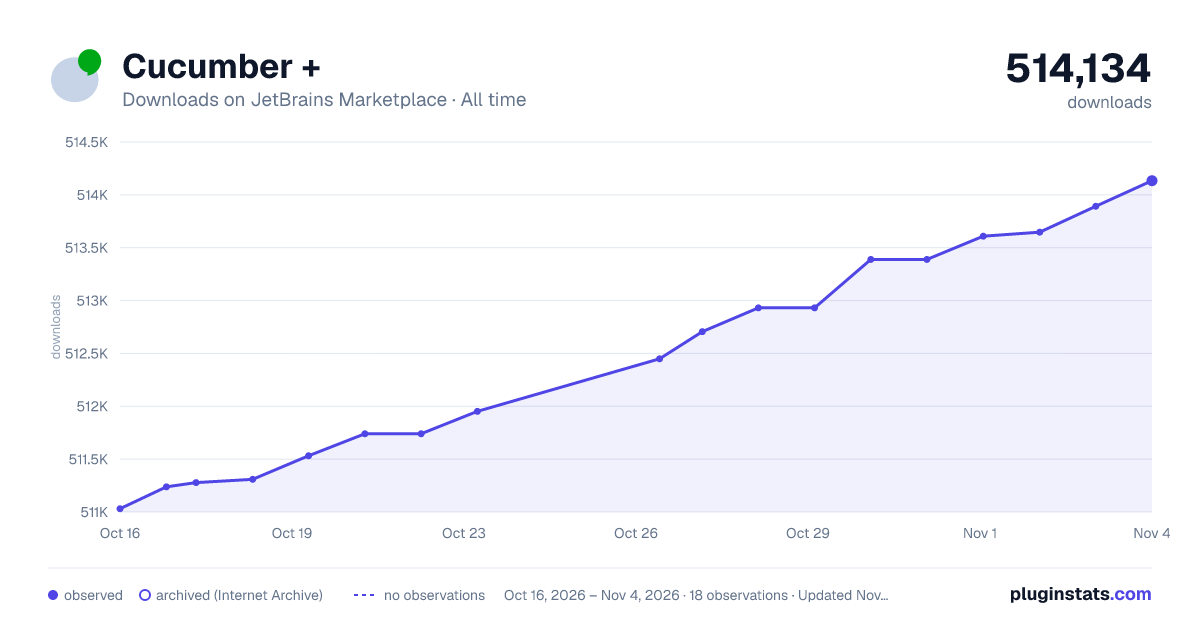
Cucumber + has 511,532 recorded downloads on JetBrains Marketplace, ranking #417 of 2,502 tracked listings.
Rating: 4.67 / 5 from 24 ratings
About Cucumber +
The best Cucumber user experience to run, edit, print Gherkin features... and develop with Java, Kotlin, Scala...
NEW : Reorder Gherkin table rows and columns by drag-and-drop
✓ Grab the top frame of a table to drag a column to a new position
✓ Grab the left frame to drag a row up or down
NEW : Rewriting breakpoint supports (Java, Kotlin, Scala only)
✓ Hightlighting the Gherkin step/example in progress when debugger in pause
✓ Add breakpoint from Gherkin : the debugger will stop only for selected step/example
✓ Add breakpoint from Java, Kotlin, Scala : add a condition « "Cucumber+"!=null » to stop only for Gherkin step's having breakpoints
Display list of features in Cucumber+ tool window
• Group feature per tag or per module • Filter features per tags • Launch Cucumber tests • Export features to pdf
Tests inspection and runner
• Easily locate failed steps • Run a single line of a Scenario outline (Java, Kotlin) • Print related Stacktrace using quickifix • Customize colors and font style from Settings > Color Scheme > Cucumber+
Print features to PDF
• Right click a file and select "Export feature to PDF" • Select mutiple files to print also a summary and a front page • Customize front page content, footer, header, fonts, colors, etc.
Read more at “cucumber+.default.properties” (generated at first print)
Easy handling of Cucumber tables
• Cucumber table formatting as you go : • Add new row by pressing 'Enter' from last row or from end of row. • Add a new column by pressing 'Pipe' from anywere • Smart copy or cut table cells and paste to Excel :
-
Swith automatically to column mode when focusing a Cucumber table.
-
Triple-click a header cell to select an entire he entire column, or anywhere else for a row.
-
Copy to clipboard to transfert to Excel for example !
• Smart copy from Excel or anywhere and paste to table :
-
Copy from Excel
-
Or from any source capable to copy to text separated by tabs and carriage returns
-
Paste clipboard to add or replace to Cucumber table content !
• Moving rows and colums up/down and left/right :
-
Drag-and-drop from the top frame for columns, from the left frame for rows
-
Or use the Shift actions from the table popup menu (right-click on the frame)
• Quick selection of rows and colums,
Blanking cells facilities :
-
Double click header cell to select a column
-
Double click non-header cell to select a row
-
Press 'Del' to clear cells content
-
Press 'Del' again to delete the row or column
• Navigate from cell to cell by pressing 'Tab', 'Shift tab' or 'Enter' • Completion to easily fill in tables and more:
-
Table header cells
-
Table cells
-
Markdown images references
• Step completion suggests all steps already used in current module, not only steps having an implementation :
-
The icon tells you if the completion comes from a feature implementation or a feature gherkin file.
-
The right side gives you the name of the file where the proposal step comes from (i.e a Java class, Ruby, Kotlin, etc) or a feature file name.
-
You will also know in how many files the step is used, for exemple : toto.feature (+2)
-
Tags related to step's scenario or step's feature are displayed (gray)
-
Steps related to a deprecated implementation are striked out (Java/Kotlin/Javascript)
-
Press ALT-Space to display a preview of other scenario holding the step :
• Export markdown to PDF :
-
Markdown supports into feature header, including pictures references and urls
-
Export to a nice PDF !
• Line markers indicating the number of uses of step implementations (Java, Kotlin) :
-
The icon indicates the number of scenarios that use this step
-
Click to choose a scenario and navigate to it
Other features :
• Tag completion (cursor location after @) • Toggle Cucumber table smart editing (from Edit menu) • Deprecated steps striked out inspection (Java, Kotlin, Javascript) • Navigate from Gerkin step definition to its implementation even after modifing the step text
Any suggestion ? Let me know !
@author Maxime HAMM
https://github.com/maximehamm/tzatziki
Many thanks to Pierre-Michel BRET for his contribution, the great PDF generator, allowing to realize a complete layout with page numbers, summary, paragraphs management, etc.
Description from the JetBrains Marketplace listing.
- BDD
- Code Editing
- Code Quality
- Code Tools
- Editor
- Framework
- Testing
- Tools Integration
README badge
Show your rank in a README or on your website. The badge updates automatically.
Charts
Images: 30d · 1y · all time · 1600×900 dark
Adoption over time
7/30/90-day growth
Ranking history
Ratings over time
Listing placement
Listing placement
Listing placement
Listing placement
Filled points are observed values; hollow points come from Internet Archive snapshots of the listing page. Dashed segments span periods with no observations — values between points are not interpolated.
Each band is one page of 20. Downloads on a linear scale. Placement is projected from downloads, so it can differ from the marketplace's own sort order. Hover a dot to see the listing.
Recent observations
Full history (5)Similar JetBrains Marketplace BDD plugins
All 20 Cucumber + alternatives



Data source
Cumulative download counts come from the public JetBrains Marketplace API. JetBrains reports downloads, not active installs. Ratings are the mean of public votes.
Listing: https://plugins.jetbrains.com/plugin/16289-cucumber-. First seen Oct 16, 2026; last successful collection Oct 20, 2026. See the methodology.