 PluginStats
StringManipulation downloads statistics
By Vojtěch Krása (9 listings) · JetBrains Marketplace · Code Editing
Case switching, sorting, filtering, incrementing, aligning to columns, grepping, escaping, encoding... Features: Case switching: Switch case (camelCase...
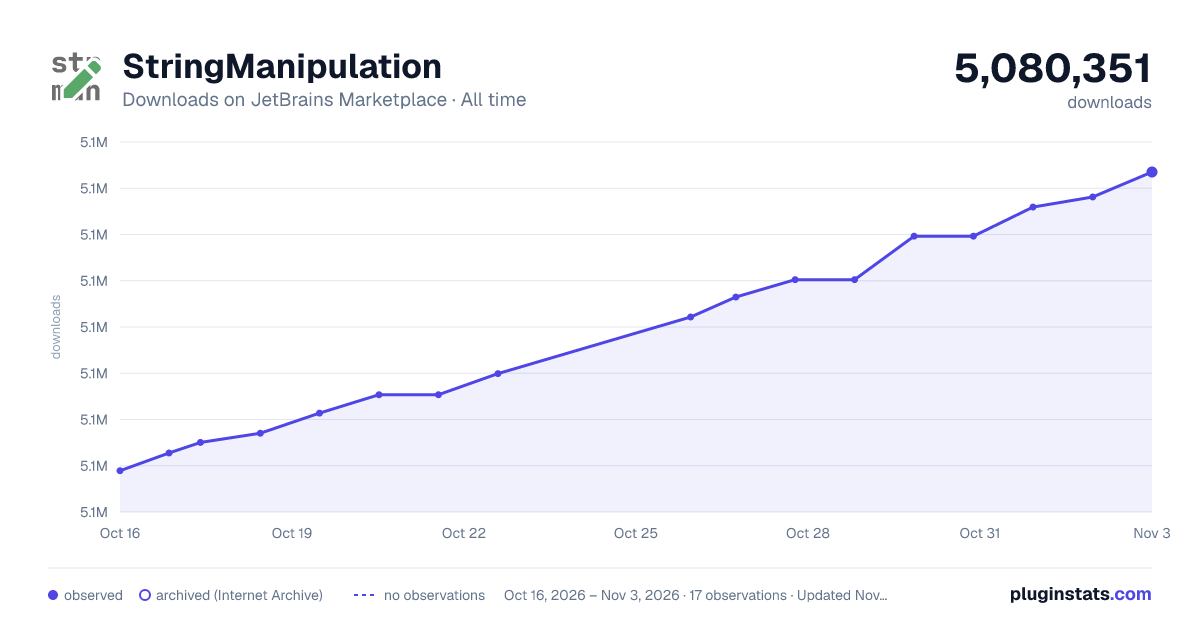
StringManipulation has 5,075,138 recorded downloads on JetBrains Marketplace, ranking #96 of 2,502 tracked listings.
Rating: 4.94 / 5 from 243 ratings
About StringManipulation
Case switching, sorting, filtering, incrementing, aligning to columns, grepping, escaping, encoding...
Features:
Case switching:
• Switch case (camelCase, kebab-lowercase, KEBAB-UPPERCASE, snake_case, SCREAMING_SNAKE_CASE, dot.case, words lowercase, First word capitalized, Words Capitalized, PascalCase)
• Toggle: SCREAMING_SNAKE_CASE / camelCase • Toggle: snake_case / camelCase • Toggle: kebab-case / snake_case • Toggle: kebab-case / camelCase • Toggle: dot.case / camelCase • Toggle: PascalCase / camelCase • Toggle: lowercase words / camelCase • Toggle: First word capitalized / camelCase • Toggle: Capitalized Words / camelCase • To camelCase • To snake_case • To kebab-case • To PascalCase • To SCREAMING_SNAKE_CASE • To Capitalized_Snake_Case • Capitalize • To lower case • To UPPER CASE • Invert case • To Spring Boot System Env Variable
-'Switch case' action can be customized, or new ones can be added in settings
-when nothing is selected, then either nothing or whole line or a particular element is selected (report an issue if you find something to improve, each file type needs its own implementation to work flawlessly)
Un/Escape:
• Un/Escape selected Java text • Un/Escape selected JavaScript text • Un/Escape selected C# text (regular, verbatim, interpolated) • Un/Escape selected HTML text • Un/Escape selected JSON text • Un/Escape selected XML text • Un/Escape selected SQL text • Un/Escape selected PHP text • Convert diacritics (accents) to ASCII • Convert non-ASCII to escaped Unicode • Convert escaped Unicode to String • Unicode normalization (NFD, NFC, NFKC, NFKD)
Encode/Decode:
• Encode selected text to MD5 Hex • Encode selected text to SHA-1 Hex • Encode selected text to SHA-256 Hex • Encode selected text to SHA-512 Hex • Encode selected text to SHA3-256 Hex • Encode selected text to SHA3-512 Hex • De/Encode selected text as URL • De/Encode selected text to Base64 (+ zip/deflate) • De/Encode selected text to Hex • ISO Timestamp to Epoch Milliseconds • Epoch Milliseconds to ISO Timestamp
Increment/Decrement:
• Increment/decrement all numbers found. • Duplicate selection and increment/decrement all numbers found. • Create sequence - Keep first number, replace all other by incrementing • Increment duplicate numbers
Sort with natural order or Collator:
• Reversing order of lines • Shuffle lines • Sort case-sensitive A-z • Sort case-sensitive z-A • Sort case-insensitive A-Z • Sort case-insensitive Z-A • Sort line length asc., desc. • Sort hexadecimally • Sort lines by subselection - only one selection/caret per line is handled • Sort tokens (delimited text) • Shuffle Characters • JSON sort • Hierarchical sort
Align:
• Align carets/selections into a vertical line by inserting spaces • Format selected text to columns/table by a chosen separator/delimiter and sort by columns • Align text to left/center/right
Filter/Remove/Trim/Minify/Convert...:
• Grep • Inverted Grep • Group by Grep - matched lines will be separated from not matched • Trim • Trim Leading • Trim Trailing • Replace whitespaces with a single space char • Remove all spaces • Remove duplicates (supports multicaret subselection) • Keep only duplicate lines • Group and Count • Remove empty lines • Remove consecutive empty lines • Remove all newlines • Convert Between Char and Int • Minify JSON • Minify JavaScript • Convert Between JSON and YAML
Other:
• Reverse Letters • Swap Words • Swap Characters/Selections/Lines/Tokens • Wrap or shift double quotes to single quotes to backticks • Swap between double quotes and single quotes • Straighten/Educate quotes • Switch file path separators: Windows<->UNIX • Select All Occurrences For All Carets • Extend Selection in Different "CamelHumps" Mode • Multi Replace • Duplicate and Multi Replace • Paste - camelCased • Paste - and Keep Selections • Create Border
Actions are available under Edit menu, or via the shortcut "alt M" and "alt shift M".
You can setup your own shortcuts for better usability.
Popup can be customized in File | Settings | Appearance & Behavior | Menus and Toolbars.
Donations | GitHub | Issues
Description from the JetBrains Marketplace listing.
- Code Editing
README badge
Show your rank in a README or on your website. The badge updates automatically.
Charts
Images: 30d · 1y · all time · 1600×900 dark
Adoption over time
7/30/90-day growth
Ranking history
Ratings over time
Listing placement
Listing placement
Filled points are observed values; hollow points come from Internet Archive snapshots of the listing page. Dashed segments span periods with no observations — values between points are not interpolated.
Each band is one page of 20. Downloads on a linear scale. Placement is projected from downloads, so it can differ from the marketplace's own sort order. Hover a dot to see the listing.
Recent observations
Full history (5)Similar JetBrains Marketplace Code Editing plugins
All 20 StringManipulation alternatives



Data source
Cumulative download counts come from the public JetBrains Marketplace API. JetBrains reports downloads, not active installs. Ratings are the mean of public votes.
Listing: https://plugins.jetbrains.com/plugin/2162-stringmanipulation. First seen Oct 16, 2026; last successful collection Oct 20, 2026. See the methodology.