 PluginStats
vim-flash downloads statistics
By yelog · JetBrains Marketplace · Code Editing
Like flash.nvim on IdeaVim lets you navigate your code with search labels, enhanced character motions Usage Add the following code to your .ideavimrc file. nmap s...
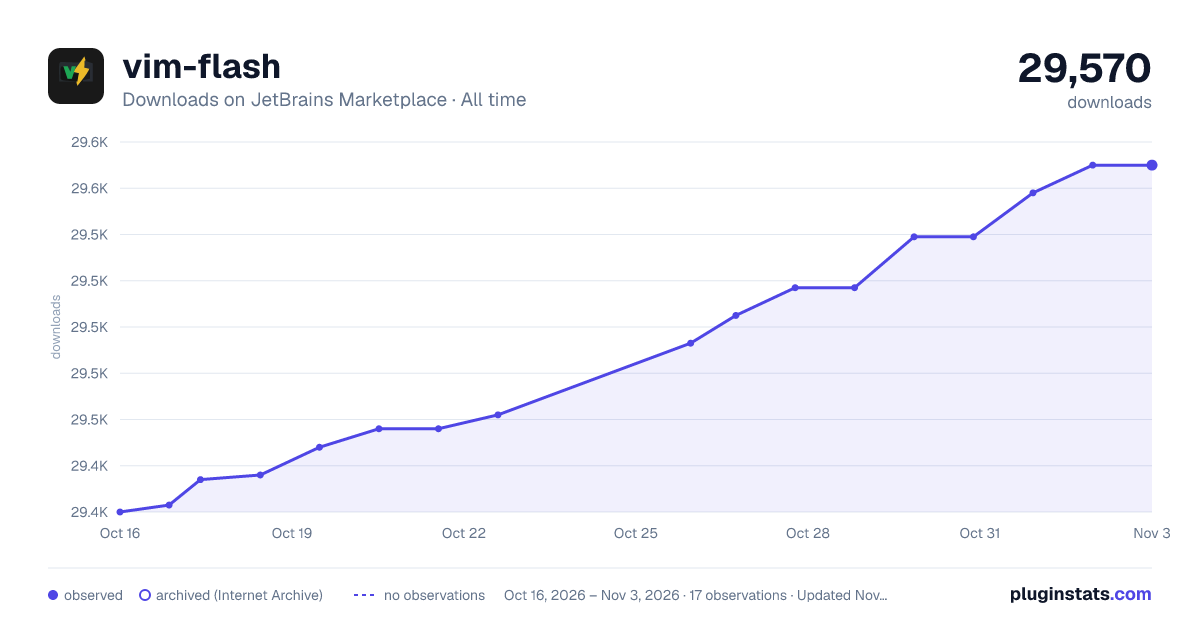
vim-flash has 29,436 recorded downloads on JetBrains Marketplace, ranking #1759 of 2,501 tracked listings.
Rating: 4.55 / 5 from 11 ratings
About vim-flash
Like flash.nvim on IdeaVim
lets you navigate your code with search labels, enhanced character motions
Usage
Add the following code to your .ideavimrc file.
nmap s <Action>(flash.search) xmap s <Action>(flash.search)
Then you can use s and type the word you want to search for. The word will be highlighted in the editor.
Off course you can use other keybindings. for example map <leader>s <Action>(flash.search)
Enhanced Vim F/f/T/t/;/, Feature
New enhanced vim F/f/T/t/;/, functionality similar to classic vim f command:
" enhance vim f (find for char in characters to the right of the current cursor) nmap f <Action>(flash.find) xmap f <Action>(flash.find) " enhance vim F (find for char in characters to the left of the current cursor) nmap F <Action>(flash.find_backward) xmap F <Action>(flash.find_backward) " enhance vim t (till for char in characters to the right of the current cursor) nmap t <Action>(flash.till) xmap t <Action>(flash.till) " enhance vim T (till for char in characters to the left of the current cursor) nmap T <Action>(flash.till_backward) xmap T <Action>(flash.till_backward) " enhance vim ; (Repeat the last f/F/t/T search) nmap ; <Action>(flash.repeat) xmap ; <Action>(flash.repeat) " enhance vim , (Repeat the last f/F/t/T search backward) nmap , <Action>(flash.repeat_backward) xmap , <Action>(flash.repeat_backward)
This feature:
• Grays out text after cursor when activated • Highlights all matching characters after cursor with red background • Jumps to the nearest match automatically • Press 'f'/'t'/';' again to jump to next match • Press 'F'/'T'/',' again to jump to privious match • Press Esc or Backspace to exit search mode
Configuration
Find Settings -> Others Settings -> vim-flash to configure the plugin.
• 1. Characters: This This is the sequence of letters used in order of proximity from nearest to farthest between the match and the current cursor.
• 2. Label color: The first input box is the color of label text, and the second input box is the color of label background. • 3. Match color: The first input box is the color of match text, and the second input box is the color of match background. • 3. Match nearest color: The first input box is the color of match nearest text, and the second input box is the color of match nearest background. • 4. Enter confirms nearest: Pressing Enter during flash search jumps to the nearest match. Disable this if you bind flash.search itself to <cr>.
Issues
Please log any issues to vim-flash repo
Description from the JetBrains Marketplace listing.
- Code Editing
- Editor
README badge
Show your rank in a README or on your website. The badge updates automatically.
Charts
Images: 30d · 1y · all time · 1600×900 dark
Adoption over time
7/30/90-day growth
Ranking history
Ratings over time
Listing placement
Listing placement
Listing placement
Filled points are observed values; hollow points come from Internet Archive snapshots of the listing page. Dashed segments span periods with no observations — values between points are not interpolated.
Each band is one page of 20. Downloads on a linear scale. Placement is projected from downloads, so it can differ from the marketplace's own sort order. Hover a dot to see the listing.
Recent observations
Full history (4)Similar JetBrains Marketplace Code Editing plugins
All 20 vim-flash alternatives



Data source
Cumulative download counts come from the public JetBrains Marketplace API. JetBrains reports downloads, not active installs. Ratings are the mean of public votes.
Listing: https://plugins.jetbrains.com/plugin/25101-vim-flash. First seen Oct 16, 2026; last successful collection Oct 19, 2026. See the methodology.