 PluginStats
CodeArts Agent downloads statistics
By Huawei Cloud ToolKit (2 listings) · JetBrains Marketplace · Cloud
CodeArts Agent: Your AI-Powered Dev Sidekick Basic Features Code generation R&D Q&A Code commenting Unit testing Code explanation Code optimization Shortcuts...
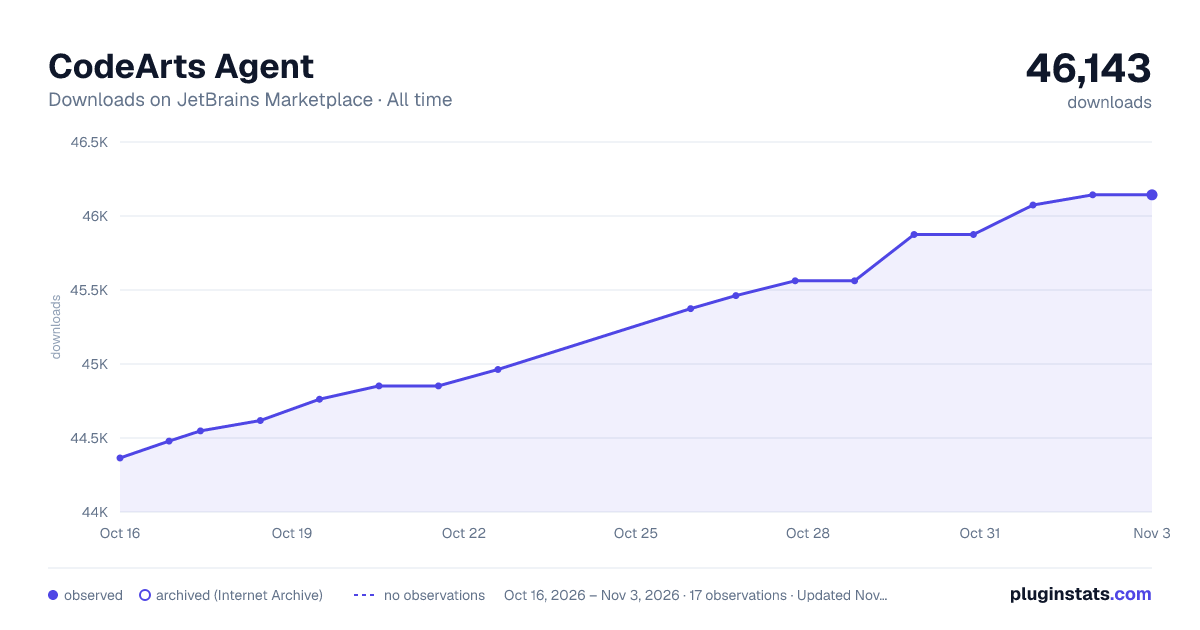
CodeArts Agent has 44,618 recorded downloads on JetBrains Marketplace, ranking #1387 of 2,501 tracked listings.
Rating: 4.00 / 5 from 19 ratings
About CodeArts Agent
CodeArts Agent: Your AI-Powered Dev Sidekick
Basic Features
• Code generation • R&D Q&A • Code commenting • Unit testing • Code explanation • Code optimization
Shortcuts
• Enter: Trigger auto-generation under functions or method signatures. • Tab: Accept the current suggestion. • Esc: Dismiss the current suggestion. • Alt (Option)+U: Pop open the chat panel. • Alt (Option)+]: View the next suggestion. • Alt (Option)+[: View the previous suggestion. • Alt (Option)+X: Trigger single-line code generation. • Alt (Option)+C: Trigger multi-line code generation. • Alt (Option)+R: Regenerate code.
Slash Commands
• /explain: Provide breakdowns for the selected code. • /comment: Generate method or line comments for the selected code. • /tests: Spawn unit tests for the selected code. • /optimize: Level up the selected code. • /clear: Flush context memory mid-session. • /help: Find out how CodeArts Agent can give you a boost.
Note: The ask supports all commands, the agent only supports /clear.
Function Settings
CodeArts Agent hooks into your coding muscle memory. Code as usual. Watch suggestions pop in when you need them.
Examining Default Settings
-
Click File on the menu bar of IDE, and select Settings. On the displayed page, choose CodeArts Agent.
-
Choose CodeArts Agent > Code Generation.
-
Choose CodeArts Agent > Unit Test Case Generation.
Intelligent Functions
- Code Generation
Press Alt+C for multi-line code. For just one line, press Alt+X. Smart triggers in settings include Enter keystroke and pauses.
- Code Explanation
Right-click on a code snippet and choose CodeArts Agent > > Explain Code. You'll get a breakdown and doc that help you speed through unfamiliar code.
- Code Commenting
Right-click on a code snippet and choose CodeArts Agent > Generate Comment. CodeArts Agent then crafts clear, clean, and comprehensive comments that match your repo's style, giving you instant insights into code smells.
- Unit Testing
Right-click on a code snippet and choose CodeArts Agent > Generate Unit Tests. CodeArts Agent then spins up unit test cases to hit coverage goals.
- Code Optimization
Right-click on a code snippet and choose CodeArts Agent > Optimize Code. CodeArts Agent then analyzes the code and proposes quality-tuned rewrites.
- R&D Q&A
Got questions about research, development, or anything in between? Just ask in the chat box.
- Convenient Functionality Access
Press Alt+U or open the toolbar on the right. Type a slash (/) in the input box to see all available commands.
CodeArts Agent Service Statement
For details of the service statement, please click the link below: https://www.huaweicloud.com/declaration/tsa-codearts-doer.html.
华为云码道CodeArts代码智能体
基础特性
• 代码生成 • 研发问答 • 代码注释 • 单元测试 • 代码解释 • 代码优化
快捷键
• Enter:在函数/方法签名下触发自动生成 • Tab:接受当前生成结果 • Esc:忽略当前生成结果 • Alt(Option)+U:打开问答对话框 • Alt(Option)+]:查看下一个推荐 • Alt(Option)+[:查看上一个推荐 • Alt(Option)+X:主动触发单行代码生成 • Alt(Option)+C:主动触发多行代码生成 • Alt(Option)+R:重新生成代码
快捷指令
• /explain: 解释选中的代码 • /comment: 为选中的代码生成方法注释或行间注释 • /tests: 为选中的代码生成单元测试 • /optimize:优化选中的代码 • /clear: 当你在会话中时,清空上下文记忆 • /help: 学习如何使用华为云码道CodeArts代码智能体
注:智能问答支持全部指令,智能体仅支持/clear
功能、设置
小伙伴们无需改变日常的开发习惯,只需要正常敲击键盘进行编程, 华为云码道CodeArts代码智能体 智能编码助手将在合适时候主动生成代码给予协助。
华为云码道CodeArts代码智能体 默认设置
1.点击 IDE 菜单栏中 "File" --> "Settings" 打开设置面板,选中 华为云码道CodeArts代码智能体。
2.展开 华为云码道CodeArts代码智能体 --> "代码生成",可以看到默认设置功能键。
3.展开 华为云码道CodeArts代码智能体 --> "单元测试用例生成",可以看到默认设置功能键。
功能介绍
- 代码生成
在任意位置使用Alt + C快捷键可以触发代码生成;在设置里可打开"回车触发"以及"停顿触发"使用其他功能触发方式。同时也支持代码单行生成,快捷键为Alt + X。
- 代码解释
选中合适的代码片段,点击右键在华为云码道CodeArts代码智能体下选中"代码解释"功能,快速分析代码并自动生成文档,提高阅读代码的速度和效率。
- 代码注释
选中合适的代码片段,点击右键在华为云码道CodeArts代码智能体下选中"代码注释"功能,快速分析代码,自动生成有意义的完整注释,增加代码可读性,同一个代码库注释风格的一致性,提高研发问题的解决效率。
- 单元测试
选中合适的代码片段,点击右键在华为云码道CodeArts代码智能体下选中"单元测试"功能,能够自动创建单元测试用例,提高测试覆盖率,确保每个功能和场景都被测试到。
- 代码优化
选择需要优化的代码,点击右键在华为云码道CodeArts代码智能体下选中代码优化功能,对代码进行检查,并提供优化建议,提升代码质量。
- 研发知识问答
在交互框中进行研发相关提问,提高研发问题的解决效率。
- 快捷功能
使用热键Alt + U或打开右边工具栏,点击输入框内敲下"/"可看到快捷功能使用选择。
华为云码道CodeArts代码智能体服务声明
服务声明详情请点击链接查阅:https://www.huaweicloud.com/declaration/tsa-codearts-doer.html。
Description from the JetBrains Marketplace listing.
- Cloud
README badge
Show your rank in a README or on your website. The badge updates automatically.
Charts
Images: 30d · 1y · all time · 1600×900 dark
Adoption over time
7/30/90-day growth
Ranking history
Ratings over time
Listing placement
Listing placement
Filled points are observed values; hollow points come from Internet Archive snapshots of the listing page. Dashed segments span periods with no observations — values between points are not interpolated.
Each band is one page of 20. Downloads on a linear scale. Placement is projected from downloads, so it can differ from the marketplace's own sort order. Hover a dot to see the listing.
Recent observations
Full history (5)Similar JetBrains Marketplace Cloud plugins
All 20 CodeArts Agent alternatives



Data source
Cumulative download counts come from the public JetBrains Marketplace API. JetBrains reports downloads, not active installs. Ratings are the mean of public votes.
Listing: https://plugins.jetbrains.com/plugin/21068-codearts-agent. First seen Oct 16, 2026; last successful collection Oct 20, 2026. See the methodology.