 PluginStats
Flutter Storm downloads statistics
By BeanSoft (7 listings) · JetBrains Marketplace · Code Tools
Note: this plugin will be updated in the next version to match latest Flutter features. Support for developing Flutter applications for WebStorm etc/Flutter中文版开发工具...
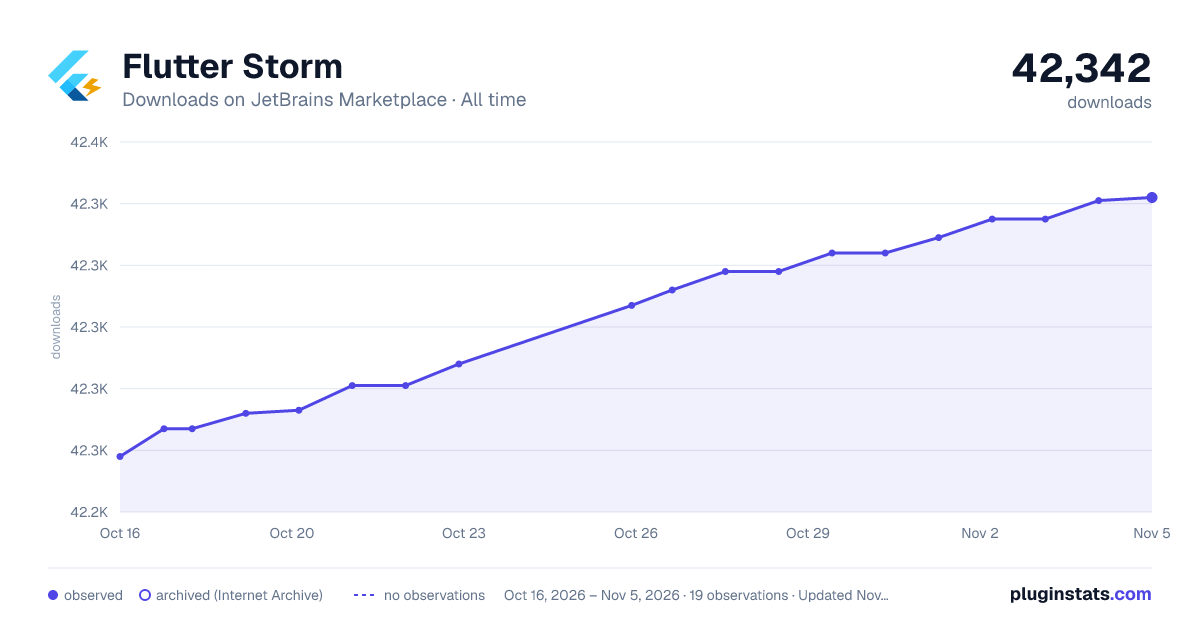
Flutter Storm has 42,273 recorded downloads on JetBrains Marketplace, ranking #1433 of 2,502 tracked listings.
Rating: 3.58 / 5 from 12 ratings
About Flutter Storm
Note: this plugin will be updated in the next version to match latest Flutter features.
Support for developing Flutter applications for WebStorm etc/Flutter中文版开发工具.
Unofficial WebStorm /PhpStorm /GoLand /PyCharm /CLion /RubyMine plugin for developing Flutter applications. AppCoder and Rider currently only supports open Flutter project folder.
⚠This plugin's main target is small IDEs such as WebStorm etc, but this plugin also supports Android Studio and IDEA.
WANING: Please uninstall Official Flutter plugin before installing this plugin, there might be conflicts.
WebStorm下的 Flutter 应用开发插件, 提供完整Flutter开发支持, 包括新建/打开项目, 编译运行及断点调试等功能, 并提供了一些增强辅助功能, 助力*Storm /GoLand /PyCharm /CLion用户无需切换其他开发工具完成Flutter应用开发. 如果您追求最新功能,请使用Google提供的Flutter插件, 本插件也支持Android Studio 和 IDEA. 技术支持及折扣信息请加QQ群: 589685750
Simplified Chinese Language UI support(支持简体中文界面显示, 结合Jetbrains官方中文插件 Chinese (Simplified) Language Pack / 中文语言包效果更佳)
Flutter and the related logo are trademarks of Google LLC. We are not endorsed by or affiliated with Google LLC.
Based on Official Flutter IDEA plugin with bugs fix and support for *Storm IDE. Provides extra features such as tool window, color editor, image previewer etc.
FREE or discount provided: I provides the same offer as Jetbrains' Special Offers, for students and teachers, OSS devs, this plugin is Free - see: Free Offer
Features
• Run and debug Flutter iOS, Android and web applications right in the IDE using the built-in debugger • Create new Flutter projects from the IDE Welcome screen • Support whole iOS distribution progress just in IDE: edit iOS app version, archive iOS project, export to IPA, open Transporter, open App Store Connect, open Xcode and iOS Simulator
• Allow manually refresh Flutter device list (after switch Flutter channel or switch SDK path) • Support view or switch Flutter channels, enable web or desktop features, recreate project files, build web or desktop release application • Flutter official IDE features like code edit, refactor, run, debug, hot reload, hot restart; Flutter performance, outline inspector • Create New Flutter project on *Storm IDE • Fix UI freeze when creating New Flutter project on *Storm IDE and IDEA/Ultimate • Visual color editor for Colors.xxx, Color.fromARGB and Color.fromRGBO • Single click in pubspec.yaml and Dart source code to open dependency package's source file or view homepage in web browser • Preview Image.asset('images/ble.png') icon as editor line marker and click to open • Auto complete of font name and image path when edit Dart string • Autocomplete Pub Packages in pubspec.yaml • Highlight and Update Pub Packages in pubspec.yaml • View Pub Package's Documentation in pubspec.yam, press Ctrl+Q to show additional information • Preview project images as an icon in your project explorer, supports png, svg, jpg, etc • Debug Android devices over wifi with just one click • Display colorful terminal output • Start Xcode, Android Studio on Mac with one click • list and run android emulator(avd) • list all iOS simulator, start device and run as target • take screenshot • Flutter Pub Get • Flutter Pub Upgrade • Flutter Pub Outdated • Flutter Logs • Flutter test • flutter upgrade • fultter build ios and android • fultter clean • Reveal project folder in Finder/Explorer • Generate Widgets: When creating a new file, choose the "New Flutter Widget" option. • Generate Blocs: When creating a new file, choose the "New Flutter Bloc" option.
Installation
First, please setup your Flutter dev env:
https://flutter.dev/docs/get-started/install, Then install this plugin to your IDE, then you will find a Flutter Storm toolbar. Follow the guide to install the Dart plugin to adds Dart and enables Flutter specific functionality.
WANING: Please uninstall Official Flutter plugin before installing this plugin, there might be conflicts.
Or uninstall Flutter Storm before you installing the Official Flutter plugin to ensure stability.
[❌] If you found Android Studio/IDEA can't start up issue, please delete Flutter Storm plugin locally:
Mac:
open "$HOME/Library/Application Support/Google/AndroidStudio2020.3/plugins"
for IDEA CE: open "$HOME/Library/Caches/JetBrains/IdeaIC2020.3/plugins"
for IDEA Ultimate: open "$HOME/Library/Caches/JetBrains/Idea2020.3/plugins"
Windows:
C:\Users\YourUserName\AppData\Roaming\Google\AndroidStudio2020.3\plugins
Remove the plugin file or folder flutter-storm, then start Android Studio/IDEA again.
Provides live templates for Flutter to save time writing boilerplate: Flutter Snippets
Description from the JetBrains Marketplace listing.
- Code Tools
README badge
Show your rank in a README or on your website. The badge updates automatically.
Charts
Images: 30d · 1y · all time · 1600×900 dark
Adoption over time
7/30/90-day growth
Ranking history
Ratings over time
Listing placement
Listing placement
Filled points are observed values; hollow points come from Internet Archive snapshots of the listing page. Dashed segments span periods with no observations — values between points are not interpolated.
Each band is one page of 20. Downloads on a linear scale. Placement is projected from downloads, so it can differ from the marketplace's own sort order. Hover a dot to see the listing.
Recent observations
Full history (5)Similar JetBrains Marketplace Code Tools plugins
All 20 Flutter Storm alternatives



Data source
Cumulative download counts come from the public JetBrains Marketplace API. JetBrains reports downloads, not active installs. Ratings are the mean of public votes.
Listing: https://plugins.jetbrains.com/plugin/14718-flutter-storm. First seen Oct 16, 2026; last successful collection Oct 20, 2026. See the methodology.