 PluginStats
Uniapp Tool downloads statistics
By fjdmy · JetBrains Marketplace · Build
Uniapp Tool provides comprehensive uni-app development, running, debugging, and publishing support for JetBrains IDEs. 中文 Uniapp Tool 是一款免费的 JetBrains IDE 插件,为...
Uniapp Tool has 188,324 recorded downloads on JetBrains Marketplace, ranking #674 of 2,502 tracked listings.
Rating: 4.75 / 5 from 67 ratings
About Uniapp Tool
Uniapp Tool provides comprehensive uni-app development, running, debugging, and publishing support for JetBrains IDEs.
中文
Uniapp Tool 是一款免费的 JetBrains IDE 插件,为 HBuilderX 创建的 uni-app 项目和 uni-app CLI 项目提供开发、运行与发布支持。
编码支持
• 提供 uni-app 内置 API、组件、属性、生命周期和 CSS 变量补全。 • 支持 easycom 组件识别,包括自定义 easycom 规则和 node_modules 组件。 • 支持 vue、nvue、uvue、uts 和 renderjs 文件的代码编辑。 • 支持 pages.json、manifest.json 等配置文件的补全、校验,并提供可选的 manifest.json 可视化编辑功能。 • 支持页面、分包、图片及 @、~ 路径的补全、跳转和存在性检查,并可预览图片。 • 路径错误提供快速修复,可创建缺失页面或修正引用。 • 支持条件编译指令补全、嵌套检查、代码高亮和折叠。 • 支持 rpx、upx、uni-app CSS 变量,以及组件和样式代码的快速展开。 • .env、.env.test、.env.* 文件使用 Ctrl+/ 时统一以 # 切换行注释。
运行与发布
• 支持 HBuilderX 项目以及 Vue 2、Vue 3、Vue 3 + TypeScript CLI 项目。 • 自动识别项目根目录和 monorepo 中的多个 uni-app 子项目,并可为当前文件生成运行配置。 • 支持 H5、微信小程序、支付宝小程序、抖音小程序以及自定义 CLI 平台。 • 支持 Android、iOS、鸿蒙设备发现与运行,可在运行配置中刷新并选择目标设备。 • 支持运行参数、环境参数、编译模式和自定义脚本配置。 • 支持自动打开微信、支付宝和抖音开发者工具。 • 支持微信小程序上传,显示上传日志并配置版本、描述、AppID 和上传密钥。
项目工具
• 创建 uni-app CLI 项目,支持 Vue 2、Vue 3 和 Vue 3 + TypeScript 模板。 • 在项目视图中创建页面并自动注册主包或分包;新分包可在创建页面时一并建立。 • 为 .cmd、.bat 文件提供专用图标;Windows 下可从编辑器或项目视图直接运行,输出显示在 IDE 运行控制台。 • 批量操作项目中的 Git 仓库:一键更新所有当前分支,或将指定远端分支合并到各仓库当前分支。 • 批量 Git 操作会跳过脏工作区和异常仓库状态,并统一汇总成功、跳过、冲突和失败结果。 • 提供 Uniapp 工具窗口及可选实验功能。 • Uniapp 工具窗口内置详细使用教程,覆盖项目识别、代码编辑、配置与路径、条件编译、运行发布、项目工具、自动更新和常见问题。
基本配置
打开 Settings | Tools | UniApp:
• 运行 HBuilderX 项目前,请配置 HBuilderX 安装目录。 • HBuilderX 项目需要通过 HBuilderX | 工具 | 插件安装 安装对应的 uni-app Vue 2 或 Vue 3 编译器,并建议先在 HBuilderX 中运行项目一次。 • Android 真机运行还需要安装 HBuilderX 的 App 真机运行相关插件和标准基座。 • 微信开发者工具支持自动检测;未检测到时请手动选择安装目录。支付宝和抖音开发者工具仍需手动配置路径。 • 支持模式可选择“仅运行”“基础支持”或“完整支持”:低配置设备可使用仅运行模式,大型项目可使用基础支持,完整模式会额外启用 easycom 深度分析和多项目编辑支持。 • 可在 Settings | Tools | UniApp(当前项目) 中选择“跟随全局”或单独覆盖支持模式,多个同时打开的项目可以使用不同性能档位。 • 在仅运行模式与编辑支持模式之间切换后,请按通知重新打开项目,使 JavaScript 类型库缓存完全生效。
版本下载 · 问题反馈 · 商务合作与项目开发:fjdmy@outlook.com
English
Uniapp Tool is a free JetBrains IDE plugin for developing, running, and publishing uni-app projects created with HBuilderX or the uni-app CLI.
Highlights
• Complete uni-app APIs, components, properties, lifecycle hooks, easycom components, paths, and CSS variables. • Edit vue, nvue, uvue, uts, and renderjs files with language-aware assistance. • Complete, validate, and edit pages.json and manifest.json, with an optional visual editor for manifest.json. • Complete and navigate pages, subpackages, images, and aliased paths, with image previews and missing-path fixes. • Complete, validate, highlight, and fold conditional-compilation blocks. • Quickly expand common uni-app component and style code. • Run HBuilderX, Vue 2, Vue 3, and Vue 3 + TypeScript projects, including multiple uni-app projects in a monorepo. • Target H5, WeChat, Alipay, Douyin, Android, iOS, HarmonyOS, and custom CLI platforms. • Discover mobile devices, configure scripts and arguments, launch Mini Program developer tools, and upload WeChat builds with visible logs. • Create CLI projects and pages with automatic package registration, including new subpackages created with their first page. • Toggle comments in .env and .env.* files with # using the standard line-comment shortcut. • Show dedicated icons for .cmd and .bat files and run them in the IDE console on Windows. • Update all Git repositories in the project or merge a selected remote branch into every repository's current branch in one operation.
Configure tool paths and choose Run Only, Basic Support, or Full Support under Settings | Tools | UniApp. Each project can follow that default or override it in its project settings. Reopen the project after switching into or out of Run Only mode so cached JavaScript libraries are refreshed.
Releases · Issues
Description from the JetBrains Marketplace listing.
- Build
- Web
README badge
Show your rank in a README or on your website. The badge updates automatically.
Charts
Images: 30d · 1y · all time · 1600×900 dark
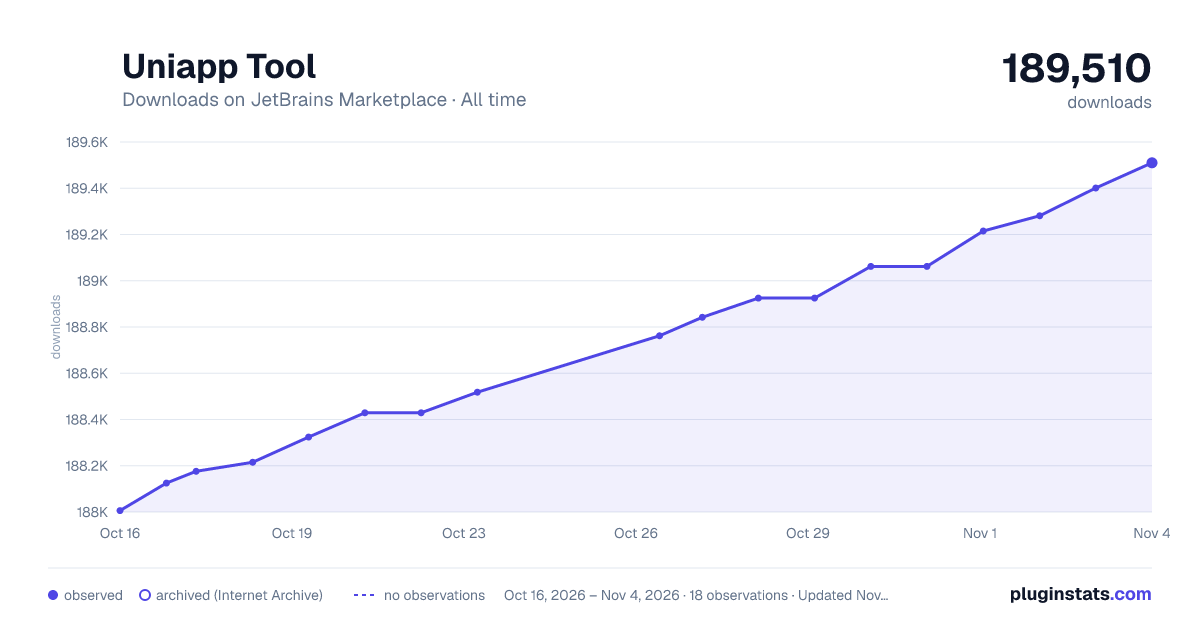
Adoption over time
7/30/90-day growth
Ranking history
Ratings over time
Listing placement
Listing placement
Listing placement
Filled points are observed values; hollow points come from Internet Archive snapshots of the listing page. Dashed segments span periods with no observations — values between points are not interpolated.
Each band is one page of 20. Downloads on a linear scale. Placement is projected from downloads, so it can differ from the marketplace's own sort order. Hover a dot to see the listing.
Recent observations
Full history (5)Similar JetBrains Marketplace Build plugins
All 20 Uniapp Tool alternatives



Data source
Cumulative download counts come from the public JetBrains Marketplace API. JetBrains reports downloads, not active installs. Ratings are the mean of public votes.
Listing: https://plugins.jetbrains.com/plugin/21470-uniapp-tool. First seen Oct 16, 2026; last successful collection Oct 20, 2026. See the methodology.