 PluginStats
Kronk CMS downloads statistics
By AIVory, Inc. · JetBrains Marketplace · AI
Kronk CMS turns your JetBrains IDE into a content workbench for static sites. Browse and edit Hugo, Jekyll, Astro, Eleventy, Next.js, Gatsby, Nuxt, Hexo, and Strapi...
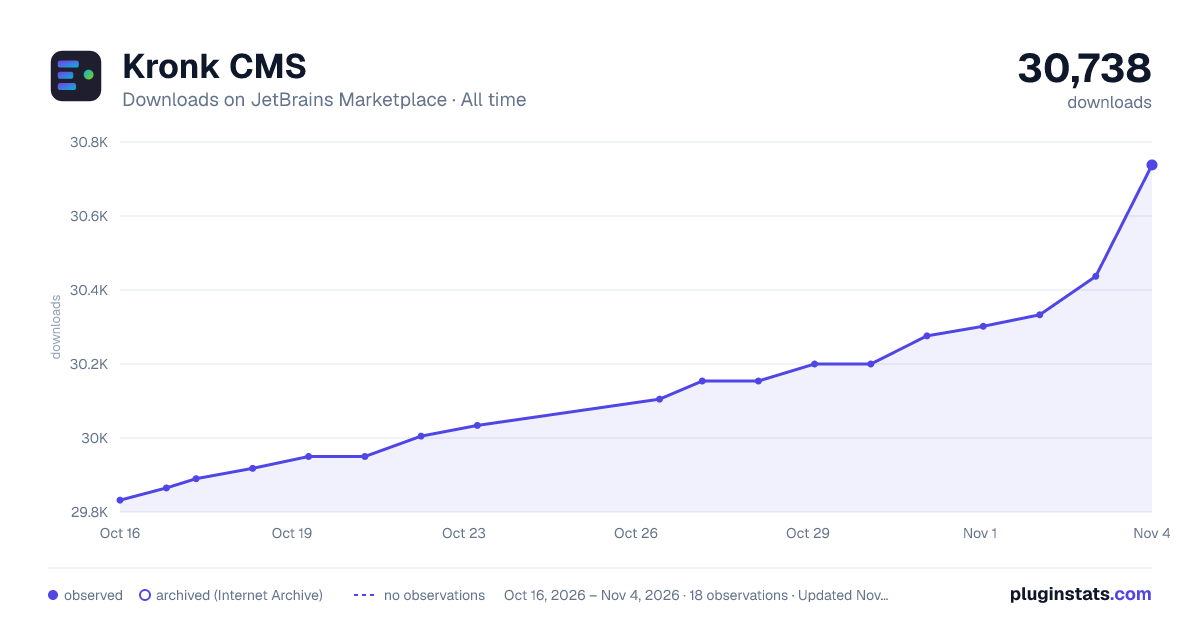
Kronk CMS has 29,950 recorded downloads on JetBrains Marketplace, ranking #1729 of 2,502 tracked listings.
Rating: 1.00 / 5 from 3 ratings
About Kronk CMS
Kronk CMS turns your JetBrains IDE into a content workbench for static sites. Browse and edit Hugo, Jekyll, Astro, Eleventy, Next.js, Gatsby, Nuxt, Hexo, and Strapi content, preview the site live, and let your own AI coding agent create content with quality guardrails.
Free, no account needed
These features work right after install, with no sign-up and no time limit:
• New project wizard: pick a goal, pick a generator, and Kronk creates the site. It installs Hugo, Node.js, or the Kronk CLI when one is missing, applies a theme, writes a sample post, starts git, and adds the AI guardrails. Also in the New Project dialog and on the Welcome screen of the IDE • Content tree: all collections, posts, and pages in one navigator • Content editor: form-based front matter editing, no YAML or TOML by hand • AI chat: talk to the AI CLI you already have (Claude Code, Codex, Gemini, Cursor, or Antigravity) next to your content, with project context attached • Page layout view: browse wireframes and component diagrams • Live preview: the Preview tab starts your dev server and reloads on save • Media gallery: browse the images and files of your site • Quality checks: SEO, accessibility, and performance findings for your content • Addon browser: search themes and plugins for your framework • Kronk CLI and MCP server: MIT licensed, npm install -g kronk-cms • Community support
The AI chat needs an AI CLI installed on your machine. The Kronk CLI is optional. It adds guardrails, skills, and the local agent that powers audits.
Pro: 4.90 per month or49 per year
• Scheduled publishing: Kronk rebuilds your site when a future-dated post is due • Deploy: deployment scripts, CI templates (GitLab, GitHub, Bitbucket, CircleCI), SSH and rsync • Image tools: optimization and conversion • Media sync: S3 and SFTP • Hosted media CDN: upload from the media gallery, get a public URL • Editorial workflow: submit a draft from the IDE, approve on the web, publish from the IDE • Addon install: one-click install and update • Priority support
Coming to Pro at no extra charge: git-based access management, team activity dashboard, branching and staging environments, additional users per project.
Try Pro for one hour per day without an account. A 7-day trial and a free Kronk account are available at https://getkronk.com/plans.
Getting started
• Install the plugin. Open a static site project, or create one: File, New, Kronk CMS Project. The Welcome screen and the New Project dialog have the same entry • Open the Content tool window on the right, pick a file, edit its front matter, press the Preview tab • Install an AI CLI, then ask the chat to create a post • Optional: npm install -g kronk-cms and run kronk init for guardrails and audits
If no supported project is open, the Kronk windows show what to do next.
Supported frameworks
FrameworkConfig detectionContent directoryPackage manager
Hugohugo.toml, hugo.yaml, config.tomlcontent/go modules
Jekyll_config.yml_posts/, _pages/gem
Astroastro.config.mjssrc/content/npm
Strapiconfig/database.jssrc/api/npm
Next.jsnext.config.jspages/, app/npm
Gatsbygatsby-config.jssrc/pages/npm
Eleventy.eleventy.js, eleventy.config.jssrc/, content/npm
Nuxtnuxt.config.js, nuxt.config.mjspages/, content/npm
Hexo_config.ymlsource/_posts/npm
Requirements
• IntelliJ IDEA 2023.3+ (Community or Ultimate), WebStorm, PhpStorm, RubyMine, PyCharm • An AI CLI agent (Claude Code, Codex, Gemini, Cursor, or Antigravity) for the chat features
Feedback
We are a two-person team and we read everything. Use the Send Feedback action in any Kronk tool window or in the Help menu, open an issue at https://github.com/aivorynet/kronk-jetbrains/issues, or write to support@kronkcms.com.
Description from the JetBrains Marketplace listing.
- AI
- Administration Tools
- CSS
- Code Editing
- Code Quality
- Code Tools
- Editor
- Folder
- Formatting
- Framework
- Miscellaneous
- Navigation
- User Interface
README badge
Show your rank in a README or on your website. The badge updates automatically.
Charts
Images: 30d · 1y · all time · 1600×900 dark
Adoption over time
7/30/90-day growth
Ranking history
Ratings over time
Listing placement
Listing placement
Listing placement
Filled points are observed values; hollow points come from Internet Archive snapshots of the listing page. Dashed segments span periods with no observations — values between points are not interpolated.
Each band is one page of 20. Downloads on a linear scale. Placement is projected from downloads, so it can differ from the marketplace's own sort order. Hover a dot to see the listing.
Recent observations
Full history (5)Similar JetBrains Marketplace AI plugins
All 20 Kronk CMS alternatives



Data source
Cumulative download counts come from the public JetBrains Marketplace API. JetBrains reports downloads, not active installs. Ratings are the mean of public votes.
Listing: https://plugins.jetbrains.com/plugin/29886-kronk-cms. First seen Oct 16, 2026; last successful collection Oct 20, 2026. See the methodology.