 PluginStats
Penstock downloads statistics
By Oleksandr Havrysh · JetBrains Marketplace · Editor
Penstock edits BPMN 2.0 diagrams, DMN decisions and Camunda forms for Camunda 7, Camunda 8 (Zeebe), Operaton, and CIB seven in your JetBrains IDE - a Camunda Modeler...
Penstock has 29,014 recorded downloads on JetBrains Marketplace, ranking #1777 of 2,502 tracked listings.
Rating: 5.00 / 5 from 3 ratings
About Penstock
Penstock edits BPMN 2.0 diagrams, DMN decisions and Camunda forms for Camunda 7, Camunda 8 (Zeebe), Operaton, and CIB seven in your JetBrains IDE - a Camunda Modeler that lives next to your code. Files with the .bpmn, .bpmn.xml, .bpmn20.xml, .dmn and .form extensions open in a visual modeler built on bpmn-js, next to the raw file in the same editor. Diagrams stay in the project and in version control, so process models are reviewed the same way as code.
Documentation and setup guides: kern0x1b.github.io/penstock-release. Bugs and feature requests: GitHub issues.
Penstock was previously published as "Camunda BPMN Editor". Same plugin, same vendor, new name - it updates in place and nothing needs to be reinstalled.
Features
• Five modeling profiles - Classic BPMN, Camunda 7, Camunda 8, Operaton, and CIB seven, selected per project and written to penstock.yaml. • Properties panel - edit element properties, including Camunda extension attributes. • Comments - a note on any element, kept in the file so it travels with it through git, with what is still open counted on the element. • Script editor - inline Groovy and JavaScript scripts open as regular IDE tabs with syntax highlighting and completion, and are written back into the diagram as you type (Camunda 7).
• Element templates - load Camunda 8 connector templates from the project, or browse connectors in the templates marketplace, downloaded on demand from GitHub to ~/.penstock/connectors.
• Deployment - deploy the open diagram to Camunda 7 REST or Camunda 8, with basic-auth or OAuth 2.0 credentials stored in the IDE password safe rather than in project files.
• Validation - bpmnlint runs against your own .bpmnlintrc and reports errors and warnings on the diagram.
• Problems in the IDE - the check also runs in the background with no diagram open, and its findings are in the IDE's own Problems window and in Code > Inspect Code, as an inspection you can switch off.
• Camunda 7 to Camunda 8 - see what does not carry over, convert a diagram with the visual diff before anything is written, and start job workers from your Java delegates. Analysis and the report are free; converting is Pro.
• Token simulation - step a token through the process to check the flow. • Trace paths - select a step and see every path that runs through it, the steps before and the steps after, with the rest of the diagram dimmed. Follow message flows to cross pools, and trace a decision in a requirements diagram to what it needs and what depends on it.
• DMN - decision tables, the requirements diagram and literal expressions, in the same editor, with a table you can run against values you type. • Forms - a Camunda form on the canvas with a live preview, the JSON it takes and the JSON it submits. • Monitor - the instances of the open diagram on your engine, what is waiting at each step, any incident, and an expression run against a real instance's variables. • Share and import - one offline HTML file with a viewer for the diagram and its documentation, and draw.io, Visio, Signavio and Bizagi diagrams turned into BPMN 2.0. • Export - SVG, PNG, and PDF. • Tool window - the processes, workers, messages, decisions, forms and element templates of the whole project, with every BPMN file in one tree. • MCP server - penstock mcp lets an AI agent list, read and check your diagrams for free across projects; flow analysis, scenarios, code links and editing need Pro, the same as from the command line. With the command line installed (npm install -g @kern0x1b/penstock-cli), in Claude Code: claude mcp add penstock -- penstock mcp.
• Visual Studio Code - the same editors, the same penstock.yaml and the same licence as an extension for VS Code, which also registers the MCP server with Copilot.
• Themes - follow the IDE, or pick Light, Dark or Dracula for the editor, plus an optional hand-drawn diagram style.
Penstock Pro
Everything above is free, and so is going from a Camunda 7 delegate to its class or bean. Pro adds what only Penstock does, and every new machine gets thirty days of it:
• Diagrams linked to the code - from a step to the worker that runs it and back, usages in code, Code Vision, variables and error codes checked across diagrams and code, tests run and debugged from the diagram, coverage on it, other repositories counted as part of the project, and Check Workers against the engine.
• Flow analysis - finds deadlocks, branches that run twice, steps that can never run and loops with no way out, and outlines the path that leads there on the diagram.
• Auto layout - reflows a tangled diagram into a readable left-to-right flow, with a preview before it is applied.
• Scenarios and documentation - every distinct way through a process with its conditions, and a page per process with its picture, steps, decisions, events and data.
• Test-case runs - Scenarios on the toolbar runs a process step by step against a local Camunda 7 or 8 engine, with mocks, and shows on the diagram what every step received, sent and changed. Test cases use Camunda Process Test's format and run in the IDE's test runner, and in CI with Team.
• Visual diagram diff in version control, and modelling conventions from penstock.yaml.
Team adds the review bot for pull and merge requests and the checks for CI. Buy from Tools | Penstock licence… - the licence arrives in the IDE by itself, with no key to copy.
Getting started
• Open a .bpmn, .dmn or .form file. It opens in its editor; the raw XML or JSON is the tab beside it, in the same editor tab strip.
• The first time a folder is opened, Penstock asks which engine runs it - Camunda 7, Camunda 8, Operaton, CIB seven or plain Classic BPMN. The answer is written to penstock.yaml in that folder, so it is shared with everyone who clones the project and with the command line. Edit that file, or run penstock init, to change it later.…
Description from the JetBrains Marketplace listing.
- Editor
- GUI Builder
README badge
Show your rank in a README or on your website. The badge updates automatically.
Charts
Images: 30d · 1y · all time · 1600×900 dark
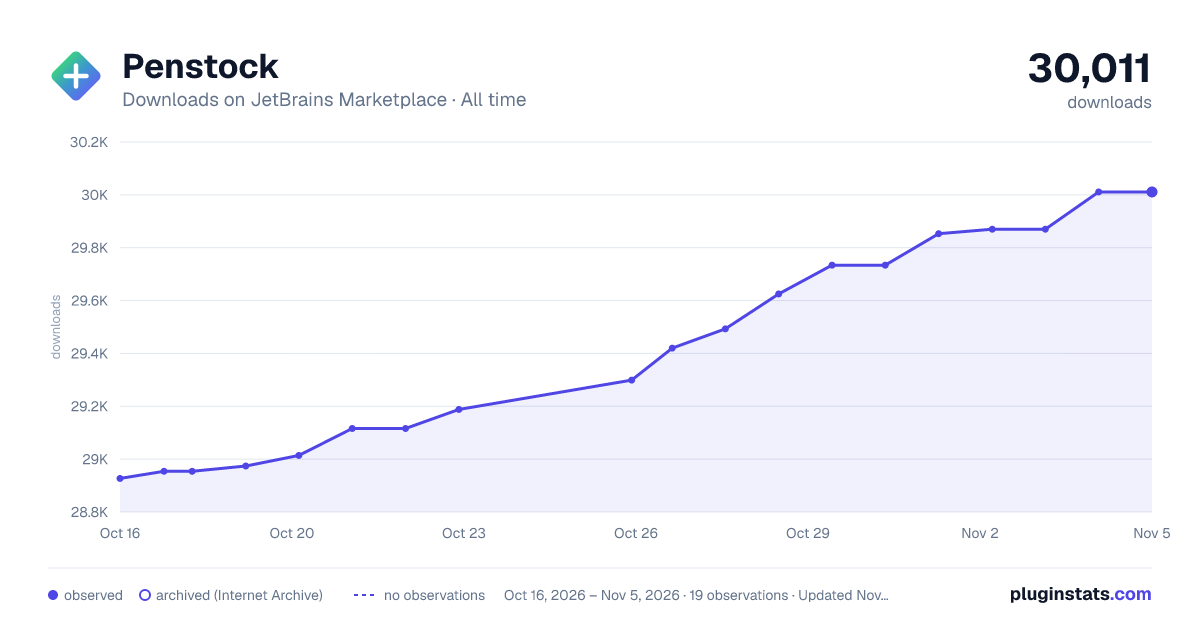
Adoption over time
7/30/90-day growth
Ranking history
Ratings over time
Listing placement
Listing placement
Filled points are observed values; hollow points come from Internet Archive snapshots of the listing page. Dashed segments span periods with no observations — values between points are not interpolated.
Each band is one page of 20. Downloads on a linear scale. Placement is projected from downloads, so it can differ from the marketplace's own sort order. Hover a dot to see the listing.
Recent observations
Full history (5)Similar JetBrains Marketplace Editor plugins
All 20 Penstock alternatives



Data source
Cumulative download counts come from the public JetBrains Marketplace API. JetBrains reports downloads, not active installs. Ratings are the mean of public votes.
Listing: https://plugins.jetbrains.com/plugin/25710-penstock. First seen Oct 16, 2026; last successful collection Oct 20, 2026. See the methodology.