 PluginStats
PDF Viewer downloads statistics
By Ivan Posti · JetBrains Marketplace · User Interface
IntelliJ PDF Viewer plugin adds support for viewing PDF files in IntelliJ-based IDEs. This plugin uses recently integrated (2020.2) CEF (Chromium Embedded Framework...
PDF Viewer has 408,087 recorded downloads on JetBrains Marketplace, ranking #474 of 2,502 tracked listings.
Rating: 4.45 / 5 from 31 ratings
About PDF Viewer
IntelliJ PDF Viewer plugin adds support for viewing PDF files in IntelliJ-based IDEs. This plugin uses recently integrated (2020.2) CEF (Chromium Embedded Framework) browser to render PDF documents with PDF.js library.
Features
• Document navigation • Integration with TeXiFy IDEA • Auto-refresh on document change • Text search • Document scaling • Thumbnail view • Sections list • Structure view • Presentation mode • Document information • Pages spread (even/odd) • Horizontal/vertical pages scroll directions • Customizable toolbar • Customizable dark mode • File watcher
All the settings can be found in Settings | Other settings | PDF Viewer.
Shortcuts
• Move editor up or down: up and down arrow keys. • Move editor right or left: right and left arrow keys. • Move to the next page: when the whole width of the page is in view, the right and left arrow keys will navigate to the next and previous page. • Zoom in: Ctrl + +, Ctrl + =. • Zoom out: Ctrl + - • Reset zoom: Ctrl + 0 • Enter presentation mode: Ctrl + Alt + p • Inverse search (LaTeX): Ctrl + Left click (can be customized in Settings | Keymap to other mouse shortcuts)
Feature Notes
• Text search will work only in text-based documents. For example, it won't work in all-images documents (books scans). • For the sections list or structure view to work documents should define sections list. Otherwise, sections view won't be active, and the structure view will be empty. • Right-click on a pdf to open it in PDFium, the default Chrome PDF viewer. If you do not see a context menu, it may help to go to Help > Find Action, search for Registry, set pdf.viewer.use.jcef.osr.view to false, and restart. See IJPL-59459 for more details. • To view pdfs in a Code With Me session, you may need to install the PDF viewer plugin (0.17.0 or later) in the client as well. This feature is still expirimental, for more info see CWM-1199. • When you have the pdf open in a separate window and you want inverse search to open the LaTeX file in the main window when it is not open yet, go to Settings > Advanced settings and enable "Open declaration source called from a detached window in the main IDE window" • You only need to enable the file watcher global setting if you are using some program to automatically update the pdf which is running in the terminal (or at least outside the IDE), since IntelliJ would not be triggered to look for file system changes. You do not need this setting when using TeXiFy.
Use cases
• Writing latex documents • Split-view code and documentation • Presentations with live-coding • ...
Providing Feedback
If you want to support PDF Viewer development, just give a star on GitHub or write a review on the marketplace page.
In case you encountered any bugs, feel free to create an issue.
Description from the JetBrains Marketplace listing.
- User Interface
- Viewer
README badge
Show your rank in a README or on your website. The badge updates automatically.
Charts
Images: 30d · 1y · all time · 1600×900 dark
Adoption over time
7/30/90-day growth
Ranking history
Ratings over time
Listing placement
Listing placement
Listing placement
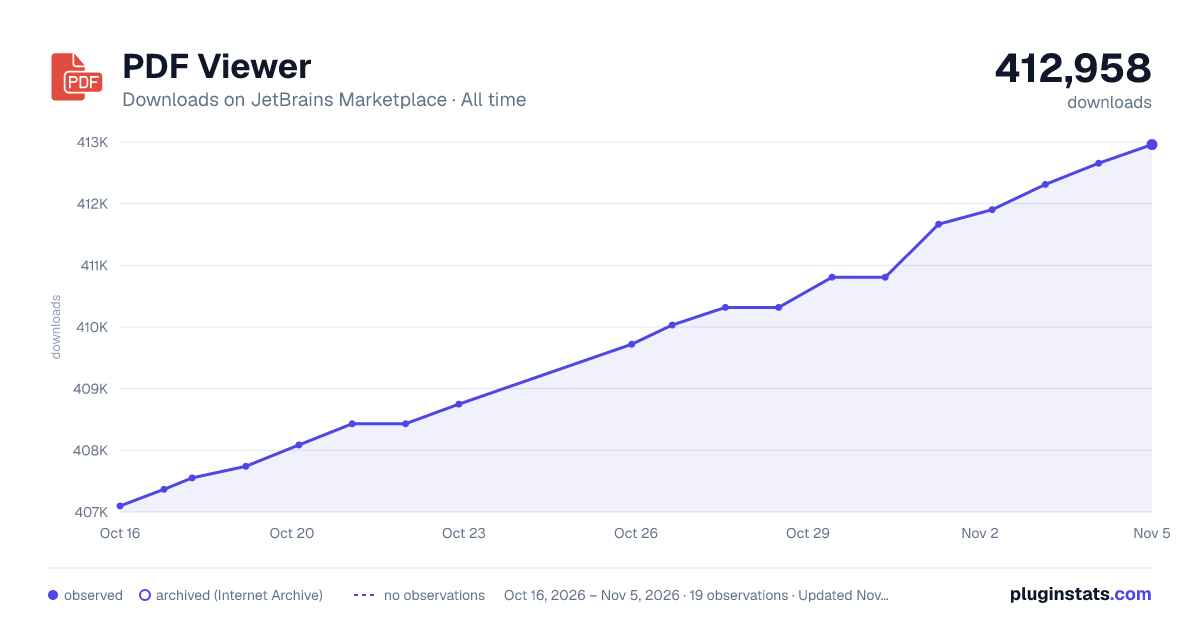
Filled points are observed values; hollow points come from Internet Archive snapshots of the listing page. Dashed segments span periods with no observations — values between points are not interpolated.
Each band is one page of 20. Downloads on a linear scale. Placement is projected from downloads, so it can differ from the marketplace's own sort order. Hover a dot to see the listing.
Recent observations
Full history (5)Similar JetBrains Marketplace User Interface plugins
All 20 PDF Viewer alternatives



PDF Viewer on other marketplaces
Data source
Cumulative download counts come from the public JetBrains Marketplace API. JetBrains reports downloads, not active installs. Ratings are the mean of public votes.
Listing: https://plugins.jetbrains.com/plugin/14494-pdf-viewer. First seen Oct 16, 2026; last successful collection Oct 20, 2026. See the methodology.