 PluginStats
Atlas downloads statistics
By Ariga · JetBrains Marketplace · Completion
Atlas is a modern schema management tool that streamlines database schema migrations through a declarative, Schema-as-Code approach. The Atlas plugin for JetBrains...
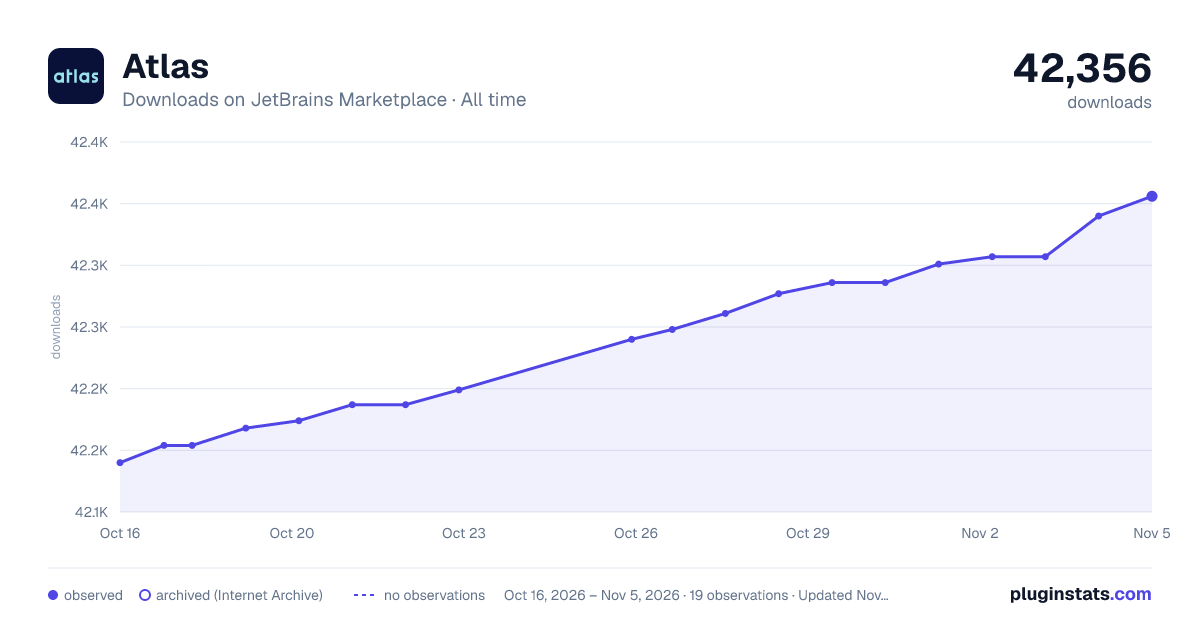
Atlas has 42,174 recorded downloads on JetBrains Marketplace, ranking #1434 of 2,502 tracked listings.
Rating: 5.00 / 5 from 4 ratings
About Atlas
Atlas is a modern schema management tool that streamlines database schema migrations through a declarative, Schema-as-Code approach. The Atlas plugin for JetBrains enhances your workflow with features like auto-completion for schemas, support for SQL dialects, qualified table referencing, and advanced linting capabilities.
How to Use the Plugin
By default, the plugin will recognize files with the name atlas.hcl.
Follow this file naming convention to help the plugin recognize the correct dialect:
• MySQL and MariaDB: *.my.hcl • PostgreSQL: *.pg.hcl • SQLite: *.lt.hcl • ClickHouse: *.ch.hcl • SQL Server: *.ms.hcl • Redshift: *.rs.hcl • Spanner: *.sp.hcl • Snowflake: *.sf.hcl • Atlas' test files: *.test.hcl • Migrate plan files: *.plan.hcl
Features
Auto-completion for schema resources
This refers to a feature that automatically suggests or completes the names of schema resources (e.g. tables, columns, etc.) as the user types, based on the database dialect being used. For a comprehensive list of the supported resources, please visit the following link: https://atlasgo.io/atlas-schema/hcl.
Syntax Highlighting
This refers to a feature that highlights syntax in a file based on the HashiCorp Configuration Language (HCL) syntax.
Txtar Support
The plugin provides syntax highlighting support for txtar files. Features include:
• Syntax highlighting for file markers, filenames, and comments • Language injection for file contents based on filename • Customizable comment language via Settings > Languages & Frameworks > Atlas (default is Shell script)
Referencing Qualified tables
This refers to a feature that allows for referencing tables and their columns in a structured manner, either relative to the current location (e.g. column.id) or absolute to the table (e.g. table.user.column.id).
Linting
The tool provides linting capabilities, including duplicate resources/attributes, required attributes, and resource hierarchy validation.
Module Paths Configuration
Configure paths to Atlas modules for cross-module references. This feature allows schema files to reference schema definitions outside their immediate directory scope.
To configure module paths:
• Go to Settings > Languages & Frameworks > Atlas • Under the Module Paths section, use the + button to add directories • Enter either a relative path (resolved against project root) or absolute path to a directory that should be treated as a module root
How it works:
• By default, schema files can only reference resources within their current directory • Adding a parent directory as a module path allows files in subdirectories to reference each other • For example, with a structure like: /home/user/projects/atlas-project ├── schema.hcl ├── tables/ │ └── users.hcl └── views/ └── user_views.hcl
• Adding /home/user/projects/atlas-project as a module path enables views/user_views.hcl to reference resources defined in tables/users.hcl or schema.hcl
This configuration is particularly useful in large projects with schema definitions split across multiple directories for better organization.
Need help? File issues on the Atlas Issue Tracker or join our Discord server.
Description from the JetBrains Marketplace listing.
- Completion
- Database
- Formatting
README badge
Show your rank in a README or on your website. The badge updates automatically.
Charts
Images: 30d · 1y · all time · 1600×900 dark
Adoption over time
7/30/90-day growth
Ranking history
Ratings over time
Listing placement
Listing placement
Listing placement
Listing placement
Filled points are observed values; hollow points come from Internet Archive snapshots of the listing page. Dashed segments span periods with no observations — values between points are not interpolated.
Each band is one page of 20. Downloads on a linear scale. Placement is projected from downloads, so it can differ from the marketplace's own sort order. Hover a dot to see the listing.
Recent observations
Full history (5)Similar JetBrains Marketplace Completion plugins
All 20 Atlas alternatives



Atlas on other marketplaces
Data source
Cumulative download counts come from the public JetBrains Marketplace API. JetBrains reports downloads, not active installs. Ratings are the mean of public votes.
Listing: https://plugins.jetbrains.com/plugin/22307-atlas. First seen Oct 16, 2026; last successful collection Oct 20, 2026. See the methodology.