 PluginStats
Aikido Security downloads statistics
By Aikido Security (3 listings) · JetBrains Marketplace · Security
Aikido Security Extension for Jetbrains IDE Secure code as it’s written (and generated). Real-time static analysis (SAST), secrets, and open-source dependency (SCA...
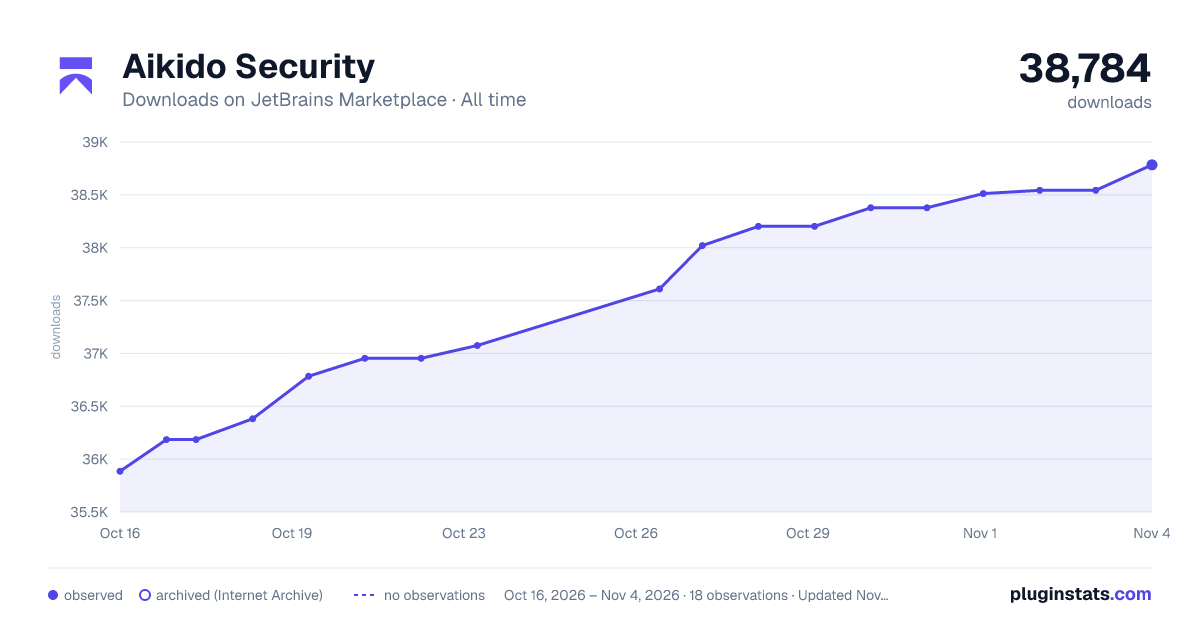
Aikido Security has 36,954 recorded downloads on JetBrains Marketplace, ranking #1527 of 2,502 tracked listings.
Rating: 5.00 / 5 from 6 ratings
About Aikido Security
Aikido Security Extension for Jetbrains IDE
Secure code as it’s written (and generated). Real-time static analysis (SAST), secrets, and open-source dependency (SCA) scanning, plus AI AutoFix for one-click fixes so you can address issues before they reach PRs.
Requirements
• Free Aikido Account
What it does
• Real-time scanning on open/save for code security problems, secrets, and open source dependency vulnerabilities. Findings appear inline, in sidebar and with hover details for fast triage. • AI AutoTriage noise reduction: Aikido prioritizes and de-emphasizes issues based on reachability/ and impact. • AI AutoFix in the IDE: When a fix is available, preview and apply a safe change for supported SAST and SCA findings, without leaving VS Code. • Policy-aware and custom SAST results in the IDE ensure workspace severities, ignores, and Aikido-defined custom SAST rules are applied so developers see the most relevant issues first.
Usage
Install & authenticate
• Install the Aikido extension. • Connect to Aikido by entering your PAT • Create a token in Aikido and paste it when prompted. • You’re ready to scan! Issues will be highlighted as you edit.
Scanning
The integration scans your codebase for secrets, API keys, SAST code issues and open-source dependency vulnerabilities. It runs scans whenever you open or save a file.
Every time you make and save changes in a file, a scan runs. If any issues are detected, they are highlighted in the editor and Aikido sidebar. When you hover over a detected SAST issue, additional context about the problem is provided.
Aikido AI AutoFix and AutoTriage
For supported SAST and SCA issues, Aikido will provide the option to assess the issue’s impact with AI AutoTriage, and optionally apply a code fix with AI AutoFix. This fix is applied directly in IDE.
How to test this extension
If this is your first time using this extension and you want to explore its capabilities, we suggest testing it with our example file below.
• Create a folder on your local machine. • Open this folder in your IDE. • Within this workspace, create a file containing the code you want to scan. • Save the file. • Any identified issues will appear as highlights in the editor and in the Problems panel below.
Below you can find an example index.js file that can be used to verify if the extension is working correctly, it should detect one SAST issue (SQL injection) and one exposed secret (Stripe Access Token).
const app = {}
app.get("/payments", (req, res) => { const PW = "sk_live_fakestripeapikeyleaked12" res.status(200).send(STRIPE_API_KEY) })
app.get("/user", (req, res) => {
const username = req.query.username
const unsafeQuery = SELECT * FROM users WHERE username = '${username}'
db.query(unsafeQuery, (err, result) => {
res.status(200).send(result)
})
})
Commands
Execute Aikido Plugin Actions by clicking on the Aikido icon in the lower left.
• Connect to Aikido: Enter an access token to connect with the Aikido Platform. • Disconnect from Aikido: Clears your access token. • Reload rules: Fetches all SAST rules from the Aikido Platform. Useful when you add new custom rules.
How does the extension perform scans on a repository
The integration does three types of scanning: secret, SAST and open-source dependency scanning. It uses Aikido-defined rules, supplemented by any custom rules you add to Aikido. The integration then processes any results to check for false positives or ignored issues.
How does the extension connect to Aikido
Using the access token that you provided, the extensions will connect and detect the matching repository in Aikido using the Git remote URL or the name of the project folder.
Description from the JetBrains Marketplace listing.
- Security
README badge
Show your rank in a README or on your website. The badge updates automatically.
Charts
Images: 30d · 1y · all time · 1600×900 dark
Adoption over time
7/30/90-day growth
Ranking history
Ratings over time
Listing placement
Listing placement
Filled points are observed values; hollow points come from Internet Archive snapshots of the listing page. Dashed segments span periods with no observations — values between points are not interpolated.
Each band is one page of 20. Downloads on a linear scale. Placement is projected from downloads, so it can differ from the marketplace's own sort order. Hover a dot to see the listing.
Recent observations
Full history (6)Similar JetBrains Marketplace Security plugins
All 20 Aikido Security alternatives



Aikido Security on other marketplaces
Data source
Cumulative download counts come from the public JetBrains Marketplace API. JetBrains reports downloads, not active installs. Ratings are the mean of public votes.
Listing: https://plugins.jetbrains.com/plugin/24993-aikido-security. First seen Oct 16, 2026; last successful collection Oct 21, 2026. See the methodology.