 PluginStats
PolyBPMN visualizer downloads statistics
By GD Next GmbH · JetBrains Marketplace · Editor
PolyBPMN plugin for IntelliJ IDEA is a visualiser for BPMN diagrams with navigation and process debugging support. It supports editing and visualising BPMN diagrams...
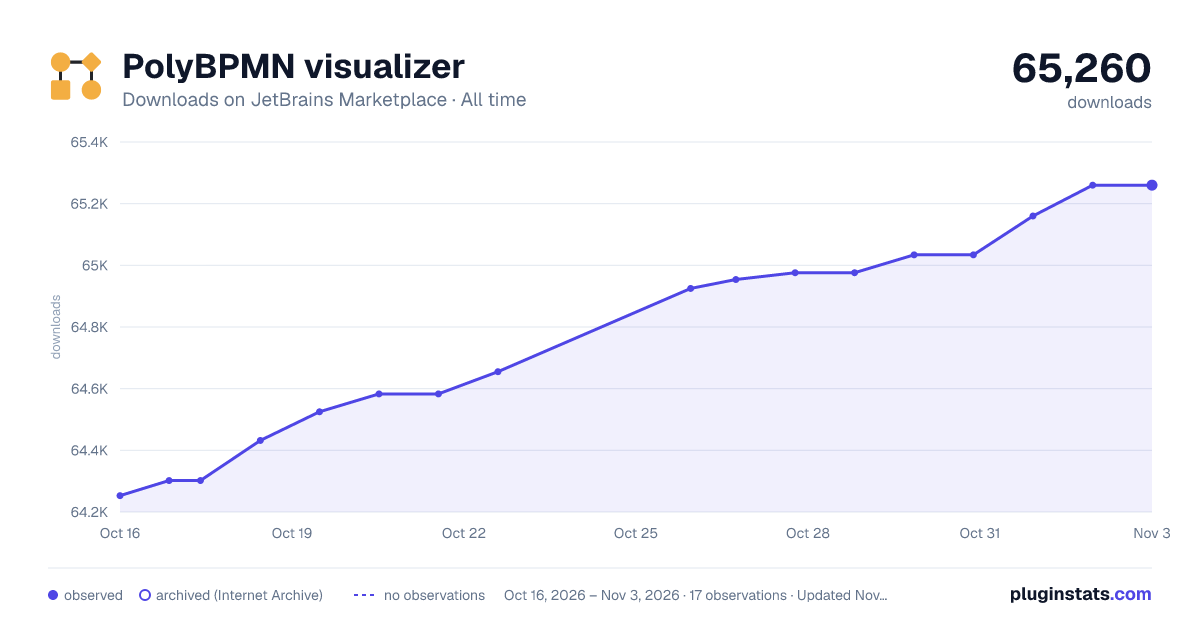
PolyBPMN visualizer has 64,525 recorded downloads on JetBrains Marketplace, ranking #1156 of 2,502 tracked listings.
Rating: 5.00 / 5 from 8 ratings
About PolyBPMN visualizer
PolyBPMN plugin for IntelliJ IDEA is a visualiser for BPMN diagrams with navigation and process debugging support. It supports editing and visualising BPMN diagrams created in such modellers as Activiti, Camunda, and Flowable.
We are waiting for your feedback, found issues, new proposals to improve the plugin, so that it becomes better and fits all your needs. Key features:
• Create and edit BPMN XML files. • IntelliJ IDEA tips (class, expression, delegate expression). • Jump from modeller element to XML element. • Smoothly change the shape of diagrams. • Multi-dialect support (Camunda, Flowable, Activiti). • Comparison of BPMN files with previous versions (works with Git). • Embedded diagram window with controls inside XML file editor. • Support for three editing modes: BPMN file, BPMN modeller, and split view.
Shortcuts:
• Ctrl/Cmd and Y: Redo • Ctrl/Cmd and Z: Undo • Ctrl/Cmd and C: Copy • Ctrl/Cmd and X: Cut • Ctrl/Cmd and V: Paste • Shift and N: Open a context menu • Ctrl/Cmd and +: Zoom in • Ctrl/Cmd and -: Zoom out • Delete or Backspace: Delete selected element • Arrow keys: Move the canvas • Hold shift key plus left click mouse to move round canvas • Ctrl and scrolling mouse or touchpad: Change layer in match mode
Description from the JetBrains Marketplace listing.
- Editor
- Modeling and CASE tools
- Productivity
- User Interface
README badge
Show your rank in a README or on your website. The badge updates automatically.
Charts
Images: 30d · 1y · all time · 1600×900 dark
Adoption over time
7/30/90-day growth
Ranking history
Ratings over time
Listing placement
Listing placement
Listing placement
Listing placement
Filled points are observed values; hollow points come from Internet Archive snapshots of the listing page. Dashed segments span periods with no observations — values between points are not interpolated.
Each band is one page of 20. Downloads on a linear scale. Placement is projected from downloads, so it can differ from the marketplace's own sort order. Hover a dot to see the listing.
Recent observations
Full history (5)Similar JetBrains Marketplace Editor plugins
All 20 PolyBPMN visualizer alternatives



Data source
Cumulative download counts come from the public JetBrains Marketplace API. JetBrains reports downloads, not active installs. Ratings are the mean of public votes.
Listing: https://plugins.jetbrains.com/plugin/21361-polybpmn-visualizer. First seen Oct 16, 2026; last successful collection Oct 20, 2026. See the methodology.