 PluginStats
Nginx Configuration Pro downloads statistics
By meanmail.dev (8 listings) · JetBrains Marketplace · Code Editing
Nginx Configuration Pro is an IDE-native nginx security analyzer and config linter. It audits your nginx.conf against a Gixy-parity check set, warns about CVEs...
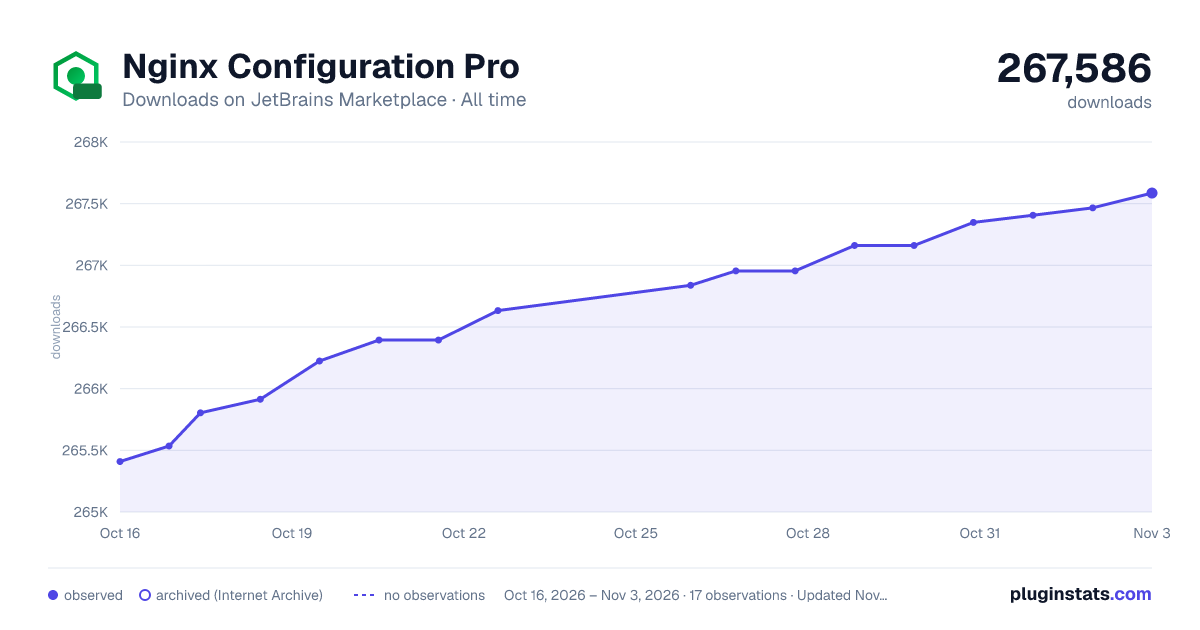
Nginx Configuration Pro has 266,394 recorded downloads on JetBrains Marketplace, ranking #569 of 2,502 tracked listings.
Rating: 5.00 / 5 from 1 ratings
About Nginx Configuration Pro
Nginx Configuration Pro is an IDE-native nginx security analyzer and config linter. It audits your nginx.conf against a Gixy-parity check set, warns about CVEs affecting the target nginx version, and flags ReDoS-prone regex patterns — while you type, with one-click fixes, and without leaving the IDE.
Built-in Nginx Security Analyzer
• Gixy-parity security audit — full parity with Gixy-Next 0.3.4: all 38 upstream checks implemented plus regex_redos as a separate heuristic inspection. Covers alias_traversal, explicit client-derived Host forwarding, response-header splitting, upstream header injection, unsafe redirects and proxy targets, if_is_evil, origins/CORS validators (wildcard + credentials, $http_referrer typo, missing regex anchors, unescaped hostname dots), hsts_header (weak max-age, missing includeSubDomains, http-level inheritance), ssrf, ssl_stapling_without_resolver, weak_ssl_tls, version_disclosure, add_header_redefinition, proxy_pass_normalized, quic_bpf_reuseport, http2_misdirected_request, stale_dns_cache, unanchored_regex, invalid_regex, and more.
• CVE advisor inspection — uses the project's target nginx version by default and accepts an installed-version override in the inspection settings. It reports CVEs affecting the effective version, with config-trigger pattern matching where relevant: CVE-2026-9256, CVE-2026-42945 (NGINX Rift, rewrite-rift trigger), CVE-2026-42946 (scgi/uwsgi), CVE-2026-40460 (HTTP/3), CVE-2021-23017 (resolver), CVE-2019-9511, CVE-2024-7347 (mp4), CVE-2022-41741 (mp4), CVE-2017-7529.
• ReDoS detection — a dedicated heuristic analyzer parses regex patterns from location /, if regex conditions, map source values with /, and the rewrite pattern, and flags nested unbounded quantifiers (exponential (a+)+), overlapping alternatives inside a quantified group (polynomial (a|ab)+), and adjacent broad greedy quantifiers (polynomial .*.*end).
• Extra checks beyond Gixy — CVE matching, SSL certificate path existence, autoindex on exposure, CORS wildcard combined with credentials, HTTPS→HTTP downgrade, open-proxy patterns, and generic security-header checks.
Catch Errors Before They Reach Production
• 30 inspections, most with quick fixes — choose a project target under Settings | Tools | Nginx Pro | Inspections (nginx 1.31.3 by default) or the Nginx Operations tool window; this target is used for inspections only and does not affect runtime instance selection. The setting controls wrong-context checks, invalid parameters, missing semicolons, undefined upstreams and variables, SSL best practices, deprecated listen parameters, performance checks, and the security analyzer above. Validates 1090+ directives from the built-in catalog. • Run nginx -t from the IDE — the Nginx Operations tool window validates every nginx root config in your project against a local nginx binary or any running Docker container, shows results in a per-root tree with clickable error hyperlinks, switches environments from a single selector, and exposes error logs, access logs, and reported modules with their type and conservative availability in dedicated tabs. • Context-aware autocomplete — suggests only directives valid in the current block. Completes upstream names in proxy_pass, paths in include, and variable names. • Quick documentation — hover over any directive or variable to see its description, allowed contexts, and a link to official nginx docs.
Navigate and Refactor with Confidence
• Go to Definition — Ctrl+Click on include paths, upstream names, variables, and named locations. Supports glob patterns in includes. • Find Usages — see where any upstream, variable, or named location is referenced across your project. • Rename — rename upstreams, variables, and named locations with automatic reference updates across all config files. • Safe Delete — checks usages before removing upstreams or files. • Breadcrumbs — always see where you are: http > server > location /api.
Write Configs Faster
• 30+ live templates — type proxy + Tab for a reverse proxy block, ssl + Tab for SSL config. Covers WebSocket, PHP-FPM, static files, CORS, rate limiting, caching, and more. • Intentions — extract blocks to include files, inline includes, convert listen to IPv6, add SSL redirects — all via Alt+Enter. • Code formatting — reformat entire configs with column alignment in map, geo, and types blocks.
Beyond Standard Nginx
• Custom directives — define your own directives with allowed contexts and parameter descriptions. Share definitions with your team via Settings > Tools > Nginx Custom Directives. • Docker support — recognizes *.conf.template files with ${VARNAME} envsubst placeholders. • Third-party modules — OpenResty (Lua, Echo, Headers More), Brotli, MaxMind GeoIP2. • Lua blocks — built-in highlighting, syntax errors, matching brackets and folding inside content_by_lua_block and similar directives. An installed Lua plugin takes priority.
Getting Started
• Install the plugin and open any .conf or nginx.conf file — inspections and autocomplete work immediately • Open the Nginx Operations tool window and click Validate to run nginx -t on every root config — pick a local binary or a running Docker container in the environment selector • Try Ctrl+Click on an include path or upstream name to navigate • Type proxy + Tab inside a location block to insert a reverse proxy template
Links
• Documentation • Report an issue • Other plugins by meanmail
Privacy
No automatic plugin usage analytics, analytics identity, or queued event uploads. The inspection suggestion stores only a local shown flag. Error reports are submitted explicitly; JetBrains licensing remains in place.
Description from the JetBrains Marketplace listing.
- Code Editing
- Code Tools
- Completion
- Inspection
- Navigation
- Programming Language
- Web
README badge
Show your rank in a README or on your website. The badge updates automatically.
Charts
Images: 30d · 1y · all time · 1600×900 dark
Adoption over time
7/30/90-day growth
Ranking history
Ratings over time
Listing placement
Listing placement
Listing placement
Listing placement
Filled points are observed values; hollow points come from Internet Archive snapshots of the listing page. Dashed segments span periods with no observations — values between points are not interpolated.
Each band is one page of 20. Downloads on a linear scale. Placement is projected from downloads, so it can differ from the marketplace's own sort order. Hover a dot to see the listing.
Recent observations
Full history (6)Similar JetBrains Marketplace Code Editing plugins
All 20 Nginx Configuration Pro alternatives



Data source
Cumulative download counts come from the public JetBrains Marketplace API. JetBrains reports downloads, not active installs. Ratings are the mean of public votes.
Listing: https://plugins.jetbrains.com/plugin/18280-nginx-configuration-pro. First seen Oct 16, 2026; last successful collection Oct 21, 2026. See the methodology.