 PluginStats
EditorJumper downloads statistics
By wanniwa · JetBrains Marketplace · Folder
2.1.0 EditorJumper EditorJumper is a plugin that enables seamless switching between different editors, automatically opening the same project and file while preserving...
EditorJumper has 71,879 recorded downloads on JetBrains Marketplace, ranking #1086 of 2,502 tracked listings.
Rating: 5.00 / 5 from 11 ratings
About EditorJumper
2.1.0
EditorJumper
EditorJumper is a plugin that enables seamless switching between different editors, automatically opening the same project and file while preserving cursor position. This allows for instant context-aware transitions between editors:
• Jump from JetBrains IDE to VSCode • Jump from JetBrains IDE to Trae|Trae CN • Jump from JetBrains IDE to Cursor • Jump from JetBrains IDE to Windsurf • Jump from JetBrains IDE to Void • Jump from JetBrains IDE to Kiro • Jump from JetBrains IDE to Qoder • Jump from JetBrains IDE to CatPaw • Jump from JetBrains IDE to Antigravity • Jump from JetBrains IDE to CodeBuddy|CodeBuddy CN
Smart Jump Behavior:
• With file open: Opens the same project and file, preserving cursor position • Without file open: Opens the project directly in target editor • Supports workspace files (.code-workspace) for multi-root projects
Multiple ways to trigger jump:
• Right-click in editor - select "Open in [Editor Name]" (name updates based on selected editor) • Tools menu - select "Open in [Editor Name]" (name updates based on selected editor) • Keyboard shortcut - use Alt+Shift+O / Option+Shift+O (macOS) • Ultra-fast jump - use Alt+Shift+P / Option+Shift+P (all platforms supported)
Keyboard Shortcuts Comparison:
Usage Scenario Alt+Shift+O / Option+Shift+O Alt+Shift+P / Option+Shift+P
On Project Folder Ultra-fast project opening Ultra-fast project opening
On Specific File Automatically opens project + file Faster on Mac (requires project opened first, otherwise opens single file), no difference on Windows
Recommendations:
• Windows users: Use Alt+Shift+O (sufficient for all needs) • Mac users: Use Option+Shift+O, experienced users can use Option+Shift+P for faster experience
Easy target editor selection:
• Status bar widget - click the jump icon to select which editor to jump to
Configuration Notes:
• macOS: No additional configuration needed for any editor • Windows: • Cursor/Qoder: No configuration needed (uses system PATH) • Other editors: Configure the .exe file path in Settings
Configuration Interface:
• Default Editor: Select which editor to use when using keyboard shortcuts • Editor Paths: • macOS: All paths are auto-detected, no manual configuration needed • Windows: • Cursor/Qoder: Auto-detected through system PATH • VS Code/Trae/Windsurf/Void/Kiro: Browse and select the .exe file location • Example: C:\Users\username\AppData\Local\Programs\VSCode\Code.exe • Project Settings: • VSCode Workspace: Configure project-specific VSCode workspace file (.code-workspace)
System Requirements:
• Works with any JetBrains IDE (IntelliJ IDEA, WebStorm, PyCharm, etc.) • Requires IDE version 2023 or newer
Recommended Plugin:
• Recommended to use with EditorJumper-V for quick return to JetBrains IDE from other editors
中文说明
EditorJumper 是一个能够在不同编辑器之间无缝切换的插件,自动打开相同的项目和文件,同时保持光标位置。这使得在编辑器之间的上下文感知转换变得即时且高效:
• 从 JetBrains IDE 跳转到 VSCode • 从 JetBrains IDE 跳转到 Trae|Trae CN • 从 JetBrains IDE 跳转到 Cursor • 从 JetBrains IDE 跳转到 Windsurf • 从 JetBrains IDE 跳转到 Void • 从 JetBrains IDE 跳转到 AWS Kiro • 从 JetBrains IDE 跳转到 Qoder • 从 JetBrains IDE 跳转到 CatPaw • 从 JetBrains IDE 跳转到 Antigravity • 从 JetBrains IDE 跳转到 CodeBuddy|CodeBuddy CN
智能跳转行为:
• 有文件打开时:打开相同的项目和文件,保持光标位置 • 无文件打开时:直接在目标编辑器中打开项目 • VSCode:支持多根项目的工作空间文件 (.code-workspace)
多种触发跳转方式:
• 在编辑器中右击 - 选择"在 [编辑器名称] 中打开"(名称会根据选择的编辑器更新) • 工具菜单 - 选择"在 [编辑器名称] 中打开"(名称会根据选择的编辑器更新) • 快捷键 - 使用 Alt+Shift+O / Option+Shift+O • 极速跳转 - 使用 Alt+Shift+P / Option+Shift+P
快捷键对比说明:
使用场景 Alt+Shift+O / Option+Shift+O Alt+Shift+P / Option+Shift+P
在项目文件夹上 极速打开项目 极速打开项目
在具体文件上 自动打开项目+文件 mac更快(但需要先打开项目,否则只会打开单个文件),windows无差别
使用建议:
• Windows 用户:使用 Alt+Shift+O 即可(满足所有需求) • Mac 用户:使用 Option+Shift+O,熟悉之后想要更快速的体验用 Option+Shift+P
便捷的目标编辑器选择:
• 状态栏小部件 - 点击跳转图标选择要跳转到哪个编辑器
配置说明:
• macOS:所有编辑器无需额外配置 • Windows: • Cursor/Qoder:无需配置(使用系统 PATH) • 其他编辑器:需在设置中配置 .exe 文件路径
系统要求:
• 适用于任何 JetBrains IDE(IntelliJ IDEA、WebStorm、PyCharm 等) • 需要 IDE 版本 2023 或更新版本
推荐插件:
• 建议与 EditorJumper-V 配合使用,以便从其他编辑器快速返回 JetBrains IDE
Description from the JetBrains Marketplace listing.
- Folder
- Tools Integration
README badge
Show your rank in a README or on your website. The badge updates automatically.
Charts
Images: 30d · 1y · all time · 1600×900 dark
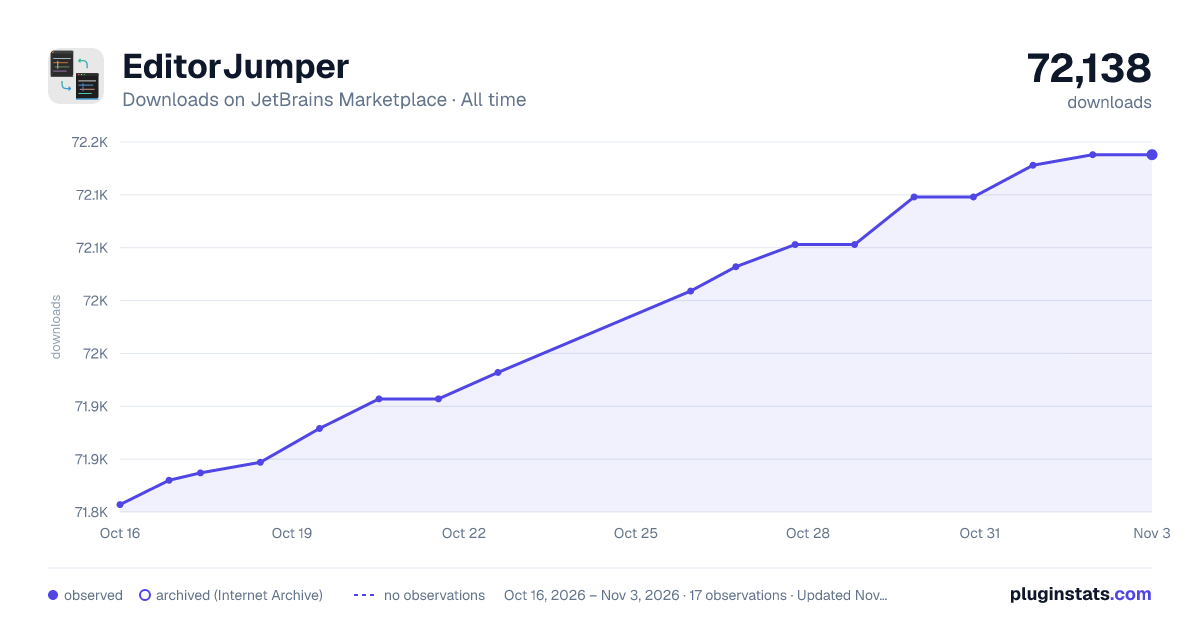
Adoption over time
7/30/90-day growth
Ranking history
Ratings over time
Listing placement
Listing placement
Listing placement
Filled points are observed values; hollow points come from Internet Archive snapshots of the listing page. Dashed segments span periods with no observations — values between points are not interpolated.
Each band is one page of 20. Downloads on a linear scale. Placement is projected from downloads, so it can differ from the marketplace's own sort order. Hover a dot to see the listing.
Recent observations
Full history (5)Similar JetBrains Marketplace Folder plugins
All 20 EditorJumper alternatives



Data source
Cumulative download counts come from the public JetBrains Marketplace API. JetBrains reports downloads, not active installs. Ratings are the mean of public votes.
Listing: https://plugins.jetbrains.com/plugin/26824-editorjumper. First seen Oct 16, 2026; last successful collection Oct 20, 2026. See the methodology.