 PluginStats
VimMulticursor downloads statistics
By Daniil Voidilov · JetBrains Marketplace · Code Editing
This plugin adds multiple cursor and selection capabilities to IdeaVim Installation & Setup Install the plugin:Open IntelliJ IDEAGo to Settings/Preferences...
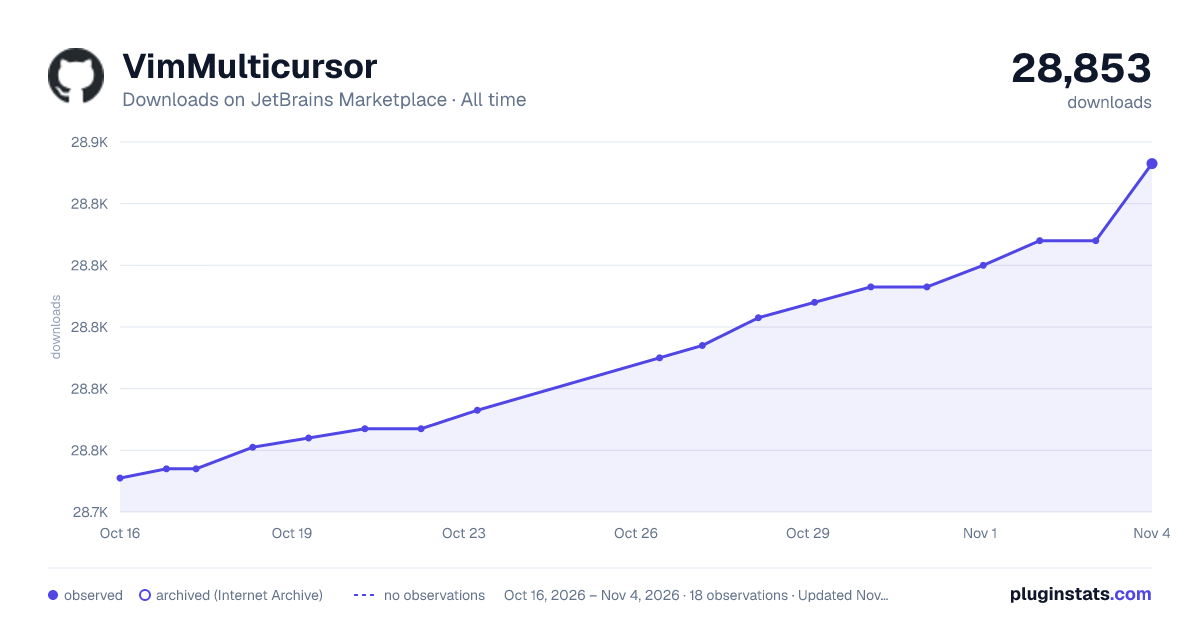
VimMulticursor has 28,767 recorded downloads on JetBrains Marketplace, ranking #1790 of 2,502 tracked listings.
Rating: 3.17 / 5 from 6 ratings
About VimMulticursor
This plugin adds multiple cursor and selection capabilities to IdeaVim
Installation & Setup
• Install the plugin: • Open IntelliJ IDEA • Go to Settings/Preferences → Plugins → Marketplace • Search for "VimMulticursor" • Click Install and restart your IDE • Enable the plugin: • Add the following line to the top of your ~/.ideavimrc file:set multicursor • Reload IdeaVim settings (:action IdeaVim.ReloadVimRc)
Commands
Basic Usage
• mc + command: Create multiple cursors • ms + command: Create multiple selections • All commands work within selected text when there's an active selection
Available Commands
• mc/ + search: Add cursors at all occurrences of search regex. • mcfx, mcFx: Add cursors at all occurrences of character x. • mcw, mcW, mcb, mcB: Add cursors at words start. • mce, mcE: Add cursors at words end. • mcaw: Around word • mca + bracket: Around bracket, like mca(/mcab, mca{/mcaB, mca", etc • mci + bracket: Inside bracket, like mci(/mcib, mci{/mciB, mci", etc • mcaa/mcia: any bracket
Cursor Management
• mcc: Add or remove a cursor highlight at the current position (preview mode) • mcr: Convert cursor highlights to active editing cursors • mcd: Remove all cursors and highlights • mcia: Place cursors inside any brackets or quotes ((), [], {}, "", '', ``) • mcaa: Place cursors around any brackets or quotes • mcaw: Add cursors at word boundaries (at the start and end of current word)
The mcia and mcaa commands automatically find the nearest matching pair of delimiters around the cursor, handling proper nesting and matching of brackets/quotes.
Examples
• Select all occurrences of "print":
ms/print<Enter>
• Create cursors at each word start in selection:
msw
• Add cursors at specific positions: • Move cursor to desired position • Type mcc to add a cursor highlight • Repeat for more positions • Type mcr to convert highlights into editing cursors
Optional Key Mappings
Add these to your ~/.ideavimrc for faster access:
" Quick search-select map q <Plug>(multicursor-ms/)
" Quick cursor add/apply map z <Plug>(multicursor-mcc) map Z <Plug>(multicursor-mci)
" Word-based selections map <leader>w <Plug>(multicursor-msw) map <leader>b <Plug>(multicursor-msb)
Troubleshooting
• Commands not working? • Ensure set multicursor is at the top of .ideavimrc • Restart IdeaVim after changes • Check if IdeaVim plugin is enabled • Cursors not appearing? • Ensure you are in normal mode • Try clearing all cursors with mcd • If issues persist, restart your IDE
Description from the JetBrains Marketplace listing.
- Code Editing
README badge
Show your rank in a README or on your website. The badge updates automatically.
Charts
Images: 30d · 1y · all time · 1600×900 dark
Adoption over time
7/30/90-day growth
Ranking history
Ratings over time
Listing placement
Listing placement
Filled points are observed values; hollow points come from Internet Archive snapshots of the listing page. Dashed segments span periods with no observations — values between points are not interpolated.
Each band is one page of 20. Downloads on a linear scale. Placement is projected from downloads, so it can differ from the marketplace's own sort order. Hover a dot to see the listing.
Recent observations
Full history (7)Similar JetBrains Marketplace Code Editing plugins
All 20 VimMulticursor alternatives



Data source
Cumulative download counts come from the public JetBrains Marketplace API. JetBrains reports downloads, not active installs. Ratings are the mean of public votes.
Listing: https://plugins.jetbrains.com/plugin/19162-vimmulticursor. First seen Oct 16, 2026; last successful collection Oct 22, 2026. See the methodology.