 PluginStats
Font Detector – What font is this? users statistics
Chrome Web Store · Developer Tools
Font Detector is a fast and free font finder tool that helps you identify any font on a webpage instantly. What font is used here?
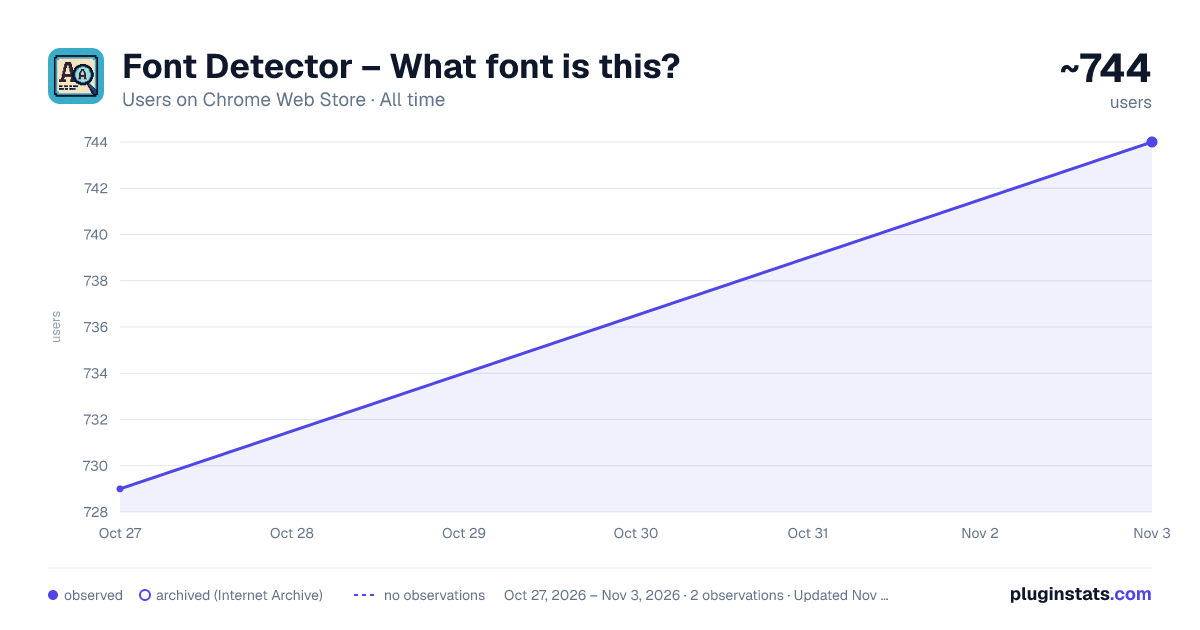
Font Detector – What font is this? has approximately 729 recorded users on Chrome Web Store, ranking #2066 of 4,880 tracked listings.
Rating: 5.00 / 5 from 5 ratings
About Font Detector – What font is this?
Font Detector is a fast and free font finder tool that helps you identify any font on a webpage instantly. What font is used here?
Whether you're a designer, developer, or just curious about typography, this lightweight Chrome extension gives you everything you need to discover, analyze, and reuse the fonts you find online — with just one click.
No more guessing what the font or what type was used — simply hover, click, and instantly get detailed typography info, including font family, size, style, color, and spacing.
🛠️ How to Use Font Detector
- Install the extension from the Chrome Web Store
- Click the Font Detector icon in your toolbar
- Hover over any text or click it to see full font details
- Copy font data with one click
- Press ESC or click “Exit” to turn it off
⚡ Instantly Identify Fonts from Any Website
With Font Detector, you can: 💝 Detect fonts on hover or click — see results in a tooltip or popup instantly 🌤 Get full typography information: • Font family • Font size and line height • Weight and style (italic, bold, etc.) • Text and background color (HEX, RGB) • Letter spacing, word spacing, alignment, decoration, transformation 🗌 Copy font family data and CSS with one click 🌍 Works on any website, including pages using Google Fonts, web-safe fonts, or custom-embedded fonts 🧹 Supports live text (not images) — ideal for clean and accurate font detection 🆗 Finally answer: What font is this? – Find out what the typeface is on any web page in seconds! 🎯 Built for Designers, Developers, and Typography Lovers
Whether you're building a brand, coding a frontend, or admiring a beautiful headline and wondering what font or what type was used — Font Detector helps you analyze and capture fonts quickly and effortlessly.
It’s perfect for:
🎨 Web & Graphic Designers – identify and replicate fonts for consistent branding 💻 Frontend Developers – copy ready-to-use font CSS directly to your stylesheet 📈 Marketers & Creators – ensure visual consistency across all assets 👨🎓 Students & Typography Enthusiasts – learn from real-world font usage examples
✅ Key Benefits of Font Detector
⚡ Instant font detection on hover or click 🧠 Accurate font matcher powered by real-time CSS inspection 🌟 100% Free — no premium plans, no feature limits, no sign-up required 🔐 Privacy-friendly — no tracking, no data collection, no cookies 🚀 Lightweight and fast — based on Manifest V3, optimized for Chrome 🔄 Regular updates keep the tool accurate and compatible with the latest font technologies 💻 Works offline — all detection happens locally in your browser
It’s that simple — no coding required. Whether you're asking "what the font is that?" or need to identify what the typeface is on a client’s site — you'll get answers instantly.
❓ Frequently Asked Questions
Is it really free? → Yes, Font Detector is 100% free and has no premium tier.
Does it work on all websites? → Yes, it can detect fonts on any page with selectable (live) text.
Can I copy font CSS? → Yes! One click lets you copy font family, size, color, spacing, and more.
Is it safe? → Absolutely. The extension doesn’t track or collect any personal data.
Does it work offline? → Yes, font detection happens locally in your browser. 🚀 Try Font Detector Today – Your Free Font Detection Tool
Font Detector is trusted by thousands of professionals who need a simple, accurate, and free way to explore and copy font styles from across the web. Whether you're working on a website, brand guide, or just wondering what font is this, this tool saves you time and helps you make better design decisions. 👉 Install Font Detector now — the best free font finder for Chrome!
Description from the Chrome Web Store listing.
README badge
Show your rank in a README or on your website. The badge updates automatically.
Charts
Images: 30d · 1y · all time · 1600×900 dark
Adoption over time
7/30/90-day growth
Ranking history
Ratings over time
Listing placement
Listing placement
Filled points are observed values; hollow points come from Internet Archive snapshots of the listing page. Dashed segments span periods with no observations — values between points are not interpolated.
Each band is one page of 20. Users on a linear scale. Placement is projected from users, so it can differ from the marketplace's own sort order. Hover a dot to see the listing.
Recent observations
Full history (1)Similar Chrome Web Store Developer Tools plugins
All 20 Font Detector – What font is this? alternatives



Data source
Covers every Chrome Web Store extension with at least 100 users, found through the store's public sitemap. User counts are read from public listing pages. The 10% most-used extensions are refreshed daily, the next 40% weekly and the next 40% monthly; the least-used 10% are not refreshed. Google displays rounded user counts (and caps the display at 10,000,000+), so small changes may not be visible. Rating counts above 1,000 are rounded (e.g. 1.6K).
Listing: https://chromewebstore.google.com/detail/font-detector-–-what-font/eidkbffhnnjjhogjmgfkoffofldnhoee. First seen Oct 27, 2026; last successful collection Oct 27, 2026. See the methodology.