 PluginStats
DataBlur: Blur Screen & Hide Sensitive Data for Screen Sharing users statistics
Chrome Web Store · Privacy & Security
Blur or redact passwords, emails and customer data on any web page before screen sharing or recording. 100% local, no account.
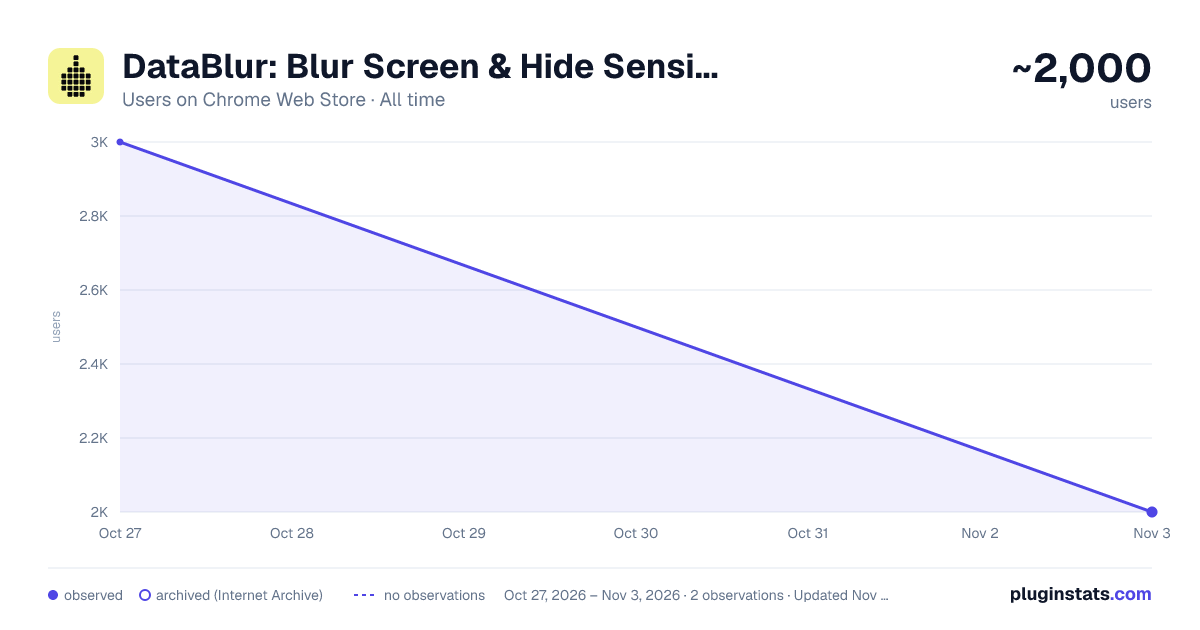
DataBlur: Blur Screen & Hide Sensitive Data for Screen Sharing has approximately 3,000 recorded users on Chrome Web Store, ranking #1065 of 4,880 tracked listings.
Rating: 4.90 / 5 from 41 ratings
About DataBlur: Blur Screen & Hide Sensitive Data for Screen Sharing
Blur or redact passwords, emails and customer data on any web page before screen sharing or recording. 100% local, no account.
Blur screen content before you share it. DataBlur hides sensitive data on any web page in real time: passwords, emails, customer names, card numbers, API keys. Blur, redact or hide it right in the browser tab before a screen share, screen recording or screenshot.
MANUAL BLUR • Blur element: click any text, image, button or form field on the page to blur it • Blur area: drag to blur any region of the screen • Blur text: select a passage and blur just those words • Blur tab title: hide the page title and icon in the browser tab • Blur similar elements: blur every matching row, cell or card in one click • Right-click menu: Blur element and Blur text, without opening the toolbar • Peek: hold Alt (Option on Mac) to look under a blur without removing it • Remove all blur on the page in one click
THREE BLUR STYLES • Blur: soft, classic screen blur • Redact: solid black boxes, so nothing is readable in the recording • Transparent: the content disappears and the layout stays Adjust the blur strength with the – and + buttons.
AUTO-DETECT SENSITIVE DATA One click finds and blurs sensitive information on the page: • Email addresses and phone numbers • Credit card numbers, IBANs and US Social Security numbers • Password fields • API keys and secrets from the usual cloud, payment and developer platforms, JWT tokens, private keys and database connection strings • Crypto wallet addresses • Optional: money amounts, dates of birth and addresses Pick the categories you want to blur.
KEYWORD BLUR List words, names, client IDs or /regex/ patterns once, and they are blurred on every website, embedded frames included.
DEMO MODE Turn it on with Alt+Shift+D, or let it switch on by itself when you start sharing your screen from the browser. Demo mode blurs personal data, your keywords, tab titles and DataBlur's own controls. It also holds each new page blurred until it has been checked. Stop it any time; your saved settings stay as they were.
PROFILES Save the blurs you set up for one site or for all sites under a name, one per client or per demo. Restore them in one click before the next call.
BLURS THAT STAY Blurs are saved per site or per page and come back when you return, so a dashboard you demo every week is ready before you share.
TOOLBAR AND KEYBOARD SHORTCUTS • Alt+Shift+T: show or hide the toolbar • Alt+Shift+A: auto-detect and blur sensitive content • Alt+Shift+D: demo mode on or off • Alt+Shift+R: remove all blur on the page • Blur text: assign your own key in chrome://extensions/shortcuts
MADE FOR • Sales demos and client presentations: screen sharing with real customer data • Tutorials, courses and screen recordings without hours of video editing • Support and onboarding calls inside admin panels and CRMs • Webinars, live streams and screenshots for docs, tickets and social posts • Developers sharing a cloud console, a dashboard or an .env file open in the browser
PRIVACY BY DESIGN • Blurring and detection run on your device • Page content, URLs and what you blur are never sent anywhere • No account needed • Anonymous usage stats can be turned off under Settings → Help improve DataBlur • Turn DataBlur off for specific websites under Settings → Disabled sites
WORKS IN Chrome, Edge, Brave and other Chromium browsers. A Firefox version is also available. DataBlur blurs the page in your browser, so the blur is already there when you record your screen or join a video call.
Questions or ideas? Write to support@datablur.app or use Contact support in the extension popup.
Description from the Chrome Web Store listing.
README badge
Show your rank in a README or on your website. The badge updates automatically.
Charts
Images: 30d · 1y · all time · 1600×900 dark
Adoption over time
7/30/90-day growth
Ranking history
Ratings over time
Listing placement
Listing placement
Filled points are observed values; hollow points come from Internet Archive snapshots of the listing page. Dashed segments span periods with no observations — values between points are not interpolated.
Each band is one page of 20. Users on a linear scale. Placement is projected from users, so it can differ from the marketplace's own sort order. Hover a dot to see the listing.
Recent observations
Full history (1)Similar Chrome Web Store Privacy & Security plugins
All 20 DataBlur: Blur Screen & Hide Sensitive Data for Screen Sharing alternatives



Data source
Covers every Chrome Web Store extension with at least 100 users, found through the store's public sitemap. User counts are read from public listing pages. The 10% most-used extensions are refreshed daily, the next 40% weekly and the next 40% monthly; the least-used 10% are not refreshed. Google displays rounded user counts (and caps the display at 10,000,000+), so small changes may not be visible. Rating counts above 1,000 are rounded (e.g. 1.6K).
Listing: https://chromewebstore.google.com/detail/datablur-blur-screen-hide/fnjoejcjefolmkdnmbdpafijmjdoaodp. First seen Oct 27, 2026; last successful collection Oct 27, 2026. See the methodology.