 PluginStats
varnish pulls statistics
Varnish is an HTTP accelerator designed for content-heavy dynamic web sites as well as APIs.
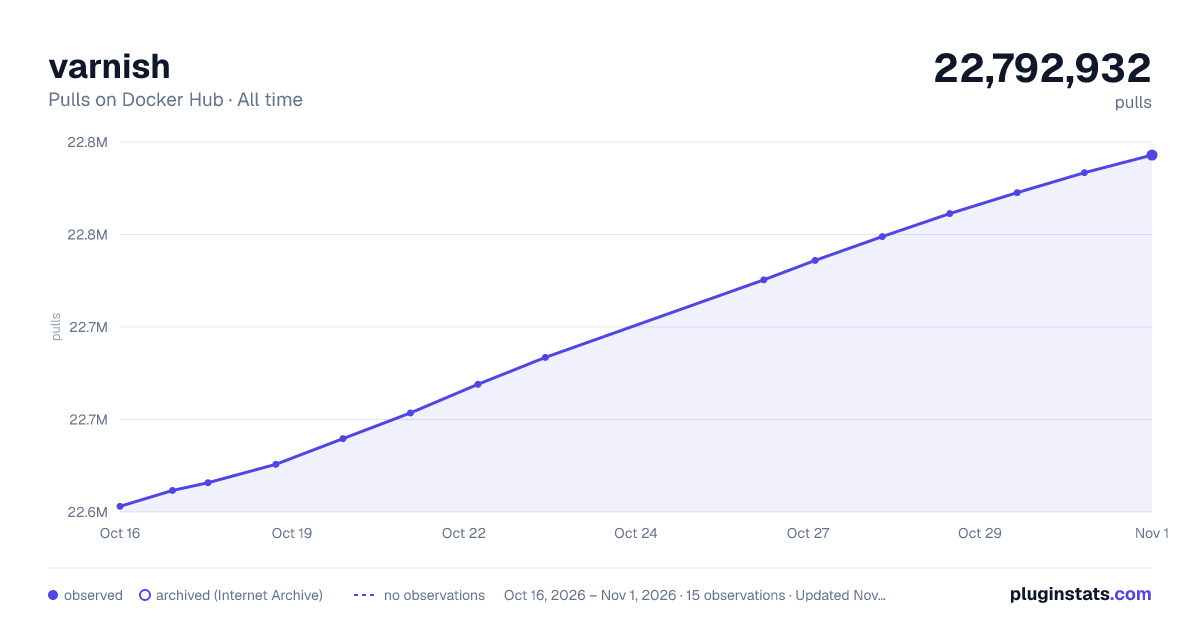
varnish has 22,653,553 recorded pulls on Docker Hub, ranking #97 of 1,265 tracked listings.
About varnish
Quick reference
-
Maintained by:
the Varnish Docker Community -
Where to get help:
the Docker Community Slack, Server Fault, Unix & Linux, or Stack Overflow
Supported tags and respective Dockerfile links
Quick reference (cont.)
-
Where to file issues:
https://github.com/varnish/docker-varnish/issues -
Published image artifact details:
repo-info repo'srepos/varnish/directory (history)
(image metadata, transfer size, etc) -
Image updates:
official-images repo'slibrary/varnishlabel
official-images repo'slibrary/varnishfile (history) -
Source of this description:
docs repo'svarnish/directory (history)
What is Varnish?
Varnish is an HTTP accelerator designed for content-heavy dynamic web sites as well as APIs. In contrast to other web accelerators, such as Squid, which began life as a client-side cache, or Apache and nginx, which are primarily origin servers, Varnish was designed as an HTTP accelerator. Varnish is focused exclusively on HTTP, unlike other proxy servers that often support FTP, SMTP and other network protocols.

How to use this image.
$ docker run -p 8080:80 --ulimit memlock=-1:-1 --tmpfs /var/lib/varnish/varnishd:exec varnish
You can then visit http://localhost:8080 with your browser and be greeted by the default landing page.
Note: while the --ulimit and --tmpfs options aren't necessary, they are greatly recommended. More details are available at the end of this page.
Basic usage
Simple cache
The default Varnish configuration will read the VARNISH_BACKEND_HOST environment variable which should be an HTTP or HTTPS URL, for example:
$ docker run \
	--ulimit memlock=-1:-1 \
	--tmpfs /var/lib/varnish/varnishd:exec \
	-p 8080:80 \
	-e VARNISH_BACKEND_HOST=https://example.com/ \
	varnish
By default, Varnish is extremely careful regarding what it can and cannot cache by looking at the client request and at the backend response.
Notably, Varnish will not cache if:
- the request is not a
GETorHEAD - the request contains an
AuthorizationorCookieheader - the response status is not cacheable (i.e., not a 2xx or 4xx response)
- the response contains a
Set-Cookieheader - the response contains headers indicating it is uncacheable
These rules can, of course, be overridden by providing your own VCL file, as explained in the next section.
Custom caching logic
If you already have a VCL file, you can directly mount it as /etc/varnish/default.vcl:
$ docker run \
	--ulimit memlock=-1:-1 \
	--tmpfs /var/lib/varnish/varnishd:exec \
	-p 8080:80 \
	-v /path/to/default.vcl:/etc/varnish/default.vcl:ro \
	varnish
Alternatively, a simple Dockerfile can be used to generate a new image that includes the necessary default.vcl:
FROM varnish

COPY default.vcl /etc/varnish/
Place this file in the same directory as your default.vcl, run docker build -t my-varnish ., then start your container:
$ docker \
	--ulimit memlock=-1:-1 \
	--tmpfs /var/lib/varnish/varnishd:exec \
	-p 8080:80 \
	my-varnish
Reloading the configuration
The images all ship with varnishreload which allows you to easily update the running configuration without restarting the container (and therefore losing your cache). At its most basic, you just need this:
# update the default.vcl in your container
docker cp new_default.vcl running_container:/etc/varnish/default.vcl
# run varnishreload
docker exec running_container varnishreload
Note that varnishreload also supports reloading other files (it doesn't have to be default.vcl), labels (-l), and garbage collection of old labels (-m), among others. To learn more, run
$ docker run --rm varnish varnishreload -h
File server…
Description from the Docker Hub listing.
README badge
Show your rank in a README or on your website. The badge updates automatically.
Charts
Images: 30d · 1y · all time · 1600×900 dark



Adoption over time
7/30/90-day growth
Ranking history
Listing placement
Listing placement
Filled points are observed values; hollow points come from Internet Archive snapshots of the listing page. Dashed segments span periods with no observations — values between points are not interpolated.
Each band is one page of 20. Pulls on a linear scale. Placement is projected from pulls, so it can differ from the marketplace's own sort order. Hover a dot to see the listing.
Recent observations
Full history (6)Similar Docker Hub Web servers plugins
All 20 varnish alternativesData source
Cumulative pull counts and stars come from the public Docker Hub API. Pulls count image downloads (including automated CI pulls), not installs or users.
Listing: https://hub.docker.com/_/varnish. First seen Oct 16, 2026; last successful collection Oct 21, 2026. See the methodology.