 PluginStats
orientdb pulls statistics
Docker Hub · Databases & storage
OrientDB a Multi-Model Open Source NoSQL DBMS that combines graphs and documents.
orientdb has 16,503,402 recorded pulls on Docker Hub, ranking #116 of 1,267 tracked listings.
About orientdb
Quick reference
-
Maintained by:
OrientDB -
Where to get help:
the Docker Community Slack, Server Fault, Unix & Linux, or Stack Overflow
Supported tags and respective Dockerfile links
Quick reference (cont.)
-
Where to file issues:
https://github.com/orientechnologies/orientdb-docker/issues -
Published image artifact details:
repo-info repo'srepos/orientdb/directory (history)
(image metadata, transfer size, etc) -
Image updates:
official-images repo'slibrary/orientdblabel
official-images repo'slibrary/orientdbfile (history) -
Source of this description:
docs repo'sorientdb/directory (history)
What is OrientDB?
OrientDB is the first Multi-Model Open Source NoSQL DBMS that combines the power of graphs and the flexibility of documents into one scalable, high-performance operational database.

How to use this image
When OrientDB starts it asks for the root password. The root user is able to manage the OrientDB server: create new databases, manage users and roles. The root password can be passed to the container using an environment property:
$ docker run -d --name orientdb -p 2424:2424 -p 2480:2480 -e ORIENTDB_ROOT_PASSWORD=rootpwd orientdb
The Studio is accessible to http://<docker-host>:2480 (e.g.: http://localhost:2480)
Attach persistent volumes
The docker image contains an OrientDB installation with basic configuration. If you need to provide your own config folder to override the one included in the OrientDB container, simply attach a persistent volume for configuration folder. Providing a configuration folder enables integration with software configuration tools such as Ansible, Chef or Puppet.
The same applies for the databases folder, which if local to the running container would go away as soon as it died/you killed it. Obviously use volumes from dedicated data container is another option.
$ docker run -d --name orientdb -p 2424:2424 -p 2480:2480 \
    -v <config_path>:/orientdb/config \
    -v <databases_path>:/orientdb/databases \
    -v <backup_path>:/orientdb/backup \
    -e ORIENTDB_ROOT_PASSWORD=rootpwd \
    orientdb
NOTE: don't provide an empty config folder as volume, because OrientDB will startup with a very minimal configuration.
Running OrientDB tools
The OrientDB image contains a full fledge installation, so it is possible to run the console
$ docker run --rm -it orientdb /orientdb/bin/console.sh
or even the etl
$ docker run --rm -it -v <config_path>:/orientdb/config orientdb /orientdb/bin/oetl.sh ../config/oetl-config.json
Override configuration parameters
Any configuration settings may be specified upon startup using the -D option prefix. For example, starting OrientDB in distributed configuration will work this way:
$ docker run -d --name orientdb -p 2424:2424 -p 2480:2480 \
    -v <config_path>:/orientdb/config \
    -v <databases_path>:/orientdb/databases \
    -v <backup_path>:/orientdb/backup \
    -e ORIENTDB_ROOT_PASSWORD=rootpwd \
    -e ORIENTDB_NODE_NAME=odb1 \
    orientdb /orientdb/bin/server.sh  -Ddistributed=true
For further configuration options please refer to the Configuration section of the online documentation.
Environment
Environment parameters such as heap size could be passed via command line:
$ docker run -d --name orientdb -p 2424:2424 -p 2480:2480 \
    -e ORIENTDB_ROOT_PASSWORD=rootpwd \
    orientdb /orientdb/bin/server.sh -Xmx8g
License
View license information for the software contained in this image.
As with all Docker images, these likely also contain other software which may be under other licenses (such as Bash, etc from the base distribution, along with any direct or indirect dependencies of the primary software being contained).…
Description from the Docker Hub listing.
README badge
Show your rank in a README or on your website. The badge updates automatically.
Charts
Images: 30d · 1y · all time · 1600×900 dark


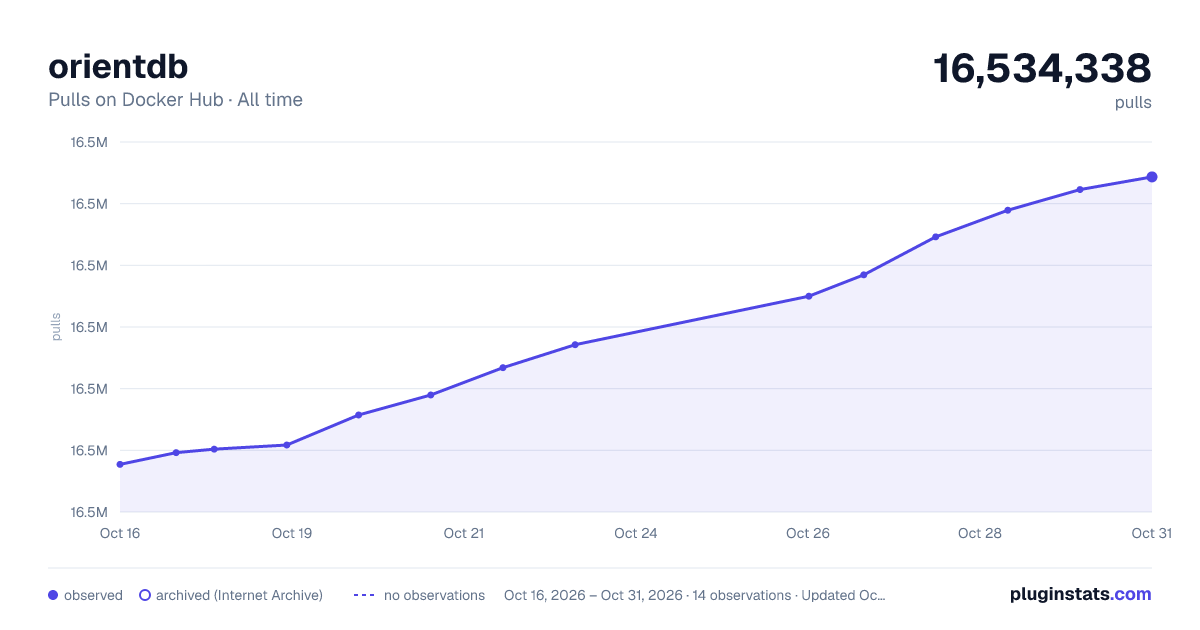

Adoption over time
7/30/90-day growth
Ranking history
Listing placement
Listing placement
Filled points are observed values; hollow points come from Internet Archive snapshots of the listing page. Dashed segments span periods with no observations — values between points are not interpolated.
Each band is one page of 20. Pulls on a linear scale. Placement is projected from pulls, so it can differ from the marketplace's own sort order. Hover a dot to see the listing.
Recent observations
Full history (7)Similar Docker Hub Databases & storage plugins
All 20 orientdb alternativesData source
Cumulative pull counts and stars come from the public Docker Hub API. Pulls count image downloads (including automated CI pulls), not installs or users.
Listing: https://hub.docker.com/_/orientdb. First seen Oct 16, 2026; last successful collection Oct 22, 2026. See the methodology.