 PluginStats
atlassian/bitbucket-server pulls statistics
By atlassian (66 listings) · Docker Hub
On-premises source code management for Git that's secure, fast, and enterprise grade.
atlassian/bitbucket-server has 32,025,446 recorded pulls on Docker Hub, ranking #80 of 1,265 tracked listings.
About atlassian/bitbucket-server

Bitbucket Server is an on-premises source code management solution for Git that's secure, fast, and enterprise grade. Create and manage repositories, set up fine-grained permissions, and collaborate on code - all with the flexibility of your servers.
Learn more about Bitbucket Server: https://www.atlassian.com/software/bitbucket/server
Contents
- Overview
- Quick Start
- Shared directory and user IDs
- Upgrade
- Backup
- Versioning
- Supported JDK versions
- Building your own image
- Supported architectures
- Troubleshooting
- Support
- Changelog
- License
Overview
This Docker container makes it easy to get an instance of Bitbucket up and running.
This Docker image is published as both atlassian/bitbucket and
atlassian/bitbucket-server. These are the same image, but the -server
version is deprecated and only kept for backwards-compatibility; for new
installations it is recommended to use the shorter name.
** NOTE: For backwards-compatibility, by default the image will start both Bitbucket and an embedded OpenSearch. However this is not a recommended configuration, especially in a clustered environment, and has known issues with shutdown. instead, we recommend running a separate OpenSearch instance (possibly in another Docker container); see below for instructions on connecting to an external OpenSearch cluster. **
** If running this image in a production environment, we strongly recommend you run this image using a specific version tag instead of latest. This is because the image referenced by the latest tag changes often and we cannot guarantee that it will be backwards compatible. **
** Use docker version >= 20.10.10 **
Quick Start
For the BITBUCKET_HOME directory that is used to store the repository data
(amongst other things) we recommend mounting a host directory as a
data volume,
or via a named volume.
Additionally, if running Bitbucket in Data Center mode it is required that a shared filesystem is mounted.
Volume permission is managed by entry scripts. To get started you can use a data volume, or named volumes. In this example we'll use named volumes.
$> docker volume create --name bitbucketVolume
$> docker run -v bitbucketVolume:/var/atlassian/application-data/bitbucket --name="bitbucket" -d -p 7990:7990 -p 7999:7999 atlassian/bitbucket
Note that this command can substitute folder paths with named volumes.
Start Atlassian Bitbucket Server:
$> docker run -v /data/bitbucket:/var/atlassian/application-data/bitbucket --name="bitbucket" -d -p 7990:7990 -p 7999:7999 atlassian/bitbucket
Success. Bitbucket is now available on http://localhost:7990*
Please ensure your container has the necessary resources allocated to it. We recommend 2GiB of memory allocated to accommodate both the application server and the git processes. See Supported Platforms for further information.
* Note: If you are using docker-machine on Mac OS X, please use open http://$(docker-machine ip default):7990 instead.
Common settings
Reverse Proxy Settings
If Bitbucket is run behind a reverse proxy server as described here, then you need to specify extra options to make Bitbucket aware of the setup. They can be controlled via the below environment variables.
-
SERVER_PROXY_NAME(default: NONE)The reverse proxy's fully qualified hostname.
-
SERVER_PROXY_PORT(default: NONE)The reverse proxy's port number via which bitbucket is accessed.
-
SERVER_SCHEME(default: http)The protocol via which bitbucket is accessed.
In certain cloud environments (specifically Kubernetes, Heroku and Cloud Foundry), this setting will be superseded by the value of the
X-Forwarded-Protorequest header if sent by a ingress or load balancer. SeeSERVER_FORWARD_HEADERS_STRATEGYbelow to alter this behaviour. -
SERVER_SECURE(default: false)Set 'true' if SERVER_SCHEME is 'https'.
-
SERVER_FORWARD_HEADERS_STRATEGY(default: NATIVE in the specified cloud environments, NONE otherwise)Can be explicitly set to a value of
NONEif deploying to a cloud environment (specifically Kubernetes, Heroku and Cloud Foundry) and the preference is forSERVER_SCHEMEto be used over the value of theX-Forwarded-Protorequest header. A value of NONE will cause X-Forwarded-* headers to no longer take priority when determining the origin of a request, which means the system will return to the default expected state.
JVM Configuration (Bitbucket Server 5.0 + only)…
Description from the Docker Hub listing.
README badge
Show your rank in a README or on your website. The badge updates automatically.
Charts
Images: 30d · 1y · all time · 1600×900 dark


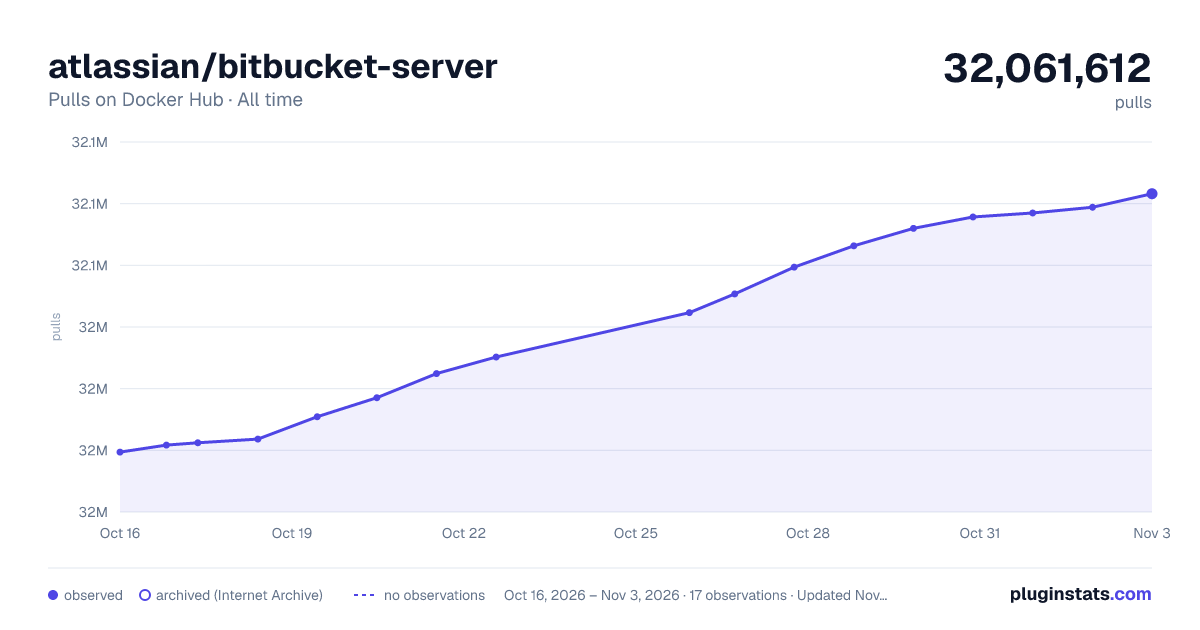

Adoption over time
7/30/90-day growth
Ranking history
Listing placement
Filled points are observed values; hollow points come from Internet Archive snapshots of the listing page. Dashed segments span periods with no observations — values between points are not interpolated.
Each band is one page of 20. Pulls on a linear scale. Placement is projected from pulls, so it can differ from the marketplace's own sort order. Hover a dot to see the listing.
Recent observations
Full history (5)Similar Docker Hub plugins
All 20 atlassian/bitbucket-server alternativesData source
Cumulative pull counts and stars come from the public Docker Hub API. Pulls count image downloads (including automated CI pulls), not installs or users.
Listing: https://hub.docker.com/r/atlassian/bitbucket-server. First seen Oct 16, 2026; last successful collection Oct 20, 2026. See the methodology.