 PluginStats
monica pulls statistics
Docker Hub · Content management system
Monica – the Personal Relationship Manager.
monica has 14,048,937 recorded pulls on Docker Hub, ranking #120 of 1,265 tracked listings.
About monica
Quick reference
-
Maintained by:
Monica Team -
Where to get help:
the Docker Community Slack, Server Fault, Unix & Linux, or Stack Overflow
Supported tags and respective Dockerfile links
-
4.1.2-apache,4.1-apache,4-apache,apache,4.1.2,4.1,4,latest -
5.0.0-beta.5-fpm-alpine,5.0.0-beta-fpm-alpine,5.0-fpm-alpine
Quick reference (cont.)
-
Where to file issues:
https://github.com/monicahq/docker/issues -
Supported architectures: (more info)
amd64,arm32v5,arm32v6,arm32v7,arm64v8,i386,ppc64le,riscv64,s390x -
Published image artifact details:
repo-info repo'srepos/monica/directory (history)
(image metadata, transfer size, etc) -
Image updates:
official-images repo'slibrary/monicalabel
official-images repo'slibrary/monicafile (history) -
Source of this description:
docs repo'smonica/directory (history)
What is Monica?
Monica is a great open source personal relationship management system to organize the interactions with your loved ones.

How to use this image
There are two versions of the image you may choose from.
The apache tag contains a full Monica installation with an apache webserver. This points to the default latest tag too.
The fpm tag contains a fastCGI-Process that serves the web pages. This image should be combined with a webserver used as a proxy, like apache or nginx.
Using the apache image
This image contains a webserver that exposes port 80. Run the container with:
docker run --name some-monica -d -p 8080:80 monica
Using the fpm image
This image serves a fastCGI server that exposes port 9000. You may need an additional web server that can proxy requests to the fpm port 9000 of the container. Run this container with:
docker run --name some-monica -d -p 9000:9000 monica:fpm
Using an external database
You'll need to setup an external database. Monica currently support MySQL/MariaDB database. You can also link a database container, e. g. --link my-mysql:db, and then use db as the database host on setup. More info is in the Docker Compose section.
Persistent data storage
To have a persistent storage for your datas, you may want to create volumes for your db, and for monica you will have to save the /var/www/html/storage directory.
Run a container with this named volume:
docker run -d \
        -v monica_data:/var/www/html/storage \
        monica
Run commands inside the container
Like every Laravel application, the php artisan command is very usefull for Monica. To run a command inside the container, run
docker exec CONTAINER_ID php artisan COMMAND
Or for Docker Compose:
docker compose exec monica php artisan COMMAND
where monica is the name of the service in your compose.yaml file.
Configuration using environment variables
The Monica image will use environment variables to setup the application. See Monica documentation for common used variables you should setup.
Running the image with Docker Compose
See some examples of Docker Compose possibilities in the example section.
Apache version
This version will use the apache image and add a mysql container. The volumes are set to keep your data persistent. This setup provides no ssl encryption and is intended to run behind a proxy.
Make sure to pass in values for APP_KEY variable before you run this setup.
- Create a
compose.yamlfile…
Description from the Docker Hub listing.
README badge
Show your rank in a README or on your website. The badge updates automatically.
Charts
Images: 30d · 1y · all time · 1600×900 dark


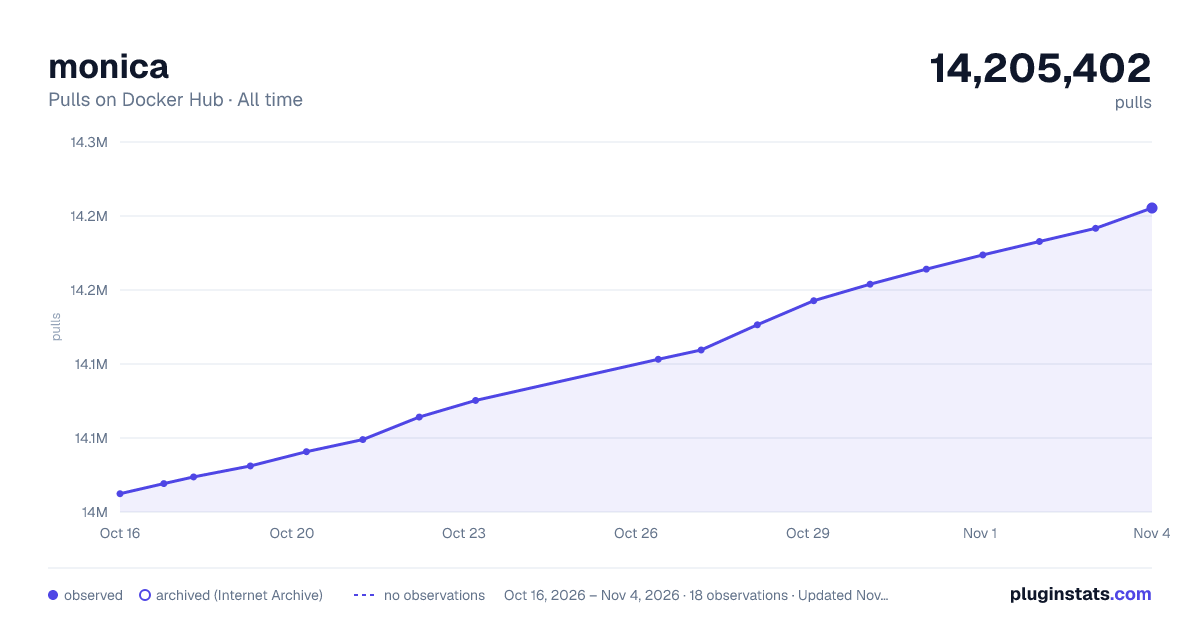

Adoption over time
7/30/90-day growth
Ranking history
Listing placement
Listing placement
Filled points are observed values; hollow points come from Internet Archive snapshots of the listing page. Dashed segments span periods with no observations — values between points are not interpolated.
Each band is one page of 20. Pulls on a linear scale. Placement is projected from pulls, so it can differ from the marketplace's own sort order. Hover a dot to see the listing.
Recent observations
Full history (6)Similar Docker Hub Content management system plugins
All 20 monica alternativesData source
Cumulative pull counts and stars come from the public Docker Hub API. Pulls count image downloads (including automated CI pulls), not installs or users.
Listing: https://hub.docker.com/_/monica. First seen Oct 16, 2026; last successful collection Oct 21, 2026. See the methodology.