 PluginStats
amazon/amazon-ecs-network-sidecar pulls statistics
By amazon (81 listings) · Docker Hub
Network sidecar container with SSH access and network troubleshooting tools for ECS.
amazon/amazon-ecs-network-sidecar has 36,721 recorded pulls on Docker Hub.
It ranks #576 of 1,263 tracked Docker Hub listings by pulls.
PluginStats has 4 daily observations since Oct 16, 2026; the latest is from Oct 19, 2026.
About amazon/amazon-ecs-network-sidecar
Amazon ECS Network Sidecar (V2)
What does it do?
The purpose of this container is to be deployed in the same network namespace as another docker container and to provide a user with easy access to various network related troubleshooting tools. In accordance with Docker design principles, application containers most often are lightweight by design and do not often have easy access to valuable troubleshooting tools that would have to be installed in the container after gaining access to it in the first place.
This tool can easily be deployed on any Linux host that has a docker daemon running on it and be attached to the network namespace of an existing container (or even the host's network namespace), to perform tasks such as capturing TCP packets, running a traceroute and more, all without the need of accessing the container we're troubleshooting directly or installing additional software.
To explain how this works, network namespaces provide isolation of the system resources associated with networking. Docker uses network and other type of namespaces (pid, mount, user..etc) to create an isolated environment for each container. Everything from interfaces, routes, and IPs is completely isolated within the network namespace of the container and by deploying this tool into the same network namespace as another container any network information that is being collected by the tools provided by 'amazon-ecs-network-sidecar' will apply to the container we are attaching to.
How to deploy it?
With host access:
When SSH access to the underlying host is possible, you can simply launch the container directly into the network namespace as a running container. First find the CONTAINER ID of the running container you'd like to troubleshoot with docker ps.
Example:
Now start the sidecar container with the following command syntax (fill in your own container ID):
Likewise you can also start the Amazon ECS Network Sidecar container in the same network namespace as the host to use any of the installed tooling to troubleshoot host related network issues:
Deploy in ECS Fargate
As running docker run commands in this situation is not possible you will need to include the Amazon ECS Network Sidecar container in the same task definition as the container you are trying to troubleshoot, similar to the following example (container definition):
Then, using Amazon ECS Exec you will be able to connect to the running container. If your cluster does not support Amazon ECS Exec, additional run modes are supported both for backwards compatibility with V1 of this image.
Example:
Available Tools/Packages
• tcpdump - A popular packet analyzer, used to capture network packets for an attached network interface. • traceroute - Diagnostic tool for displaying possible routes (paths) and measuring transit delays of packets across an Internet Protocol (IP) network. • telnet - An application protocol used to provide a bidirectional interactive text-oriented communication facility using a virtual terminal connection. • nmap - A port scanning tool that can be used to verify if a listening port is being blocked by a target host. • bind-utils - Provides various DNS related commands, such as dig & nslookup, useful in determining DNS resolution. • iperf3 - Iperf is a tool for network performance measurement and tuning. • net-tools - A collection of base networking utilities for Linux, such as ifconfig and netstat. • iproute2 - Another collection of base networking utilties for Linux using the ip command. • dhcping - A utility for checking DHCP-servers using unicast packages. • ethtool - A utility for displaying and modifying some parameters of network interface controllers and their device drivers. • mtr - MTR provides the functionality of both the ping and traceroute commands and is useful to catch intermittent issues. • iftop - System monitor tool that produces a frequently updated list of network connections and bandwidth usage. • ctop - Ctop provides a concise and condensed overview of real-time metrics for multiple containers. • curl - A command-line tool for transferring data using various network protocols.
Configuration Environment Variables
• SIDECAR_RUN_MODE - The run mode the container will run in. Options are: SSH_KEY and SLEEPER. If passing SSH_KEY make sure to also pass the SIDECAR_KEY_STR environment variable. • SIDECAR_KEY_STR - The public key line(s) to be injected into the authorized_keys file before starting SSH. It is strongly recommended that you pass this using a secret.
Migration Notes
This package has been designed to be a "like for like" replacement in all aspsects possible compared to the Amazon ECS Network Sidecar V1 container. Note that there are a few differences: • The package runs on Amazon Linux 2022 • unicornscan is no longer supported. This is because we were unable to location an Amazon Linux 2022 • The default shell has been changed to /usr/bin/zsh and uses the purer prompt by default. • While the default mode is to run the container with OpenSSH password authentication this is strongly discourage and will be fully deprecated in a future release. Switch to key based authentication or ECS Exec going forward. • While the arm64v8 tag is included and will track latest this is no longer required as the image is built for both ARM 64 and X86 64 environments.
Example Use Cases
tcpdump
A common use-case for tcpdump would be to capture packets for the network interface used by your container. The Amazon ECS Network Sidecar tool can be used regardless of the network mode being used by your container and will function in Fargate as well. The captured information will be for the network namespace the tool was launched into and will perform the packet capture for the interface (eth0) for that namespace, which will include the application container that the sidecar is attached to. To perform a full packet capture (often requested by support), the following command may be used:…
Description from the Docker Hub listing.
Where amazon/amazon-ecs-network-sidecar sits in the listing
Each band is one page of 20. Pulls on a log scale. Placement is projected from pulls, so it can differ from the marketplace's own sort order. Hover a dot to see the listing.


Charts
Images: 30d · 1y · all time · 1600×900 dark


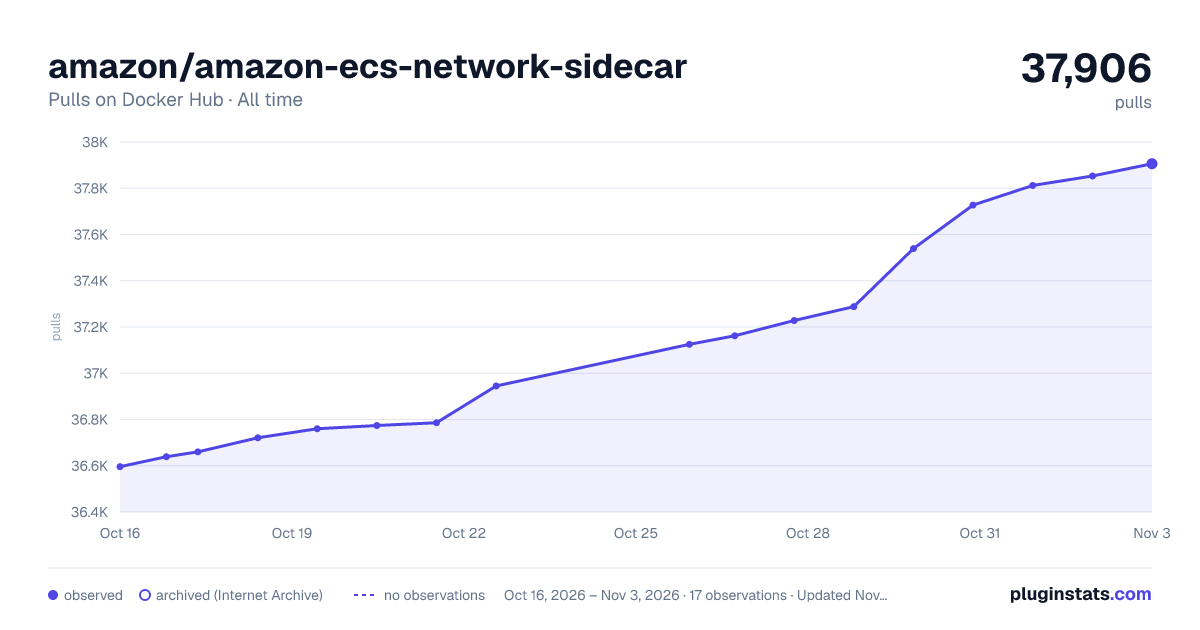

Adoption over time


7/30/90-day growth


Filled points are observed values; hollow points come from Internet Archive snapshots of the listing page. Dashed segments span periods with no observations — values between points are not interpolated.
Recent observations
Full history (4)Similar Docker Hub plugins
Data source
Cumulative pull counts and stars come from the public Docker Hub API. Pulls count image downloads (including automated CI pulls), not installs or users.
Listing: https://hub.docker.com/r/amazon/amazon-ecs-network-sidecar. First seen Oct 16, 2026; last successful collection Oct 19, 2026. See the methodology.