 PluginStats
satosa pulls statistics
SATOSA translates between auth protocols such as SAML2, OpenID Connect, and OAuth2.
satosa has 570,948 recorded pulls on Docker Hub, ranking #293 of 1,265 tracked listings.
About satosa
Quick reference
-
Maintained by:
the Identity Python project -
Where to get help:
the Identity Python mailing list or the Identity Python Slack workspace (invitation)
Supported tags and respective Dockerfile links
(See "What's the difference between 'Shared' and 'Simple' tags?" in the FAQ.)
Simple Tags
Shared Tags
-
8.6.0,8.6,8,latest:
Quick reference (cont.)
-
Where to file issues:
https://github.com/IdentityPython/satosa-docker/issues -
Published image artifact details:
repo-info repo'srepos/satosa/directory (history)
(image metadata, transfer size, etc) -
Image updates:
official-images repo'slibrary/satosalabel
official-images repo'slibrary/satosafile (history) -
Source of this description:
docs repo'ssatosa/directory (history)
What is SATOSA?
SATOSA is a configurable proxy for translating between different authentication protocols such as SAML2, OpenID Connect, and OAuth2.

Using This Image
The basic pattern for starting a satosa instance is:
docker run --name some-satosa -d satosa
To access the instance from the host without the container's IP, use port mappings:
docker run --name some-satosa -p 80:8080 -d satosa
The entrypoint script outputs SAML2 metadata to the container log at start time. This metadata refers to the instance's base URL, e.g., https://example.com. Browsers must be able to access the instance over HTTPS.
Configuration files
The satosa image stores its configuration in /etc/satosa. This configuration must persist among instances, particularly the SAML2 entity ID (derived from the proxy's base URL by default) and related keying material. Use volumes, bind mounts, or custom images to maintain this configuration.
Entrypoint script
The satosa image's entrypoint script runs Gunicorn by default if the first argument looks like a command-line flag. For example, the following will use a bind mount to provide an X.509 certificate and corresponding private key to the instance, and it will run Gunicorn with HTTPS enabled:
docker run --name some-satosa -p 443:8443 \
    -v /etc/letsencrypt/live/some-satosa/fullchain.pem:/etc/https.crt \
    -v /etc/letsencrypt/live/some-satosa/privkey.pem:/etc/https.key \
    -d satosa \
    -b0.0.0.0:8443 --certfile /etc/https.crt --keyfile /etc/https.key satosa.wsgi:app
If the first argument looks like a command instead of a flag, the entrypoint script will run that instead of Gunicorn. For example, the following will start an interactive, unprivileged shell inside the container:
docker run -it --name some-satosa satosa bash
Environment variables
The entrypoint script uses environment variables to generate the initial configuration, which requires customization. All of the environment variables are OPTIONAL.
Environment variables' values can be read from Docker secrets. Append _FILE to the variable name (e.g., STATE_ENCRYPTION_KEY_FILE), and set it to the pathname of the corresponding secret (e.g., /run/secrets/state_encryption_key).
BASE_URL
SATOSA MUST be hosted at the root of the website. This environment variable specifies the website's base URL, which defaults to http://example.com. If set, the base URL must be a method plus a hostname without any trailing slash or path components, e.g., https://idproxy.example.com, not https://idproxy.example.com/ nor https://idproxy.example.com/satosa.
STATE_ENCRYPTION_KEY
SATOSA uses encrypted cookies to track the progress of an authentication flow. This environment variable optionally sets the state cookies' encryption key. If set, the state encryption key must be an alphanumeric value, e.g., 12345SameAsMyLuggage. If not specified, a new random 32-character key will be generated.
SAML2_BACKEND_DISCO_SRV…
Description from the Docker Hub listing.
README badge
Show your rank in a README or on your website. The badge updates automatically.
Charts
Images: 30d · 1y · all time · 1600×900 dark


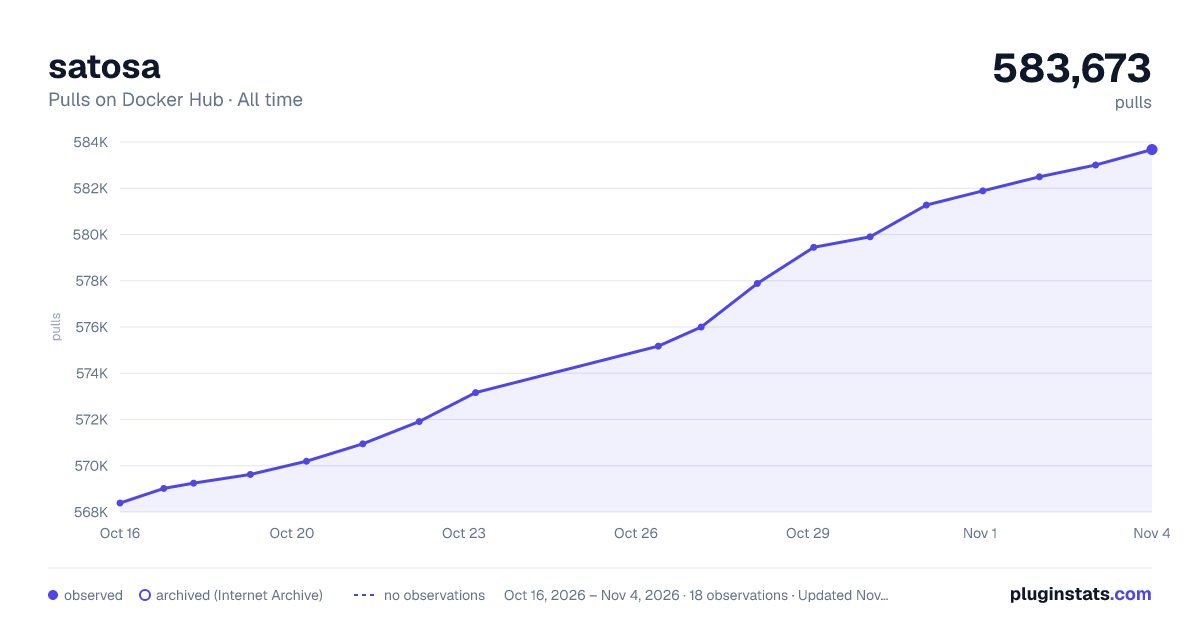

Adoption over time
7/30/90-day growth
Ranking history
Listing placement
Listing placement
Filled points are observed values; hollow points come from Internet Archive snapshots of the listing page. Dashed segments span periods with no observations — values between points are not interpolated.
Each band is one page of 20. Pulls on a linear scale. Placement is projected from pulls, so it can differ from the marketplace's own sort order. Hover a dot to see the listing.
Recent observations
Full history (6)Similar Docker Hub API management plugins
All 20 satosa alternativesData source
Cumulative pull counts and stars come from the public Docker Hub API. Pulls count image downloads (including automated CI pulls), not installs or users.
Listing: https://hub.docker.com/_/satosa. First seen Oct 16, 2026; last successful collection Oct 21, 2026. See the methodology.