 PluginStats
hashicorp/sentinel-website pulls statistics
By hashicorp (104 listings) · Docker Hub · Integration & delivery
hashicorp/sentinel-website has 12,919 recorded pulls on Docker Hub, ranking #845 of 1,263 tracked listings.
About hashicorp/sentinel-website
Sentinel Documentation
This project contains the documentation for HashiCorp Sentinel.
Local Development
There are two ways that the website can be run locally. If you do not have node installed and prefer not to, it can be run through Docker. The caveat here is that everything will be a little bit slower due to the additional overhead, so for frequent contributors it may be worth it to install node. Additionally, if the modifications you are introducing change the node dependencies, you will need to rebuild the Docker container in order for the dependency changes to appear, as the Docker workflow build pre-installed dependencies into the image so that they do not need to be re-installed each time it runs.
Local Development with Docker
To run the website in a Docker container, you must have Docker installed, but do not need node to be installed. To run with docker, you can run make to run the website in development mode. If you are changing node depencencies you will need to run make build-image to generate a local Docker image with updated dependencies, then make website-local to use that image.
Local Development with Node
To start the website in development mode if you have node installed, you can run npm start. This will start the site in dynamic mode, booting up quickly and compiling each page as its loaded.
To export a static version of the website, run npm run static. It will be exported to a folder called out.
To run the website with a server in production mode, run npm run dynamic to build the assets in production mode and kick off an express server.
In both scenarios, you can visit the local website at http://localhost:3000. When you modify content, the website will automatically reload, you do not have to stop and restart the development environment.
Creating Content
Pages
To create a page, create a Markdown (mdx), TypeScript (tsx or ts), or JavaScript (jsx or js) file in the pages/ directory. The path to the file will also be the URL to the page.
Markdown files can be used for mostly static, text-based content. You can read the documentation for that in the Markdown section.
TypeScript and JavaScript files enable more complex behavior, data querying, and more. These should be used for layout files, dynamic pages, etc. For TypeScript or JavaScript files, the defaut ES6 export should be a React Component. This will be rendered for the page. More documentation can be found on the Next.js website. You will see examples of both of these types of content in the /pages folder.
Markdown
HashiCorp websites often use Markdown for content authoring. To create a new page with Markdown, create a file ending in .mdx in the pages/ directory. The path in the pages directory will be the URL route. For example, pages/hello/world.mdx will be served from the /hello/world URL.
This file can be standard Markdown and also supports YAML frontmatter. YAML frontmatter is optional, there are defaults for all keys.
The significant keys in the YAML frontmatter are:
• layout (string) - This is the name of the layout file to wrap the Markdown page with, found in pages/layouts • title (string) - This is the title of the page that will be set in the HTML title.
Analytics
If your project needs to implement analytics, you can run the provided npm script, npm run generate:analytics to generate a typed analytics client based on a specific Tracking Plan. By default the generated files will be located within an analytics/generated directory. Pass an -o or --outputPath flag to specify a specific output directory. i.e. next-hashicorp analytics --outputPath ./analytics/typewriter
Deployment
Websites can be configured to deploy in one or more ways:
• Manually - This requires manually clicking a deploy button on Netlify.com. This is usefulf or humans. • On Git Push - This will automatically deploy the website anytime you push to a configured Git branch. This is useful for patterns such as having a stable-website branch outside of master. • Webhook - This will give you one or more URLs to GET to trigger a deploy. No auth is required, the URL is security through obscurity. This is useful for other automation systems, such as CI.
The methods for deployment are all configured via the Terraform automation explained in the next section.
Description from the Docker Hub listing.
README badge
Show your rank in a README or on your website. The badge updates automatically.
Charts
Images: 30d · 1y · all time · 1600×900 dark


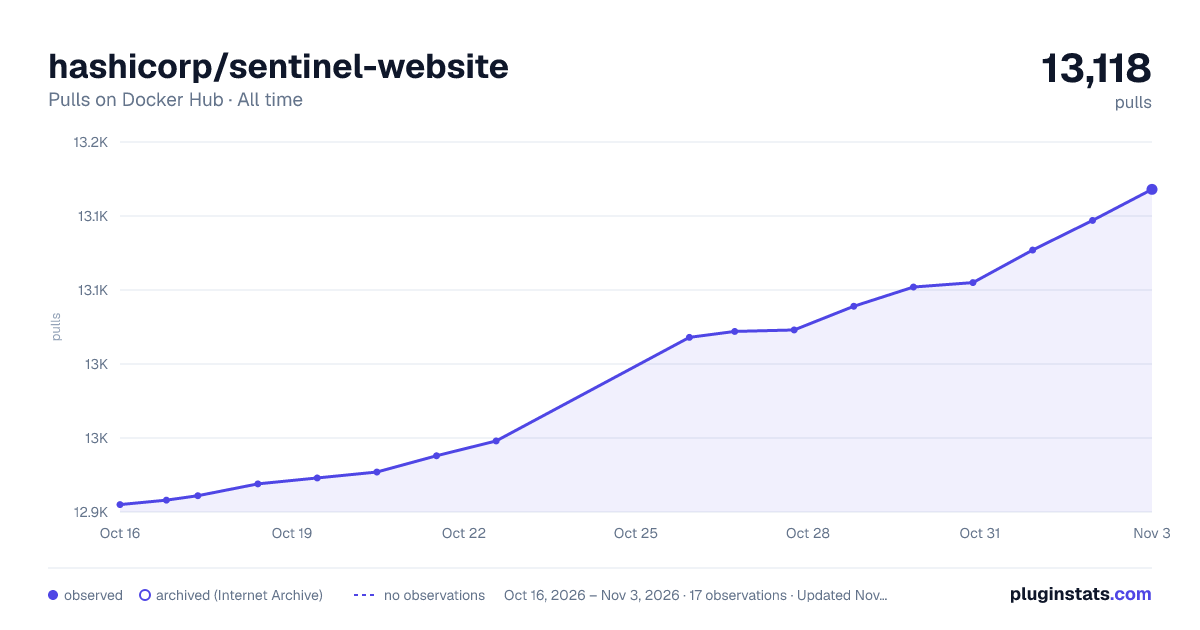

Adoption over time
7/30/90-day growth
Ranking history
Listing placement
Listing placement
Listing placement
Listing placement
Filled points are observed values; hollow points come from Internet Archive snapshots of the listing page. Dashed segments span periods with no observations — values between points are not interpolated.
Each band is one page of 20. Pulls on a linear scale. Placement is projected from pulls, so it can differ from the marketplace's own sort order. Hover a dot to see the listing.
Recent observations
Full history (4)Similar Docker Hub Integration & delivery plugins
All 20 hashicorp/sentinel-website alternativesData source
Cumulative pull counts and stars come from the public Docker Hub API. Pulls count image downloads (including automated CI pulls), not installs or users.
Listing: https://hub.docker.com/r/hashicorp/sentinel-website. First seen Oct 16, 2026; last successful collection Oct 19, 2026. See the methodology.